Monday, December 30, 2019

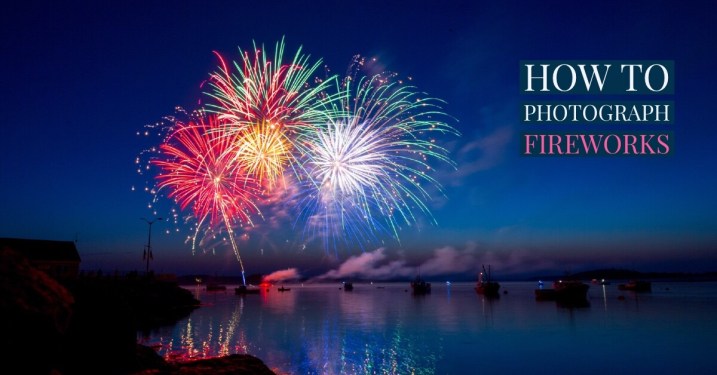
How to Photograph Fireworks

How to photograph fireworks
Do you want to know how to photograph fireworks?
With a busy time for fireworks just days away I thought I’d refresh this article in which I give 10 Fireworks Photography tips to help you get started.
Fireworks Displays are something that evokes a lot of emotion in people as they are not only beautiful and spectacular to watch but they also are often used to celebrate momentous occasions.
I’ve had many emails from readers asking how to photograph fireworks displays, quite a few of whom have expressed concern that they might just be too hard to really photograph. My response is always the same – ‘give it a go – you might be surprised at what you end up with’.
photographing fireworks
Photo by Antonio Gabola on Unsplash
My reason for this advice is that back when I bought my first ever SLR (a film one) one of the first things I photographed was fireworks and I was amazed by how easy it was and how spectacular the results were. I think it’s even easier with a digital camera as you can get immediate feedback as to whether the shots you’ve taken are good or not and then make adjustments.
Of course it’s not just a matter of going out finding a fireworks display – there are, as usual, things you can do to improve your results. With 4 July just around the corner I thought I’d share a few tips.
Here are the steps you’ll need to work through to photograph fireworks:
  1. Start by using a Tripod
  2. Use a Remote Release
  3. Frame Your Shot
  4. Choose the best Focal Length
  5. Select the right Aperture
  6. Get your Shutter Speed Right
  7. Set your ISO
  8. Switch off your Flash
  9. Shoot in Manual Mode
  10. Experiment and Track Results
Let me expand on each tip in more detail below.
Note: Get more Digital Photography Tips like this in your email with our free newsletter

1. Use a tripod to keep your camera still

Perhaps the most important tip is to secure your digital camera to something that will ensure it doesn’t move during the taking of your shots. This is especially important in photographing fireworks simply because you’ll be using longer shutter speeds which will not only capture the movement of the fireworks but any movement of the camera itself. The best way to keep your camera still is with a tripod (read our series on tripods and how to use and buy them). Alternatively – keep in mind that there are other non Tripod options for beating camera shake.
photograph fireworks tripod
Photo by Jamie Fenn on Unsplash

2. Use a remote release to further reduce camera shake

One way to ensure your camera is completely still during fireworks shots is to invest in a remote release device. These will vary from camera to camera but most have some sort of accessory made for them. The other way of taking shots without touching your camera is to use the self-timer. This can work but you really need to be able to anticipate shots well and it’s very very hit and miss (read more on remote shutter releases).

3. Plan your shot to anticipate the best framing

One of the most difficult parts of photographing fireworks is working out where to aim your camera. The challenge you’ll face in doing this is that you generally need to aim your camera before the fireworks that you’ll be photographing goes off – anticipation is key. Here are a few points on getting your framing right.
Framing fireworks photography
Photo by Evelyn Paris on Unsplash
  • Scope out the location early – Planning is important with fireworks and getting to the location early in order to get a good, unobstructed position is important. Think about what is in the foreground and background of your shots and make sure you won’t have people’s heads bobbing up into your shots (also consider what impact you’ll have on others around you also). Take note of where fireworks are being set up and what parts of the sky they are likely to be shot into – you might also want to try to ask some of those setting up the display for a little information on what they are planning. Also consider what focal lengths you might want to use and choose appropriate lenses at this time (rather than in the middle of the show).
  • Watch your Horizons – One thing that you should always consider when lining up fireworks shots is whether your camera is even or straight in it’s framing. This is especially important if you’re going to shooting with a wide focal length and will get other background elements in your shots (ie a cityscape). Keeping horizons straight is something we covered previously on this site and is important in fireworks shots also. As you get your camera on your tripod make sure it’s level right from the time you set up.
  • Vertical or Horizontal? – There are two main ways of framing shots in all types of photography, vertically (portrait) or horizontally (landscape). Both can work in fireworks photography but I personally find a vertical perspective is better – particularly as there is a lot of vertical motion in fireworks. Horizontal shots can work if you’re going for more of a landscape shot with a wider focal length of if you’re wanting to capture multiple bursts of fireworks in the one-shot – but I don’t tend to go there that often.
  • Remember your framing – I find that when I photograph fireworks that I spend less time looking in my viewfinder and more looking at the sky directly. As a result, it’s important to remember what framing you have and to watch that segment of the sky. Doing this will also help you to anticipate the right time for a shot as you’ll see the light trails of unexploded rockets shooting into the sky.

4. Experiment with focal length

zoomed in fireworks photography
Photo by Jack Patrick on Unsplash
One of the hardest parts of photographing fireworks is having your camera trained on the right part of the sky at the right time. This is especially difficult if you’re shooting with a longer focal length and are trying to take more tightly cropped shots. I generally shoot at a wider focal length than a tight one but during a show will try a few tighter shots (I usually use a zoom lens to give me this option) to see if I can get lucky with them. Of course zoomed in shots like this one can be quite effective also. They enable you to really fill the frame with great color. Keep in mind however that cropping of your wider angle fireworks shots can always be done later to get a similar impact in your photography.

5. Use apertures in the mid to small range

A common question around photographing fireworks displays is what aperture to use. Many people think you need a fast lens to get them but in reality it’s quite the opposite as the light that the fireworks emit is quite bright. I find that apertures in the mid to small range tend to work reasonably well and would usually shoot somewhere between f/8 to f/16.

6. Keep the shutter open, but not too long

shutter speed for fireworks
Photo by San Fermin Pamplona – Navarra on Unsplash
Fireworks are a moving subject, so it’s probably more important to get shutter speed right than aperture. To capture this movement you need a nice long exposure. The technique that I developed when I first photographed fireworks was to shoot in ‘bulb’ mode. This is a mode that allows you to keep the shutter open for as long as you hold down the shutter (preferably using a remote shutter release of some type). Using this technique you hit the shutter as the firework is about to explode and hold it down until it’s finished exploding (generally a few seconds).
You can also experiment with set shutter speeds to see what impact it will have but I find that unless you’re holding the shutter open for very long exposures that the bulb technique works pretty well.
Don’t keep your shutter open too long. The temptation is to think that because it’s dark that you can leave it open as long as you like. The problem with this is that fireworks are bright and it doesn’t take too much to overexpose them, especially if your shutter is open for multiple bursts in the one area of the sky. By all means, experiment with multiple burst shots – but most people end up finding that the simpler one burst shots can be best.

7. Use low ISO for the cleanest shots

Shooting at a low ISO is preferable to ensure the cleanest shots possible. Stick to ISO 100 and you should be fine.
low iso for fireworks
Photo by Steven HWG on Unsplash

8. Switch off your Flash

Shooting with a flash will have no impact upon your shots except to trick your camera into thinking it needs a short exposure time. Keep in mind that your camera’s flash will only have a reach of a few meters and in the case of fireworks even if they were this close a flash wouldn’t really have anything to light except for some smoke which would distract from the real action (the flashing lights).Switch your flash off.

9. Shoot in Manual Mode

I find I get the best results when shooting in manual exposure and manual focus modes. Auto focusing in low light can be very difficult for many cameras and you’ll end up missing a lot of shots. Once your focusing is set you’ll find you don’t really need to change it during the fireworks display – especially if you’re using a small aperture which increases depth of field. Keep in mind that changing focal lengths will mean you need to need to adjust your focusing on most lenses.

10. Experiment and Track Results

photography people watching fireworks
Photo by Amarnath Tade on Unsplash
Throughout the fireworks display periodically check your results. I generally will take a few shots at the start and do a quick check to see that they are OK before shooting any more. Don’t check after every shot once you’ve got things set up OK (or you’ll miss the action) but do monitor yours shots occasionally to ensure you’re not taking a completely bad batch.
Also experiment with taking shots that include a wider perspective, silhouettes and people around you watching the display. Having your camera pointed at the sky can get you some wonderful shots but sometimes if you look for different perspectives you can get a few shots that are a little less cliche and just as spectacular. Most of the best shots that I’ve seen in the researching of this article have included some other element than the fireworks themselves – whether it be people, buildings, landmarks or wider cityscape perspectives.

More Fireworks Photography Tips from DPS Readers

  • “Find Out the Direction of the Wind – You want to shoot upwind, so it goes Camera, Fireworks, Smoke. Otherwise, they’ll come out REALLY hazy.”
  • “Also, I find that if you shoot from a little further back and with a little more lens, you can set the lens to manual focus, focus it at infinity and not have to worry about it after that.”
  • “Remember to take advantage of zero processing costs and take as many pictures as possible (more than you’d normally think necessary). That way, you’ll up your chances of getting that “perfect” shot.”
  • “Make sure you are ready to take pictures of the first fireworks. If there isn’t much wind, you are going to end up with a lot of smoke in your shot. The first explosions are usually the sharpest one.”
  • “Get some black foam core and set your camera to bulb mode. Start the exposure when the fireworks start with the piece of foam core in front of the lens. Every time a burst happens, move the foam core out of the way. You will get multiple firework bursts in one exposure”
  • “Another tip I would add to this is pre-focus if possible (need to be able to manually focus or lock down focus for good) before the show starts so other elements in the frame are sharp They did mention that you only need to focus once but its a lot easier to take a few shots before the show starts and check them carefully rather than wait until the show has begun and you are fiddling with focus instead of watching fireworks!”
Tell us your fireworks display photography tips in comments below. Don’t forget to tell us which city you’re in and what the fireworks are like there!

Share this article.

Tips for Preparing for a Portrait Session

A portrait session can be a nerve-racking event. There’s so much to remember and prepare before the actual press of the shutter button. It takes a lot of prep work. People don’t always realize what goes into being ready.
Even if you’re an amateur taking pics of your family and friends, there are some important steps to take if you want to capture some really beautiful images. Here are some tips to help you out.
Tips for Preparing for a Portrait Session - girl jumping into the water
In some cases, planning for a shoot is really simple. In this case, we took the kids to the beach at 
sunset to shoot some pics we could share on social media.

Logistics and Planning

This is the part where you discuss the portrait session with your friends or clients. You need to pick a date, location, and a time. You should also discuss backup dates in case the original plan doesn’t work.
If you’re shooting professionally, you need to get the contract signed, collect a deposit and ensure that clients know under which circumstances their deposit (retainer) is refundable.

Image Sharing

If you are taking family pics at a reunion and you intend to share these photos with everyone, consider setting up an online photo album you can send to everyone. It’s much easier to share the pics this way.
Make sure you have everyone’s email so that they can all download the images afterward. It’s a huge pain to email people separately. You’re taking the pictures to stay in control and don’t overwork yourself sending them to everyone. They can take some of the responsibility.
If there are older family members, consider printing out a set of instructions they can use for accessing and downloading the images. I’ve run into that issue before and found myself driving an hour to click download on someone’s computer.
kids running in the water - Tips for Preparing for a Portrait Session
Another from the sunset shoot of informal family pics.

The Style and Portrait Session Design

It’s also a good idea to discuss the type of look and feel you want to create in the portrait session. If you’re working professionally, this is really important. Make sure you and the clients are on the same page.
Do they want relaxed, candid images or do they prefer something more formal? Clothing can affect the look of a photo shoot so be sure to discuss attire. If you’re snapping pics at a family event, you probably won’t have much control over the look of the images unless you plan and get everyone on board.
I’ve seen families choose themes like “Old West” for a fun afternoon of photos. At some reunions, I’ve seen groups create a t-shirt they all wear to commemorate the pics.
A friend of mine set up a photo booth at a Christmas party. Everyone was asked to bring one piece of “bling” for their photo. When paired with the props and the background she created, it was a ton of fun.
portrait of a boy by a tree - Tips for Preparing for a Portrait Session
In this case, I was working with a family. Prior to the shoot, I visited the home and we discussed 
possible locations.

Location Matters

The chosen location can also affect the look and feel of a shoot. Consider a big comfy couch in a brightly lit room versus wooden dining room chairs on a studio backdrop. The background can considerably change the feel of an image so plan carefully.

Props

Collect some props for the portrait session. If you’re working with really young people like toddlers, it is really helpful to have things to distract the kids. Teenagers love goofy items they can hold and use for posing.
If you’re working with your own kids, it can be a huge battle to get them to cooperate. I find other people’s kids far more flexible, but if I want to photograph my kids, it’s a huge ordeal.
So think about styling the shoot in such a way that your little ones will cooperate. This might mean including their favorite toy is in the image. That’s okay! Go with it because it’s far better to get a positive, happy image than a forced angry looking smile.
Tips for Preparing for a Portrait Session - 3 ladies smiling and laughing
This was another paid session. The family had gathered for a 50th-anniversary celebration. They 
were dressed semi-formal for the occasion.

Be Informed and Plan Ahead

Make sure you do your research. Know the area in which you are going to be shooting. It’s helpful to visit the site before the shoot so you can be familiar with all the little nooks and crannies.
Plan your route to the photo shoot if you can’t visit before the big day. Download offline instructions to your phone in case you lose your connection. It’s happened to me once that I lost the signal and drove around for ages before I could find the location.

Get Permits if Needed

Double check to be sure you don’t need a permit for shooting at a specific location. Some places require you to buy a permit. So don’t get caught without one.
I know of a family that planned to do photos in the Distillery District here in Toronto only to learn they could not photograph each other when they were halfway through the shoot. I’ve also seen a family get in a lot of trouble for trespassing on private land. All they wanted to do was take a family pic for their Facebook profiles.
So double check that you can visit and use the site you want for the session. If you’re shooting professionally, permits and property releases are a must so be sure to take care of the entire nitty gritty well before the day of the shoot.

Backup Plans are Essential

Have a Plan B. Always! Have an alternative plan at the ready. You never know what may go wrong. Have a family member bring an extra camera (or rent or borrow one) in case yours breaks. Choose an alternate site if the first won’t work.
Just be prepared. The reality is that when things go wrong, they usually go horribly wrong. So try to plan for every possible road bump in advance.
girls in the snow doing a selfie - Tips for Preparing for a Portraits Session
This shoot was planned for months. Friends were happy to join me for a day of photographs in the 
winter.

Day of the Portrait Session

Always make a checklist of items that you can use to help you pack up and be ready for the photoshoot. It’s really frustrating to leave equipment at home.
Arrive early! This should go without saying. You don’t want to make people wait.
Check the weather forecast and make sure you can contact people in case of emergencies. Get contact numbers from folks.
Be prepared to have fun! Just before everyone arrives or your clients show up at the studio make sure you’ve relaxed a little. I know some photographers who take 5 minutes to have a coffee before shooting. Others will sit and meditate for a few minutes beforehand.
Whatever works for you, just make sure you are confident and enthusiastic before you begin shooting. Your nerves will affect the quality of your work so don’t let them control you.

Photography is so much more than picking up a camera. To take memorable images, you need to put in some effort and plan out the event. So think carefully about the shoot and make sure you have everything ready.
If you are prepared and relaxed you will enjoy the event more, and so will those you are photographing!
girl blowing snow off her hand - Tips for Preparing for a Portraits Session
We wanted to create some of those images where you make snow dust. Of course, there was just
too much white space around our chosen location. So sometimes your plans won’t work.
Tips for Preparing for a Portraits Session
We tried a lot of different locations.
Tips for Preparing for a Portraits Session
Eventually, we chose to shoot portraits that were much different from our initial plans.
Finally, make sure you share with us some of the ways you prepare for a photography session. Let’s get a good base of tips together we can use to our benefit.

Share this article.

The Best Camera Settings for Portrait Photography


#1 Best Camera Settings for Portrait Photography

I suggest you set your camera to manual mode to give yourself more creative control of your exposure. Sure, it will take a little extra time to capture your images but you are a much better judge of how you want the final image to look than your camera.

ISO

First choose your ISO, which is usually the lowest setting in natural light, ISO 100 on most cameras. Some Nikon cameras have a lower ISO and allow you to you choose a native ISO of 64. Set your ISO as low as possible to avoid extra noise and that grainy look you will get if you use higher ISO settings.
best camera settings for natural light portraits

Aperture

Step two, decide which aperture you would like to use. For an out of focus background use an aperture like f/1.4. If you would like more of the background in focus or a sharper image, in most cases using an aperture that is two to three stops higher than the minimum aperture will be the sharpest point of the lens.
For example, an f/2.8 lens will be at its sharpest point at around f/5.6 to f/8. If you are a little confused by that, feel free to post your questions in the comment box below this article.
Read more here: How To Find Your Lens’s Sweet Spot: A Beginner’s Guide to Sharper Images
best portrait settings mirrorless cameras

Shutter Speed

Once you have set your ISO and decided on your aperture your next step is to refer to your in-camera meter and adjust your shutter speed until you get a center reading. Then take a test shot and have a look at your camera’s LCD screen and histogram.
Make sure your histogram is as far to the right as possible without blowing out the highlights in your image. Refer to the video above for some examples of how the histogram should look on your LCD screen.
best camera settings for high speed sync
A general rule is to set your shutter speed two times the focal length of your lens. For example, if you were using a 100mm prime lens then you would set a minimum shutter speed of 1/200th to avoid camera shake and image blur.
There are exceptions to this rule. If you are using a tripod or you have in-camera stabilization, like some mirrorless cameras have, or you are using a lens that has built-in image stabilization, then you can photograph at lower shutter speeds.
best camera settings for portrait photography with flash

Step #2 Best Camera Settings for Portrait Photography Using Flash

When it comes to using flash photography there are a couple of different strobes that are in common use today. There are smaller speedlights that fit on your camera’s hotshoe mount and there are larger studio strobes.
There are also strobe units that function differently. Some strobe systems do not allow you to shoot at a shutter speed faster than 1/200th (the camera’s sync speed). Other strobe setups will allow you to use something called (high-speed sync mode) to shoot with flash up to a shutter speed of 1/8000th.
best camera settings for portraits using fill flash
If a majority of your portrait photography is going to take place outdoors, then I would consider a strobe like the Godox AD600 Pro which is what I used to take a majority of the images in this article. The Godox AD600 Pro allows you to use high-speed sync and flash at shutter speeds of up to 1/8000th.
If your current strobe does not allow you to take photos at above 1/200th, you can use a filter like a B+W 3-stop ND filter which will allow you to shoot at a shutter speed of 1/200th but also at an aperture 3-stops larger than you could without it.
For example, with a 3-stop ND filter, you can shoot at f/2.8 instead of f/8 for the same exposure.
best camera setting for natural light portraits
Another important thing to keep in mind if you are shooting outdoors is that you will achieve better results if you shoot closer to sunrise or sunset when the sun is less harsh.
The image above was taken one hour before sunset in the shade and provides a nice even light on the subject’s face. If you would like softer light, then avoid shooting in the middle of the day or move to the shade if you do not have the luxury of shooting just before sunset.

Step #3 Practice These Tips and Explore Your Creativity

best camera settings for portraits at golden hour
One last tip I have for you is to set your camera’s LCD screen brightness level to 4 or 5 and to leave it there. Make sure your LCD screen brightness is not set to auto. That is because it will be difficult for you to gauge your exposure level if your LCD screen brightness is constantly changing.
Check your camera’s settings and set your LCD screen brightness level manually and keep it at the same setting for future photo outings.
best camera settings for shooting with strobes

Conclusion

If you are new to shooting in manual mode it may seem a little difficult at first. But with a little practice, you will be shooting like a pro.
If you have any questions about the best camera settings for portrait photography that were covered in this article, feel free to ask in the comment box below this article. I look forward to hearing from you.

Share this article.

Best Camera Settings For Portrait Photography DSLR And Mirrorless

Sunday, December 29, 2019

Equipment versus photographer, which matters more?

By: Jaymes Dempsey Jaymes Dempsey 


It’s a common question without an easy answer. It’s one that pretty much every photographer has asked themselves at one time or another.
In this article, I’m going to start by identifying the ways in which the equipment matters. And then I’m going to cover the ways in which the photographer matters.
Finally, I’ll address the main question:
Which is more important?
So let’s dive right in.
equipment-versus-photographer

How does equipment change your photography?

Here’s the thing:
As much as photographers hate to admit it, equipment does matter.
If it didn’t, why would professional photographers spend $5000+ on a camera setup?
It’s not a question of whether equipment matters, it’s a question of how much it affects your photography.
So here’s a list of the key reasons equipment matters:

Why your equipment matters

Continuous shooting speeds

Cameras with high continuous shooting rates make it possible to capture amazing action photos without leaving much to chance. A camera that can shoot 12 frames-per-second is going to maximize your chances of getting a gorgeous image in the thick of the action.

Autofocus capabilities

Cameras with more autofocus points, greater autofocus coverage, better tracking, and better autofocus points (e.g., cross-type points) will make it easier to quickly lock focus on your subject and track them as they move. This is useful for any genre of photography that is fast-paced.
Equipment Versus Photographer – Which Matters More?

Ruggedness

Metal cameras with weather-sealing can handle much more difficult conditions than cameras made of non-weather sealed plastic. You can shoot for longer in the rain, snow, and freezing temperatures without your camera failing, which increases your chance of capturing a once-in-a-lifetime shot.

High-ISO capabilities

Cameras with the most advanced sensors are able to capture noise-free images when shooting at high ISOs. This makes shooting at night without a tripod a much more feasible option.

Resolution

The greater your camera’s megapixel count, the more you can crop your photos. This gives you additional flexibility in post-processing and helps you compensate for a shorter lens.
Equipment Versus Photographer – Which Matters More?

High dynamic range

Cameras with a high dynamic range maximize the amount of detail you capture in a scene. This gives you more latitude when selecting an exposure. It also allows you to photography high dynamic range scenes without resorting to HDR techniques.

Accurate previews

Mirrorless cameras with high-quality electronic viewfinders (EVFs) give you fairly accurate previews of your images before you press the shutter button. This allows you to get your exposure and depth of field correct, right from the beginning.

Size and weight

Smaller and lighter cameras are easier to carry on long treks and on travel expeditions. And the easier your camera is to carry, the more likely you are to have it with you when a once-in-a-lifetime scene happens right before your eyes.

Image stabilization

Cameras and lenses with some form of image stabilization make it possible to handhold at low shutter speeds. This increases your shooting opportunities in low light and allows you to increase your depth of field during the day.

Optical quality

Higher-quality lenses are sharper and have fewer problems (such as color fringing and distortion). This makes it possible to get tack-sharp shots that look great straight out of the camera.
Equipment Versus Photographer – Which Matters More?

Focal length

Lenses with different focal lengths allow you to capture different types of shots. If you want to capture sweeping landscape images, you’ll want an ultra-wide lens on hand. If you want to capture a detail shot of a perching eagle, you’ll want a 500mm or 600mm lens. Therefore, different lenses give you different photo opportunities.

How do you, the photographer, change your photography?

Now that we’ve covered the ways in which equipment affects your photography, it’s time to talk about you, the photographer.
What impact do you have in the photo-making process? How do you make a difference in your photography?
equipment-versus-photographer

Why you matter

Focusing skills

Even if you have the best autofocus system in the world, it won’t matter if you don’t have the capabilities to use it. It takes serious skill to track fast-moving subjects, and it’s something that takes lots of practice to master. If you want to capture gorgeous action shots, you can’t just press the shutter and hope for the best. The autofocus system is part of the equation, but so are you.

Handholding skills

Your ability to handhold is often the difference between a sharp photo and a blurry photo. You’ve often got to keep your hands steady while in the thick of the action, never an easy task. Image stabilization helps, but if your technique isn’t sound, you’ll end up with blurry photos anyway.

Exposure skills

Cameras are pretty good at identifying the right exposure for the scene. But there are plenty of times when the camera’s choice just doesn’t look good. That’s when you have to step in, as the photographer, and take control of your camera’s exposure.
equipment-versus-photographer

Working with light

As great as modern cameras are, they still can’t tell you how to find good light, and they definitely can’t tell you how to use the light for great shots. That’s all up to you, and it’s something that photographers spend their whole lives studying. Expertly used light can be the sole difference between an amazing photo and a mediocre photo.

Compositional skills

I’m putting this under a single header, but it’s a big one. Composition isn’t something that’s innate, and it’s definitely not something that your camera can control. It’s something that you learn through practice and hard work. And if you don’t bring composition skills to your photography, it’s going to look plain bad. There’s no way around it.

Working with aperture

Choosing a composition is a skill. It’s also a skill to be able to pull off that composition – to be able to use camera settings to your advantage. That’s where you have to leverage your knowledge to choose the aperture and shutter speed you need to capture the perfect shot.

Post-processing skills

This is another huge factor as post-processing skills allow you to take a shot and really turn it into something incredible. Post-processing is how you put the finishing touches on your photos, and it’s how you give your photos that professional flair.
Equipment Versus Photographer – Which Matters More?

Equipment versus photographer. And the winner is…?

Now that you’ve read this far, you and I can surely agree that both the equipment and the photographer matters.
However, if you look over the two lists, you’ll notice that there are certain aspects of photography that the gear can barely contribute to such as working with light, choosing a composition, putting the final touches on a photo in post-processing, and more.
These are huge aspects of being a photographer. If you can’t do these things, your images will be consistently poor. There’s no other way to say it.
equipment-versus-photographer
But if you can do these things well, you’ll get amazing photos. Yes, high-quality gear will help. It will increase your chances of getting beautiful shots – if you’re already very skilled. However, while the equipment is important, gear will never get you an amazing photo. At best, gear will get you ultra-sharp, well-exposed, in-focus snapshots – and that’s all. At worst, gear will get you blurry, poorly-exposed images.
In other words, you don’t need incredible gear to get incredible photos. But you do need to be an incredible photographer to get incredible photos.
Equipment Versus Photographer – Which Matters More?
So…
Which is more important, the equipment or the photographer?
The photographer.
No doubt about it.
What are your thoughts on equipment versus photographer? Do you agree that the photographer matters more than the equipment? Share your thoughts in the comments!


Adam WelchBack to Basics: Deciphering Shutter Speed and Motion


One of the things I love about photography is its simplicity. Now, I know that might be a contested statement in today’s seemingly endless world of digital photography. There are hundreds of cameras, likely thousands of lenses and virtually limitless combinations of the two. Not only that, but there are so many ways we can use our cameras. Landscapes, portraiture, street photography, architectural, abstract, wildlife, nature…the list continues. And yet, for all it’s technological and creative facets, the basics of photography remain alarmingly simple even today.
shutter-speed-and-motion-beginner-tutorial
The principles of aperture, shutter speed, and ISO constitute something called the “Exposure Triangle” and yes, I know, you’ve probably heard of it before today. The thing is, it is often these most fundamental nuances of photography that present themselves with the most difficulties, especially for beginners (and some pro) in photography.
It’s shutter speed and motion that we will be discussing today in this edition of “Back to Basics”. To be more precise, we’re going to be talking about the ways shutter speed relates to motion so that you will gain a more concrete understanding of how shutter speed affects your photos.

Shutter speed or shutter time?

Many years have passed since then, but I still remember how confused I was the first time I understood that shutter speed had absolutely nothing to do with how fast the shutter of my camera opened and closed.
Up until then, I had intuitively assumed that some cameras were simply made with faster shutters than others. I mean, come on, give me a break! I was new.
Anyway, I finally realized that shutter speed refers to the amount of time the shutter remains open…and not how fast it mechanically opens or shuts. So many concepts about shutter speed seemed to click (pun intended) in my mind.
shutter-speed-and-motion-beginner-tutorial
One of the greatest epiphanies brought about by this sudden revelation was the direct relationship between the time the shutter is open and how apparent subject motion became within my images. In reality, Einstein was right when he put forth that everything is indeed relative.
So, in a way, there are no slow or fast shutter speeds. There are only longer or shorter shutter times relative to the inherent motion of your camera and subject.
Let’s drill down a little deeper on this.

Shutter speed and the effects of motion

For just a moment, let’s pretend you are the fastest runner in the world – absolutely no other human can beat you in a race. That’s great.
But now I want you to picture yourself running next to a cheetah.
Suddenly, your speed doesn’t seem quite so fast, but let’s not stop there. Let’s say that cheetah decides to race the world’s fastest jet plane, and the jet wins every time. Then put that furiously fast jet up against the speed of light, and, well, you get the idea.
The point is, your camera’s shutter speed interacts with motion in the exact same fashion.
Back to Basics: Deciphering Shutter Speed and Motion
A shutter speed (or think shutter time) of 1 second is no problem at all when your camera is mounted securely on a tripod. Take the camera off the tripod and shoot handheld at the same shutter speed, and it becomes difficult not to introduce camera shake into the image.
The same is true for subject movement; we can blur or freeze motion depending on our selected shutter speed.
shutter-speed-and-motion-beginner-tutorial
Perceivable subject motion is due to the relationship between the amount of time the shutter is open and the speed of the subject itself.

Practical examples

Let’s pick a shutter speed randomly; we’ll say it’s 1/60th of a second. If you’re shooting a still object which has absolutely no motion in relation to your camera, like this switched off ceiling fan, then everything appears calm and still.
Back to Basics: Deciphering Shutter Speed and Motion
For the time being, we’re just going to pretend that you love shooting photos of ceiling fans. So you decide to snap another image with the fan now switched on, and the situation changes.
The blades of the fan are now moving through space much faster than 1/60th of a second shutter speed can capture with the result being perceived blurring of the blades.
Image: At 1/60th of a second, the blades have blurred
At 1/60th of a second, the blades have blurred
This is where Einstein sweeps in to save us. All we have to do to take control of the motion of the blades is to make our shutter speed faster than the speed of those ceiling fan blades. Let’s dial it in.
shutter-speed-and-motion-beginner-tutorial
At 1/125th of a second, the motion begins to become less pronounced…
Image: …and 1/500th of a second all but completely freezes the motion of the blades. Another s...
…and 1/500th of a second all but completely freezes the motion of the blades. Another stop faster 
(1/1000th) and the motion would be completed arrested.
The implications of this are absolutely profound for you and your photography. Once you understand that shutter speed is the deciding factor in controlling the amount of perceived subject motion in your images, you can then control how apparent that motion appears in your photo.

How does shutter speed relate to ISO and aperture?

So how exactly does the shutter speed play into the whole Exposure Triangle thing? I’m glad you asked.
All of the pieces of the Triangle: ISO, aperture, and shutter speed; all of them determine the amount and duration of light that enters your camera. Each of these factors complements each other in that you can achieve similar exposure outcomes by adjusting the variables in relation to one another. In our case, since we’re dealing with shutter speed, we’ll be needing to adjust our aperture and/or ISO to compensate for our shutter speed selection.
shutter-speed-and-motion-beginner-tutorial
Entire articles (and books) here at Digital Photography School have been written on each of these subjects, so I’ll be brief. But be sure to check out this cool cheat sheet on the Exposure Triangle for more info.
Simply put, for every full stop of adjustment in shutter speed you make, you are either doubling or halving the amount of light which enters your camera. This means a shutter speed of 1/250th of a second is twice as fast and lets in half the amount of light as 1/125th of a second.
Alternatively, a shutter speed of 1/60th of a second is approximately twice as slow as 1/125th, and therefore lets in double the amount of light. So, 1/250th of a second is one stop faster than 1/125th of a second with 1/60th of a second being one stop slower.
You still might be saying, “but what does this have to do with aperture and ISO?” We’re about to find out, I promise.
The connection comes into play when you realize that ISO and aperture are also measured in stops, albeit in slightly different ways, but in stops nonetheless. This means that we can directly relate shutter speed to our ISO and aperture by thinking in terms of stops.
shutter-speed-and-motion-beginner-tutorial
Let’s say we are shooting a moving subject at 1/60th of a second at F/5.6 and ISO 100. The image is exposed correctly, but the subject is blurred. We find that a shutter speed of 1/250th of a second (two stops faster) will freeze the motion, but it also leaves our scene underexposed by two stops since we have effectively decreased the amount of light by a factor of four.
To maintain our exposure, we must somehow compensate for the reduced amount of light from the faster shutter speed by either increasing the ISO by two stops or shoot an aperture that is two stops wider than F/5.6. So to maintain the same exposure, our new exposure settings would be either 1/250th of a second at F/2.8 and ISO 100 or 1/250th of a second at F/5.6 and ISO 400.

Some considerations for shutter speed

Here are a few helpful tips that you should keep in mind when it comes to shutter speed. Some of these are simply good everyday practices, and others might be new to you.
  • The longer the focal length of your lens (higher zoom), the more apparent subject motion and camera shake will become. So plan accordingly if you are intending to employ longer shutter speeds by making sure you have a sturdy tripod and even a remote shutter release for your camera.
  • At times there will be situations when you can’t equalize your exposure using your camera settings alone and still achieve the level of motion you want for your final photos. This is where a good quality neutral density filter will truly be worth its weight in gold. I recommend keeping at least one in your bag no matter what sort of photography you shoot.
  • When shooting long exposures of the night sky, make use of the “600 Rule” to approximate the longest shutter time possible before stars begin to streak based upon your lenses’ focal length. The 600 Rule states that 600 dived by your focal length will give you an approximate maximum shutter speed from which you can base your other exposure factors.
  • Reduce camera shake when shooting handheld by implementing what’s known as the “Reciprocity Rule”. Simply put, this guideline states that you should not shoot a shutter speed which is slower than 1 over your focal length. This means that with a full-frame sensor and an 85mm lens, you should never shoot slower than 1/85th of a second. If you’re using a crop sensor camera, then the formula would be 1 over (focal length x sensor crop factor). You can find the crop factors for virtually all digital camera sensors with a quick web search.
  • Use mirror-lockup (if your camera has this feature) when making long exposures. In DSLR/SLR cameras, the mirror mechanism flips out of the way during exposure. This can cause camera shake, especially when using a lightweight camera and lens setup. Mirror-lockup moves the mirror out of the way prior to exposure so that the camera remains as steady as possible.
  • Cover your viewfinder during extremely long exposures. Much like mirror-lockup, DLSR/SLR cameras make use of an optical viewfinder which means light can creep in through the viewfinder during long exposures. It’s a good idea to cover the viewfinder with tape, a lens cloth, or the dedicated viewfinder cover that comes attached to some camera straps should you be shooting ultra-long exposures (upwards of a minute or more) to ensure stray light doesn’t ruin your exposure. Some older film DSLR cameras actually have a build-in viewfinder cover for this exact reason.

Summing up shutter speed

If you’re just getting into photography, I hope this article on deciphering shutter speed and motion helps to demystify some of the enigma surrounding shutter speed (time) and aids you in becoming a more confident photo maker.
If you’re a seasoned photographer, then hopefully the information here will serve as a gentle refresher course on just how simple it is to control your photos using only the most basic of photographic principles.
Shutter speed is directly related to motion and therefore becomes a relative construct based on the inherent motion in our scene (or camera). Depending on the desired outcome, we can control the perception of this motion using our shutter speed.
Shutter speeds that are relatively slower than the motion in the scene will cause blurring. Shutter speeds relatively faster than the motion within the scene will freeze that motion. That is truly priceless knowledge, and once you learn how shutter speed interacts with aperture and ISO, you will be able to have virtually complete control over your photography. Once you understand the basic fundamentals of photo making, everything else becomes almost secondary.

Do you have any other tips on shutter speed and motion that you would like to share? Please do so in the comments! 

Share this article.

8 Tips to Minimize Memory Card Problems


Memory cards are a crucial component of digital photography. Here are 8 tips to help minimize memory card problems.
glitch
The unfortunate result of a memory card issue

What is a memory card?

minimize-memory-card-problems-tips-CF-card
A memory card is a storage accessory that records the image data you make while taking photographs with a digital camera.
Square or rectangular in shape, a memory card slots into your camera and reads/writes each image file you create.
At the end of a shoot, the memory card can be removed from the camera and connected to a computer where images are then transferred for viewing, editing and storage.
There are many different memory cards built to suit different needs, camera models and budgets.
To have an in-depth look at memory card specifications, check out our article here.
Memory cards are no doubt an amazing piece of technology, but they do require care. Fortunately, a bit of research can help minimize memory card problems.

1. Use a good card reader

As I mentioned before, there are various types of memory cards, each with different specifications and levels of quality. There are also card readers of different qualities to match.
Card readers are the devices that transfer data from the memory card to your computer.
While card readers seem like a pretty straight-forward piece of equipment, you don’t want to run the risk of corrupting files as you upload them to the computer.
Investing in a good memory card reader can save a lot of stress down the road.

2. Purchase quality cards

example-of-cheap-equipment
Uh, oh…the result of using a cheap memory card. Unfortunately, this image couldn’t be saved.
Purchasing a good memory card is key to safeguarding your images. While quality cards may be more expensive, a cheap memory card can compromise your photography.
Brands like SanDisk and Lexar are a go-to for professional photographers. Steer away from deals that look ‘too good to be true’ or obscure brands with poor reviews.

3. Eject your memory card from the computer safely

8 Tips to Minimize Memory Card Problems
While it might seem harmless to remove your memory card from the computer without ejecting, you could be putting your next shoot at risk.
Not ejecting your card may result in corrupted data or card failure. To minimize memory card problems, always eject your card through the computer before removing it.

4. Turn your camera off before removing your memory card

Another simple way to minimize memory card problems is to turn your camera off before removing your card. Removing your memory card while the camera is still on can interrupt the writing process and potentially corrupt your image files.
In addition, avoid shooting while your camera battery is low. If your camera runs out of power while reading/writing it can be detrimental to all the data on your memory card.

5. Don’t completely fill your card with images

It sounds counter-intuitive, if you have the space, why not fill the card…right?
The fact is, just like a maxed-out hard drive, a card nearing capacity under-performs, and this can compromise your images.
To avoid this issue, invest in a large memory card, keep an eye on your image-count, don’t fill your card over 85-90% capacity, and always have a spare card at the ready.

6. Don’t switch devices without formatting

minimize-memory-card-problems-tips
Switching a memory card into different camera devices risks compatibility issues that can corrupt the data of the whole card.
If you need to change equipment, formatting a card before use or using a new memory card is the safest way to go.

7. Don’t delete files in-camera

If you take a photograph you aren’t too keen on, it’s tempting to erase the image then and there. However, deleting photographs individually in-camera can result in corrupted images.
Going through and deleting images can also soak up valuable shooting time. Wait till you have uploaded your files to the computer before you start deleting content.

8. Format your memory card before using it

8 Tips to Minimize Memory Card Problems
At the start of a new shoot, you want a memory card that is ready to read/write plenty of new data.
To do this properly, it’s a good idea to format your card in-camera first.
Selecting the format option in your camera menu will clear the card, readying it for new image files.
Formatting before a shoot also minimizes the likelihood of scrambling new images with lingering data left on the card from previous shoots.

Conclusion

Memory cards are amazing little pieces of technology. With a few simple steps, you can minimize memory card problems, allowing you to focus your attention on image-making instead!

Do you have any other tips for minimizing memory card problems? Or have you had corrupted cards and lost files? Share with us your tips and stories in the comments.

Share this article.

Saturday, December 28, 2019

This weeks' Photography Freebie

The basics of photography

The basics of photography ebook cover

By Adam Dachis, is a PDF eBook that covers the very basics of photography, starting with the camera and how the camera works.
Overall you will learn how to take better photos by understanding how your camera is working. 

Get your FREE copy here:   https://bit.ly/37jibaZ