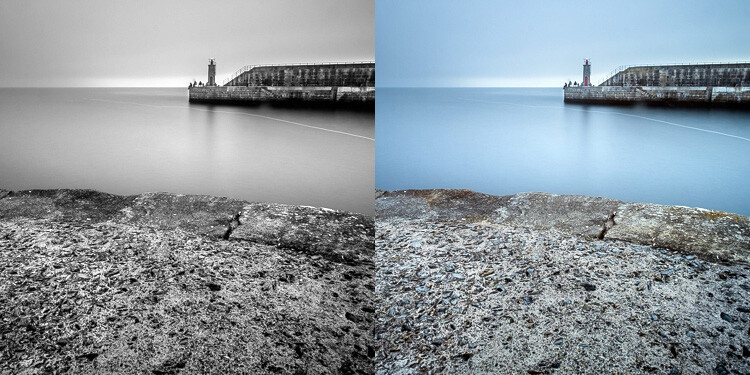
How to Achieve Awesome Black and White Photos with Digital Filters
By:
Adam Welch 
When we think about black and white photographs, we generally associate them with an absence of color.
This is certainly not the case.
Like all photographs, black and white images are made from light, and
light consists of innumerable wavelengths that produce the colors we
see with our eyes. With
black and white photography,
we might not see the saturation of colors the same way, but the
luminance values of these colors remain the same whether we view them in
color or black and white.
This is why it’s so important to shoot digital black and white photos
in RAW mode so that we can later manipulate these intact luminance
values to control the contrasts within our digitally-converted black and
white photos.

All of this is based on the use of physical “color” lens filters,
which filter out different wavelengths of light to produce varying
contrast effects in black and white photography.
A red filter produces dark, dramatic skies in landscape photos while
orange filters can radically reduce the appearance of freckles and other
skin blemishes in your portraits.
Of course, this means carrying a set of filters with you constantly
and also compensating for the slight reduction in light with adjustments
to your exposures.

But what if I told you that your DSLR or MDC (mirrorless digital
camera) most likely has all of the color filters you will need for
outstanding black and white work right at your fingertips?
I know, I was initially just as surprised as you are. Read on.
Black and white digital filters
Real black and white color filters work to filter out other
wavelengths of light that don’t fall into the color spectrum of the
filter. This means red filters allow red wavelengths to pass, blue
allows blue, etc.
The cool thing is, many major camera manufacturers have seen fit to
include digital amalgamations of these color filters. They could very
well be slightly buried in your camera’s settings, but Canon, Nikon,
Olympus, and Panasonic all offer models which sport built-in black and
white color filters.
As always, your camera user manual is your best friend. However, you
may often find these filter options (if you have them) in the
monochrome settings of your digital camera. In our example, I’ll be using a
Canon 5D MKIII.

I’m about to say something not usually encountered when it comes to
digital photography these days – when using these digital black and
white filters, it can be best to shoot
JPEG…not RAW.
Sure, you’re going to lose some post-processing leverage, but seeing
that you can see the effects of your filter choices and you likely
intend to end up with a black and white photo anyway, there’s not much
reason to save the color information with a
RAW file.
The wonderful thing about digital black and white filters is that you can enjoy real-time feedback of the filter effects.
Which filter to use?
We’ve touched on a few of the circumstances where color black and
white filters are best suited. In most cases, your digital camera will
have a set of digital color filters from which to choose: red, yellow,
orange, green and blue. These options, however, will vary. For instance,
my 5D MKIII has no blue filter option.
Have a look at some examples and each of these below. I’ve used the
same scene to show the varying effects of each filter. I’ve also listed a
few quick scenarios that may help you choose a particular filter
setting.
Here’s the original color photo for reference:

Color image with no in-camera black and white filters applied.
Red Filter
This filter is a great way to pump in instant drama to most black and white landscape photos.

Notice the immediate darkening of the blue sky with the red filter
The red filter drastically reduces the transmission of blue
wavelengths, thus darkening blue skies and making clouds pop. Some
scenes can take on an almost infrared appearance.
Orange Filter
Taking it down a notch from the heavily-apparent effects of the red
filter, the orange filter produce similar, yet subdued, contrasts to its
red cousin.

Orange color filters are great “general purpose filters” for adding
in contrast to your black and white photos. They darken blue skies and
help to bring out the appearance of clouds.
For
portraits, they work great for reducing
skin blemishes like moles and freckles.
Orange filters are also great for reducing atmospheric haze and fog.
Yellow Filter
A yellow color filter produces effects even less “in your face” than
the orange filter. A yellow filter is a good option for bringing out the
contrasts of foliage and can also be a good choice for a general
black and white photography filter when the orange filter is a bit too harsh.

The next two filters are less useful for most shooters but still bear
mentioning. Well, not less useful, but perhaps not found as commonly in
black and white photography as the other color filters I’ve mentioned.
Green Filter
Of course, this filter allows the transmission of green light. This
makes it a good choice for flower and foliage photography as it helps to
add contrast between the often green-colored stems and leaves of the
plants. All while providing separation from the different-colored
flowers and blossoms.

Green filters can also brighten blue skies but not as much as the last filter we’re about to discuss.
Final thoughts on in-camera digital filters…
Digital photography has made many things easier and more accessible
for photographers. Even more fortunate, many of the same tried-and-true
technical and optical principles still apply to our digital cameras.
Built-in digital black and white color filters are just one of the many
benefits of our brave new digital age.

Many popular camera manufacturers have included digital black and
white color filters with their digital camera offerings, so check your
particular model.
Black and white color filters allow you to add instant strength and contrast to your black and white photos.
Depending on your particular scene or subject, you can produce
amazingly powerful black and whites before you ever download them from
your camera. Color black and white filters have long been a standby of
serious photographers, and it’s great to see them still holding their
own, albeit in a more modern, digital incarnation.
So go out and try these black and white digital filters, and share your photos with us in the comments section!
Share this article.