Saturday, December 7, 2019

Portraits of Women on Sofas

Michael Zhang


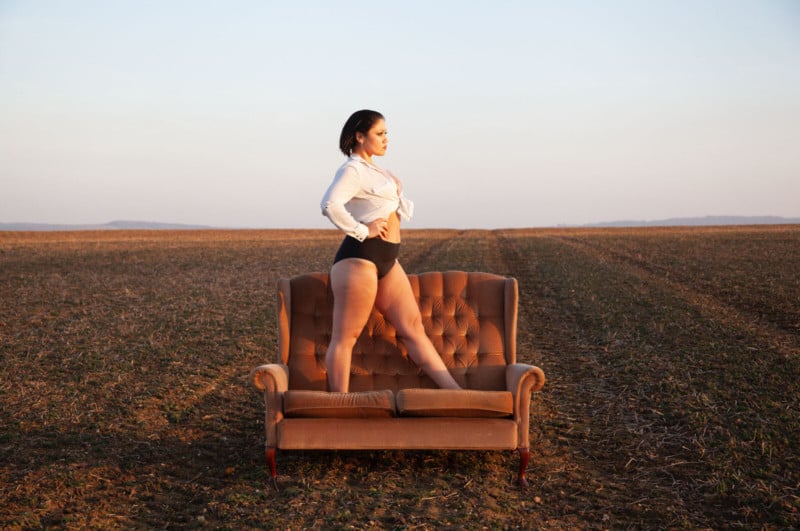
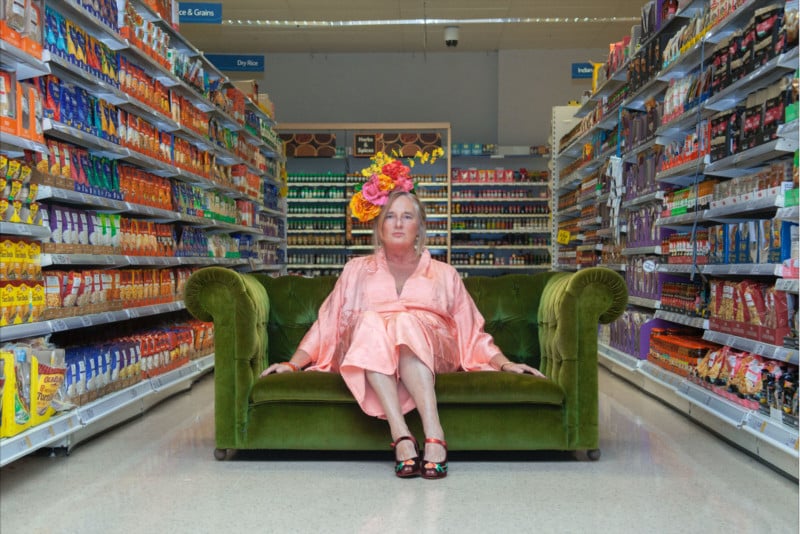
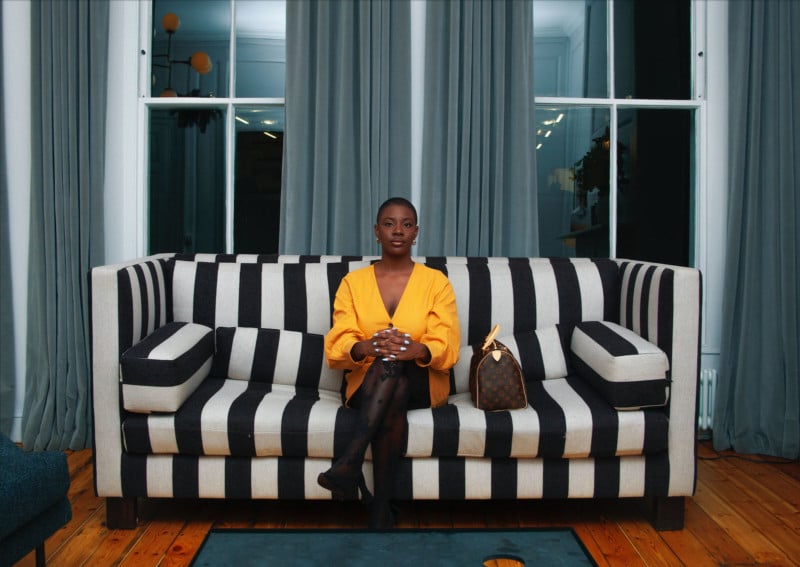
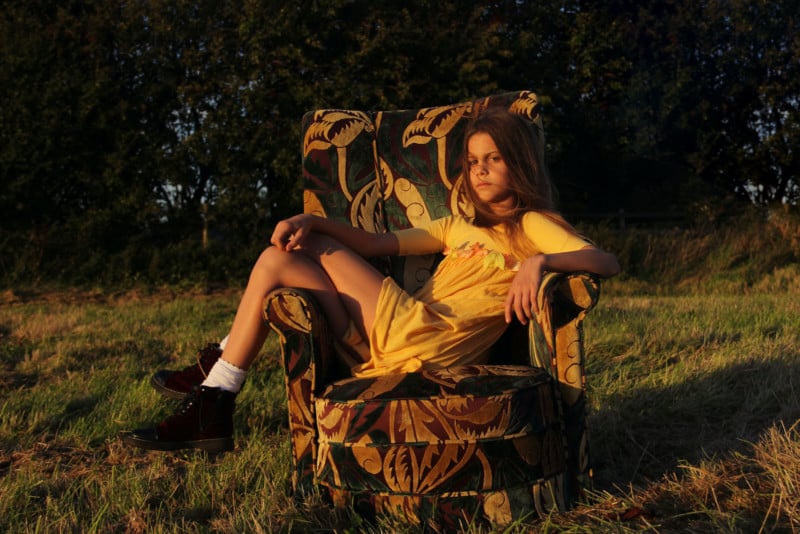
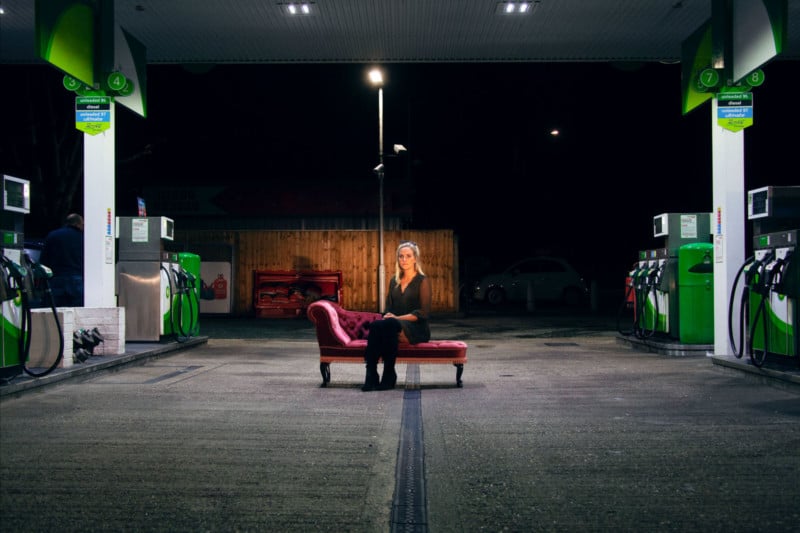
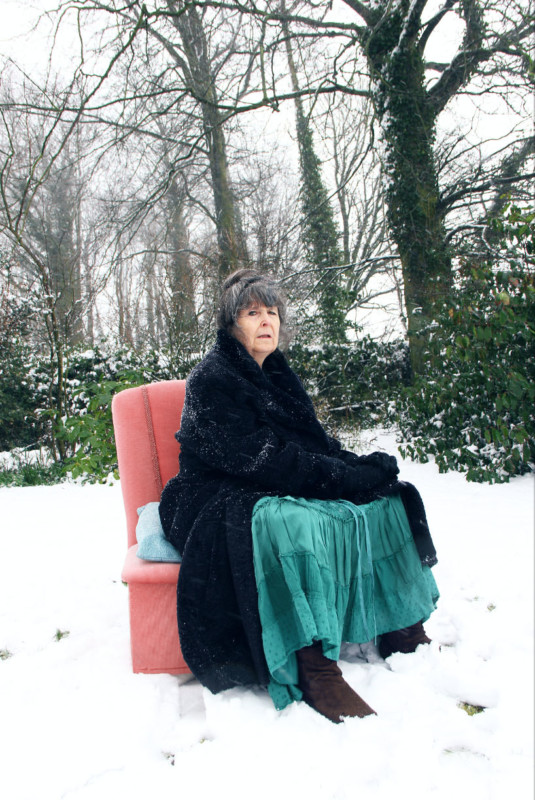
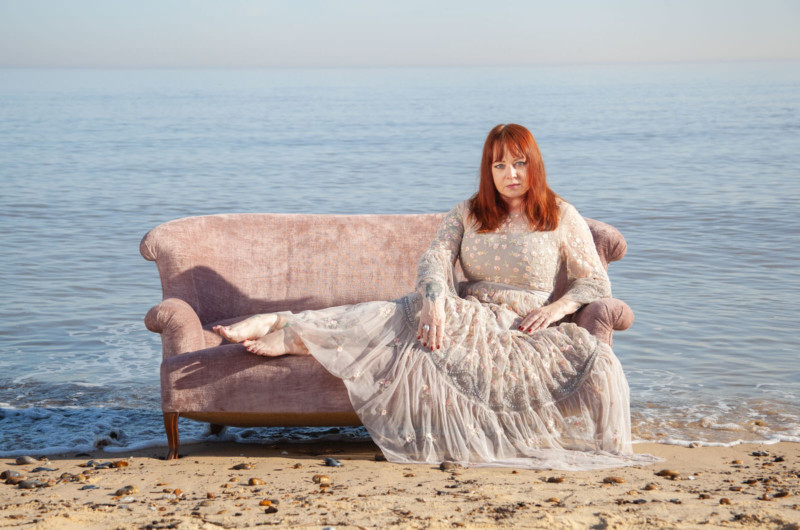
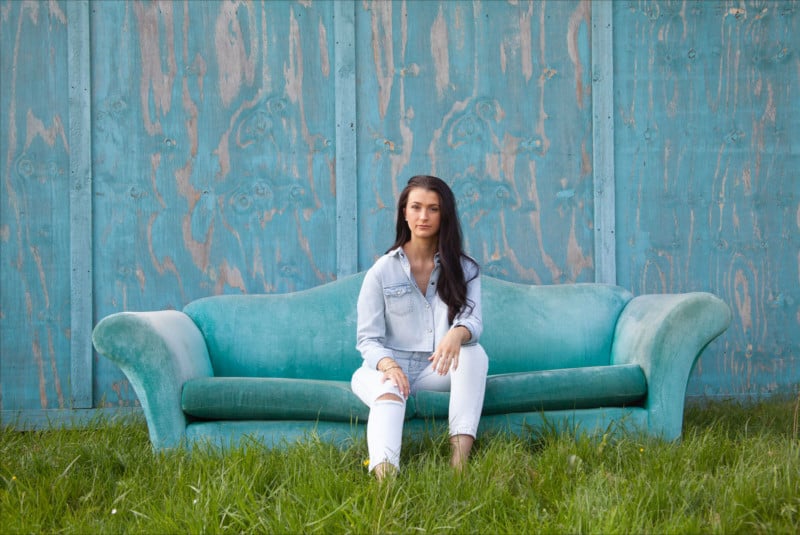
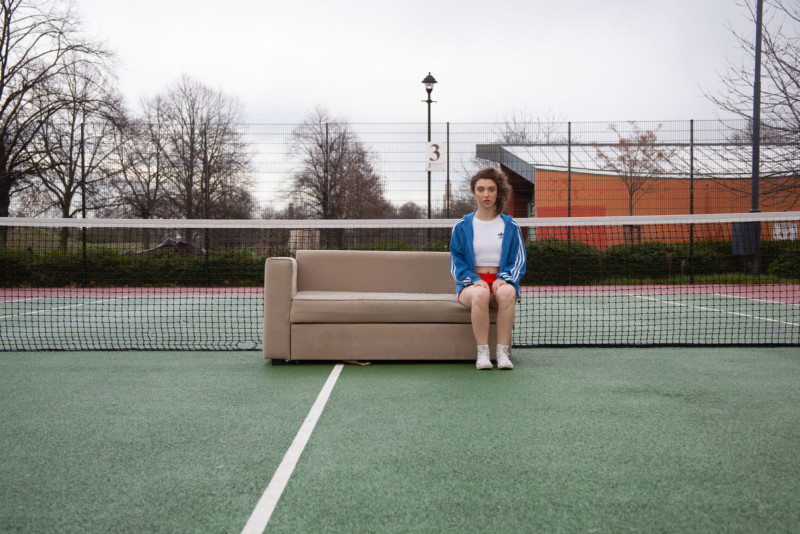
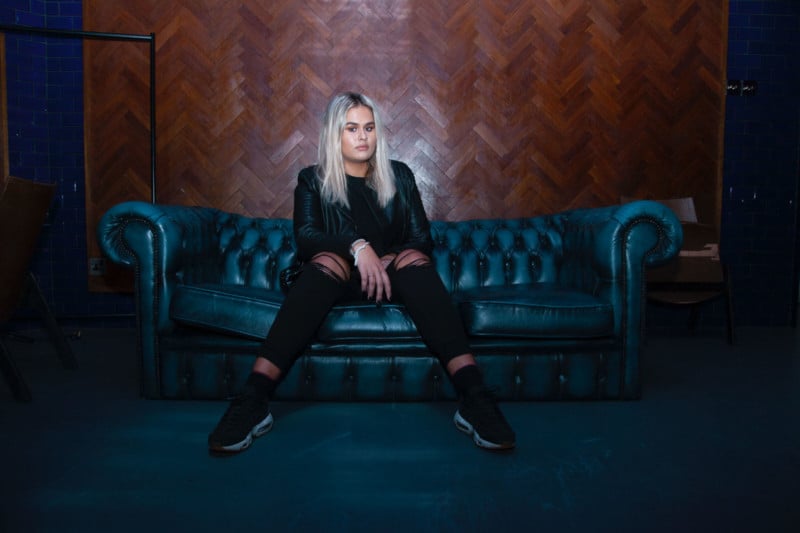
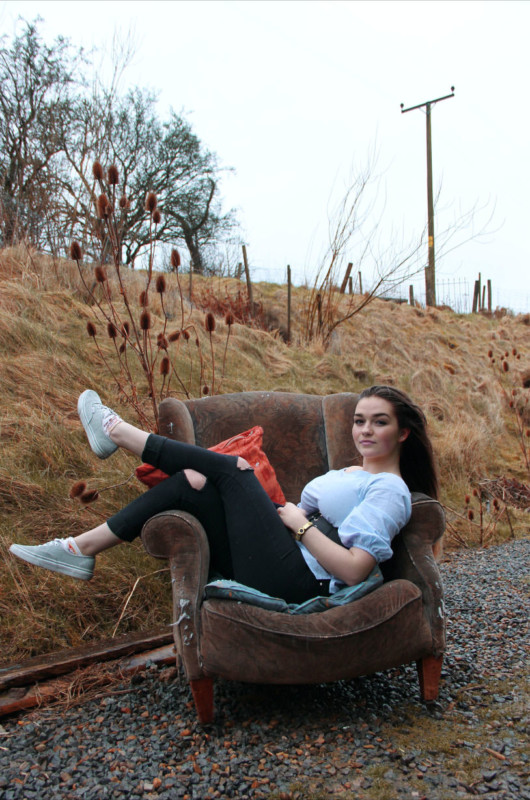
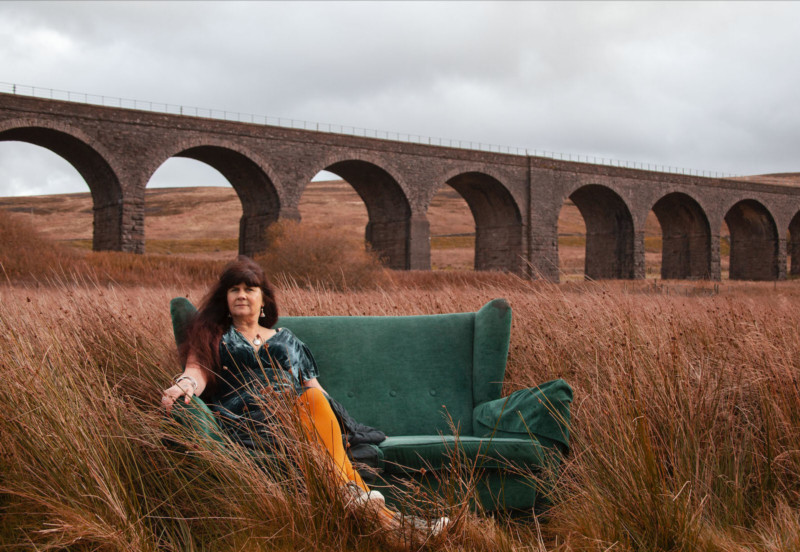
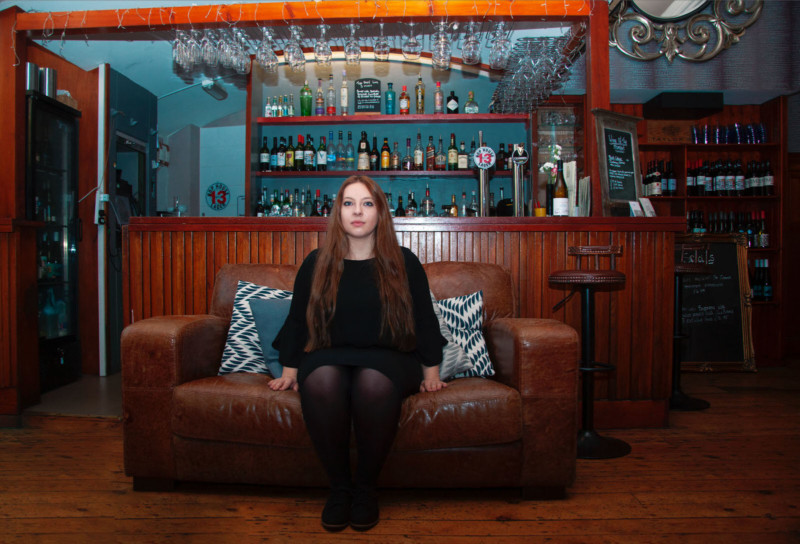
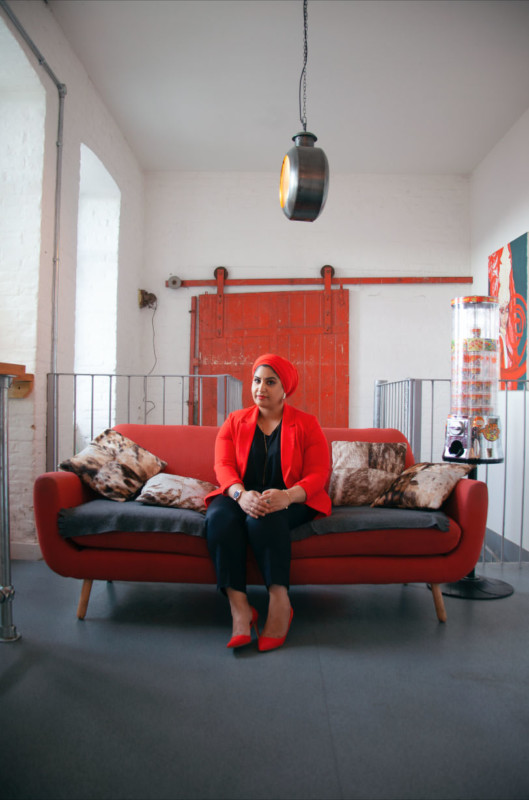
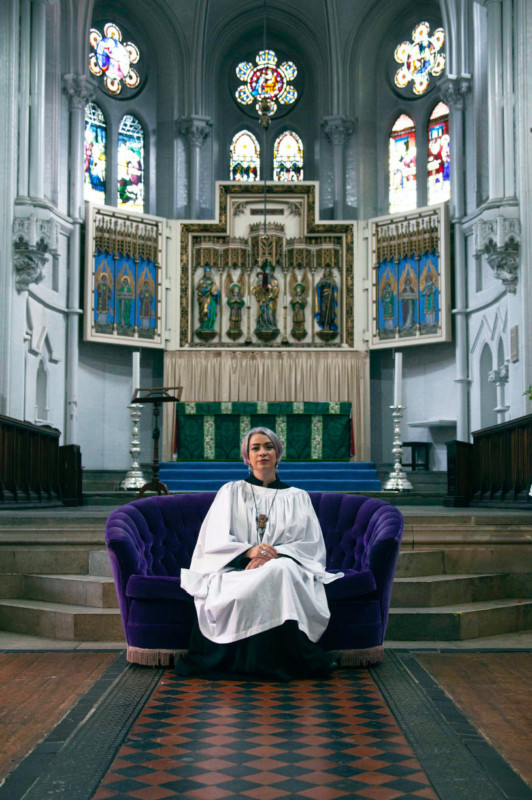
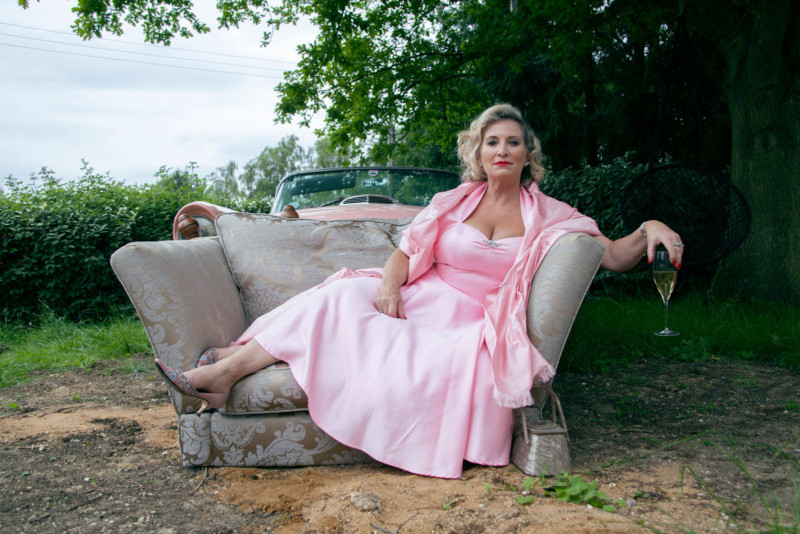
UK-based photographer Ruby Steele shot a series of portraits of women sitting on sofas in a wide range of locations. The project is simply titled “Women on Sofas.”

“Women on Sofas was driven by a curiosity about the space a woman occupies in contemporary western society,” Steele writes. “The work explores how we experience ourselves in the domestic and public arenas, whilst celebrating our diversity and power in unexpected ways.”


The project “looks at the pride and pleasure we take in our strength and resilience, and in challenging society’s expectations of us,” the photographer says. “In spite of growing freedoms in many areas of society over the past century, the domestic sphere is still often seen as women’s terrain. It is a space into which we are welcomed.”

“It has been interesting to observe this space, disrupt it and take it beyond its ‘natural’ limits, whilst exploring our emotional response to it,” Steele says. “The women come from a diversity of backgrounds and cultures and span eight decades.
“They are mothers, daughters, friends, strangers, writers, artists, models, priests, students, businesswomen, entrepreneurs, musicians, actors, doctors, scientists, and technicians. Women on Sofas was the project that offered me the opportunity to celebrate these women, both ones I knew and ones I was yet to meet.”


All the photographs in this project are for sale through Steele’s website. You can also find more of her work on Facebook and Instagram.

Share this article.

Friday, December 6, 2019

A Beginner’s Guide to Doing Black and White Photography

If you’ve never tried black and white photography before, you may be wondering what the appeal is. After all, isn’t it a little like black and white television or silent movies – an anachronism in our modern, high-tech age?
Black and white photography
The answer is no, definitely not. In the photography world, black and white is considered an art form. Some would even say only the best photographers work in monochrome. It’s a medium with a rich history, (look at the work of Ansel Adams, Edward Weston or Henri Cartier-Bresson for examples) and a bright future.
Just as importantly, working in black and white can help you become a better photographer. How? It’s all to do with composition.
Colour is very powerful, and tends to dominate the photo so much that it’s difficult to see other elements like tonal contrast, texture, shape, form and quality of light. Experienced photographers instinctively see these things, regardless of whether they work predominantly in colour or black and white. But if you’re just starting out, you may need some assistance to do so, and working in black and white photography will help you.
Black and white photography
Black and white emphasizes the textures of the rocks and sea in this landscape photo.
Naturally, there are certain subjects that tend to work better than others in black and white; two in particular are landscapes and portraits. If this is your first time shooting in black and white, then these are great subjects to try out.
Black and white photography
Black and white portraits emphasize expression and quality of light.

Black and white on your camera

Before digital photography the only way to work in black and white was to use black and white film. Thankfully, now it’s much easier to work in black and white, just by switching your camera to Monochrome Mode (check your camera’s manual if you are unsure how to do so, look for Picture Styles settings).
Cameras with electronic viewfinders automatically display the image in black and white, helping you see how the image will look, before you press the shutter. If you have a digital SLR you will get the same effect in Live View. This may be useful if you are working with your camera on a tripod (for instance, taking a landscape photo).
Usually at this point I advise you to use the Raw format. In the long run it’s easier than using JPEG, and gives you better image quality. But I appreciate that if you’re new to photography you may still be working exclusively in JPEG. The rest of this article works on this basis.

Working in Monochrome Mode

Once in monochrome mode you will see some extra options. They help you set your camera up to produce the best results. Again, check your manual if you are not sure where to find them.

Colour filters

The colour filter settings are left over from the days of film photography. Photographers would buy coloured filters, and use them to alter the tones in black and white photos. For example, if your scene includes a blue sky, then using a yellow filter will make the sky a little darker, an orange filter makes it even darker, and a red filter darker still.
Black and white photography
This scene works quite well in black and white, but it’s not nearly as dramatic as it could be.
Black and white photography
Applying the Red filter setting makes the blue sky go much darker, creating a much more dramatic 
version of the same scene.
There is also a place for green filters, which can bring out more detail in green subjects like leafy forests. Those four coloured filters (red, orange, yellow and green) have made their way onto most digital cameras as black and white settings.

Contrast

If you take a photo in flat light (for example, a portrait of somebody standing in the shade) the photo may look flat (two dimensional). So, you need to compensate by increasing the contrast. You can either do this in Photoshop or Lightroom after the photo has been taken, or you can do it in-camera with the contrast setting.
Black and white photography
The model was standing in the shade when I took this photo. The light lacks contrast, and the black 
and white photo is flat.
Black and white photography
Increasing contrast creates a much stronger image.

Cropping and the square format

Most modern cameras let you change the aspect ratio. The reasons why you might want to do that are a little complex, but the main one is that it lets you shoot in the square format, something you may already be used to if you use an app like Instagram on your smartphone. If your camera has an electronic viewfinder, it will display a square image for you, making composition much easier.
Black and white photography
Cropping to the square format emphasizes the shapes of the three pots.

Toning

Finally, you may have the option to tone your images. To be honest, unless your camera lets you apply toning affects subtly, I wouldn’t bother with these, as the effect is usually too strong.

Have fun!

Black and white is a beautiful medium to work in, one which you will appreciate the more you practice. In the meantime – have fun and enjoy yourself. You are following a path trodden by some of the most famous names in photography. And of course, if you have any questions about working in black and white, please let us know in the comments.

Share this article.

How To Make A $300 Camera Look Pro!

5 Tips for Stunning Black & White Photography

Avoid These 5 Common Mistakes in Black and White Photography

Black and white photography has been around for nearly 180 years, ever since Louis Daguerre introduced the daguerreotype process to the world. It is still hugely popular despite the rise and ease of color photography. And yet, whenever I look at other people’s black and white photos, I see the same mistakes over and over. Are you making any of these? Let’s find out!
Black & white photography mistakes

Mistake #1: Shooting in JPEG format

Ouch! This is a big one. It’s the single worse thing you could do.

The difference between RAW and JPEG

To understand why, you need to appreciate the difference between Raw files and JPEGs. Raw files contain all the information captured by your camera’s sensor. A Raw file is not a finished picture file. It has to be processed (using software like Lightroom or Adobe Camera Raw) and converted to a JPEG or TIFF file in order to be usable.
You can think of a Raw file as the equivalent of a negative (as in from film photography). You can’t send a Raw file to a photo library or a magazine any more than you could send a negative. You need to process the Raw file (or scan and process the negative) first.
JPEG files are created by the camera. It takes the information captured by the sensor, processes it (much like you would do with a Raw file in Lightroom, but according to the camera’s built-in parameters), compresses it, discards the unused information, and saves it as JPEG. They don’t necessarily need processing in software like Photoshop or Lightroom, although most can be improved by doing so.

Advantages of shooting RAW

Using the Raw format gives you the following advantages.
  • Control: You process the file yourself, rather than letting the camera do it. You can process it to your taste from a stylistic point of view. Using Raw lets you interpret the file as many ways as you want. Using JPEG means the file gets interpreted one way only – the way the camera does it.
  • More data: The Raw file contains much more information than a JPEG, especially in the highlights and shadows, that you can draw out when you process the file. The extra information helps prevent banding in areas of smooth continuous tone like clear skies.
Black & white photography mistakes
Using Raw helps you get from the before image shown above to the processed version here. With 
Raw, you can increase contrast and make the sky darker without introducing banding in the sky 
or halos along the edges of buildings. You can’t do this with JPEG files.

More advantages of shooting RAW

  • Adjust sharpness: JPEG files created by your camera are sharpened. The sharpening limits the amount you can change tonal values before introducing halos and artefacts. Yes, you can turn JPEG sharpening off in-camera – but how many people bother?
  • RAW format keeps the color info: Raw files contain all the color information captured by the sensor, so you can create a color version of the photo in Lightroom, Photoshop, etc., as well.
Black & white photography mistakes
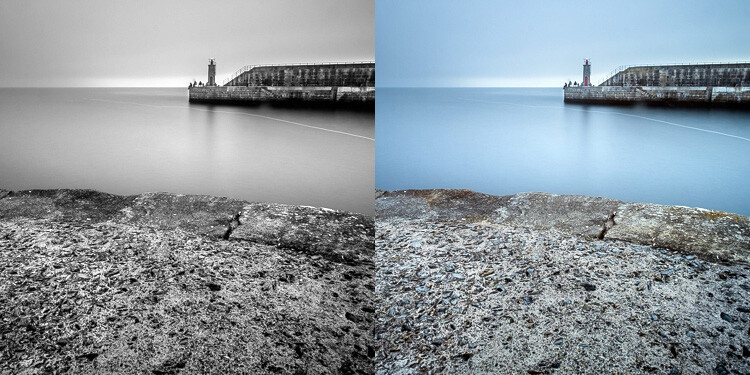
Using Raw let me create both a color and black and white version of the same image in Lightroom, 
without any loss of image quality.
  • Improvements: The software gets better every year. The version of Lightroom or Photoshop you use in five or 10 years time will be much better than the current one. With Raw, you can take advantage of these new improved tools and reprocess your images in the future.
So please, don’t use the JPEG format any more for black and white photography. There are, however, advantages to using your camera’s monochrome mode, as discussed in my article Mastering Monochrome Mode.

Mistake #2: Trying to save photos by making them black and white

Black and white is not a method for rescuing poorly crafted color photos. If your photo is bad in color, it will be bad in black and white too (although there are always photos that work better in black and white for compositional reasons).
There is nowhere to hide in black and white. In color, if the lighting or composition isn’t as good as it could be, the emotional impact of the colors in the photo may rescue the image (or, depending on how you look at it, cover up its shortcomings). Black and white images rely on factors like tonal contrast, textural detail, line and strong composition to work.
That’s why some photographers consider black and white to be a kind of higher art form than color photography.
Black & white photography mistakes
The texture in this photo is essential to make it work in black and white.

Mistake #3: Not processing the photos properly

Before digital cameras and Lightroom came along, many pro photographers used a professional printer to print their images. Creating top quality black and white prints in the darkroom is hard, and it was often outsourced to professionals.
This was a beneficial arrangement that let photographers concentrate full-time on photography and left printing to the specialists. Perhaps the best known pro printer in the UK is Robin Bell, who has worked with big names such as David Bailey, Terry O’Neil, and Eve Arnold.
Nowadays it is much easier to create beautiful black and white images in programs like Lightroom, Photoshop, or Silver Efex Pro 2, than it is to master the chemical darkroom process. But, sadly, many photographers don’t get to grips with the basics. The result is that their black and white photos are not nearly as good as they could be.
Take the time to learn how to use your software properly and your photos will get better.
Black & white photography mistakes
This before and after example shows the photo how it looked straight out of the camera compared 
to the final version, processed in Lightroom. Learn how to get from one to the other in order to get 
the most out of your black and white images.

Mistake #4: Not shooting in the best light

One of the advantages of black and white is that you can often shoot in lighting conditions not suitable for color photography. For example, on a cloudy day you can create beautiful black and white seascapes with a tripod and neutral density filters (this is called long exposure photography). Yet, in color, you would really need to shoot close to dawn or sunset to make the most of the scene.
But what some people do is use black and white to shoot in lighting conditions that are simply unsuitable for the subject. Using black and white isn’t the solution. The important skill is in matching the light to the subject. This takes a while to learn but it’s very important. Don’t be lazy just because it’s black and white.
Black & white photography mistakes
A long exposure photo made on a cloudy day. The light suits the subject – it wouldn’t have worked 
in sunny weather.

Mistake #5: Not having a strong composition

Black and white is a true test of your compositional skills. The best monochrome images use visual elements like tonal contrast, texture, line, shape, pattern, and negative space. The emotional power of color can mask poor composition. But in black and white there is nowhere to hide. You have to learn how to use these building blocks of composition effectively.
That starts with learning how to see them. For example, you can’t use lines in your compositions if you haven’t trained yourself to see straight, diagonal, or curved lines in the scene.
The good news is that once you understand the fundamentals of composition in black and white, you will instinctively apply them to your color photos as well.
Black & white photography mistakes
I took a lot of care with the composition of this landscape photo. It has foreground interest and 
plenty of texture – important elements in black and white landscapes.
Have you made any of these mistakes?
Can you think of any other mistakes that photographers make when working in black and white? Please share your thoughts in the comments below.

Share this article.

Understanding Black and White Filters in Lightroom

Shooting in black and white can be an amazingly creative way to explore new areas of photography, and help you see not only your pictures, but the world around you in a whole new light. However, unless you are shooting with black and white film or with a dedicated black and white camera like the Leica M Monochrom, all your pictures will initially be shot in color and later transformed into black and white through software tricks or filters.
Lightroom has an impressive array of presets that allow you to apply black and white effects to your color pictures, but in order to select the right filter for your particular pictures it’s important to understand how these presets work behind the scenes, and what they are really doing to your photos.
black-and-white-filters-hispanic-student-association
Back in the days of film photography, black and white film was composed of a single layer of silver crystals that were sensitive to light and affected the film in different ways depending on the wavelength, or color, of the incoming light. Green light (like reflected off of plants and trees) had a different effect on the film than red light (reflected off apples) or blue light (reflected off the sky).
When color film was invented it contained not one, but three layers of silver halide crystals, each of which produced different colors when exposed to light–similar to how the photosensitive pixels work on modern digital cameras. The problem with this method was that sometimes a photographer would need his or her film to be extra sensitive to different wavelengths of light, depending on the particular scene being photographed. One popular solution was to use colored filters that screwed onto the front of the camera lens, which still left the resulting image monochrome but changed its properties in significant ways.
A collection of color filters that can be quite useful in black and white photography.
A collection of color filters from Amazon that can be quite useful in black and white photography.
These filters operate by absorbing light on different parts of the spectrum while letting other colors pass through much more easily: green filters absorb more of most colors except green, blue blocks most colors except blue, and so on. This means that portions of the spectrum similar to the color of the filter will be lighter since more of that color of light makes it through the filter and essentially over-exposing those portions of the film. Conversely, portions on the opposite side of the color wheel from a given filter color will be darker since less of that light is allowed to pass through. For example, this diagram illustrates the basic principle behind a red color filter:
black-and-white-color-filters-diagram
The fact that more red is allowed to enter through the camera lens means the camera’s light meter would then adjust itself accordingly: you’re essentially exposing for the reds, which means that a properly exposed black and white image with a red filter would have pleasing reds with very dark cyans, blues, and greens.
black-and-white-color-filters-diagram-stars
By taking this basic idea and applying it to modern digital photography you can start to see how different black and white post-processing solutions work. In Lightroom you can mimic the effects of a color filter when converting an image to black and white. It’s not quite the same as actually using a physical filter on your lens and shooting using black and white film, but it’s a decent approximation that gets the job done for most circumstances. The trick is knowing which filter to use in a given situation.
This shot of kids’ feet would be nice in black and white, but in order to choose the right style it’s important to know how each type of color filter will affect the results. A green filter will make the leaves lighter while darkening the skin colors, since they are somewhat opposite on the color wheel. A blue filter will lighten the bluish hue of the rocks and the darker areas in the leaves but darken the skin colors, though perhaps a bit too much.
black-and-white-filters-feet-original
Here’s what the same image looks like with five different Lightroom black and white filter presets applied:
black-and-white-filters-all
In the end I chose a yellow filter to create the final image because it exposes the legs and feet a bit more while underexposing the blue and purple hues in the rocks:
black-and-white-filters-feet-yellow-filter
Of course Lightroom is not actually putting a color filter over your picture, but using digital tricks to approximate the same effect. It does this by altering the values of various parameters in the Develop module when a given preset is applied. After selecting a Black and White Filter preset you can see how various color values change by choosing the B&W panel in the Develop module. Note how the sliders change for various selected Presets, such as the Yellow and Blue in the example below.
black-and-white-lightroom-presets
Lightroom is not applying different colors to a black and white image, but deciding how much of each color value to over or under-saturate in order to mimic the effect of putting the same type of physical filter on your camera. While it’s not quite the same as shooting in pure black and white, one of the nice advantages is how Lightroom allows you to essentially create custom black and white filters by adjusting the slider values yourself. You can tweak any of the existing Presets, not just the Black and White ones, by increasing or decreasing various sliders, and even save your adjustments as new Presets that you can apply instantly to any image.
As one more extreme example, here’s an image of some bocce balls with different filters applied.
black-and-white-lightroom-balls-original
The original color image, properly exposed.
Applying a red filter preset in Lightroom produces an image where the reds are properly exposed and a bit lighter, but the blue shirts are dramatically darker since red and blue are rather opposite on the color spectrum.
black-and-white-lightroom-balls-red-filter
The same image with a Red black and white filter preset applied.
Now look what happens when a blue filter preset is applied. Just like a real physical filter on the front of the camera lens, the blues are lighter while all opposing colors are incredibly dark because very little of that light was allowed to pass through–or at least that’s the effect that Lightroom attempts to mimic.
black-and-white-lightroom-balls-blue-filter
A Blue filter preset now changes the image dramatically.
So how do you get a properly exposed image, with a well balanced amount of black and white across the frame? In real life you would use a green filter since this would block roughly equal amounts of both reds and blues, and the effect works quite well in Lightroom as well.
black-and-white-lightroom-balls-green-filter
Using a green filter preset results in a well balanced image.
As you can see, getting a proper black and white conversion in Lightroom is not always as simple as just clicking a button. It helps to know not only what options are available, but why they function the way they do.
What about you? What are your favorite black and white tips and tricks in Lightroom? There is much more I have not covered in this article, and if you have anything you’d like to share leave your thoughts in the comments below.

Share this article.

How to Achieve Awesome Black and White Photos with Digital Filters


By: Adam Welch  Adam Welch

When we think about black and white photographs, we generally associate them with an absence of color.
This is certainly not the case.
Like all photographs, black and white images are made from light, and light consists of innumerable wavelengths that produce the colors we see with our eyes. With black and white photography, we might not see the saturation of colors the same way, but the luminance values of these colors remain the same whether we view them in color or black and white.
This is why it’s so important to shoot digital black and white photos in RAW mode so that we can later manipulate these intact luminance values to control the contrasts within our digitally-converted black and white photos.
Black-and-White-digital-filters
All of this is based on the use of physical “color” lens filters, which filter out different wavelengths of light to produce varying contrast effects in black and white photography.
A red filter produces dark, dramatic skies in landscape photos while orange filters can radically reduce the appearance of freckles and other skin blemishes in your portraits.
Of course, this means carrying a set of filters with you constantly and also compensating for the slight reduction in light with adjustments to your exposures.
Black-and-White-digital-filters
But what if I told you that your DSLR or MDC (mirrorless digital camera) most likely has all of the color filters you will need for outstanding black and white work right at your fingertips?
I know, I was initially just as surprised as you are. Read on.

Black and white digital filters

Real black and white color filters work to filter out other wavelengths of light that don’t fall into the color spectrum of the filter. This means red filters allow red wavelengths to pass, blue allows blue, etc.
The cool thing is, many major camera manufacturers have seen fit to include digital amalgamations of these color filters. They could very well be slightly buried in your camera’s settings, but Canon, Nikon, Olympus, and Panasonic all offer models which sport built-in black and white color filters.
As always, your camera user manual is your best friend. However, you may often find these filter options (if you have them) in the monochrome settings of your digital camera. In our example, I’ll be using a Canon 5D MKIII.
Black-and-White-digital-filters
I’m about to say something not usually encountered when it comes to digital photography these days – when using these digital black and white filters, it can be best to shoot JPEG…not RAW.
Sure, you’re going to lose some post-processing leverage, but seeing that you can see the effects of your filter choices and you likely intend to end up with a black and white photo anyway, there’s not much reason to save the color information with a RAW file.
The wonderful thing about digital black and white filters is that you can enjoy real-time feedback of the filter effects.

Which filter to use?

We’ve touched on a few of the circumstances where color black and white filters are best suited. In most cases, your digital camera will have a set of digital color filters from which to choose: red, yellow, orange, green and blue. These options, however, will vary. For instance, my 5D MKIII has no blue filter option.
Have a look at some examples and each of these below. I’ve used the same scene to show the varying effects of each filter. I’ve also listed a few quick scenarios that may help you choose a particular filter setting.
Here’s the original color photo for reference:
Image: Color image with no in-camera black and white filters applied.
Color image with no in-camera black and white filters applied.

Red Filter

This filter is a great way to pump in instant drama to most black and white landscape photos.
Black-and-White-digital-filters
Notice the immediate darkening of the blue sky with the red filter
The red filter drastically reduces the transmission of blue wavelengths, thus darkening blue skies and making clouds pop. Some scenes can take on an almost infrared appearance.

Orange Filter

Taking it down a notch from the heavily-apparent effects of the red filter, the orange filter produce similar, yet subdued, contrasts to its red cousin.
How to Achieve Awesome Black and White Photos with Digital Filters
Orange color filters are great “general purpose filters” for adding in contrast to your black and white photos. They darken blue skies and help to bring out the appearance of clouds.
For portraits, they work great for reducing skin blemishes like moles and freckles.
Orange filters are also great for reducing atmospheric haze and fog.

Yellow Filter

A yellow color filter produces effects even less “in your face” than the orange filter. A yellow filter is a good option for bringing out the contrasts of foliage and can also be a good choice for a general black and white photography filter when the orange filter is a bit too harsh.
How to Achieve Awesome Black and White Photos with Digital Filters
The next two filters are less useful for most shooters but still bear mentioning. Well, not less useful, but perhaps not found as commonly in black and white photography as the other color filters I’ve mentioned.

Green Filter

Of course, this filter allows the transmission of green light. This makes it a good choice for flower and foliage photography as it helps to add contrast between the often green-colored stems and leaves of the plants. All while providing separation from the different-colored flowers and blossoms.
How to Achieve Awesome Black and White Photos with Digital Filters
Green filters can also brighten blue skies but not as much as the last filter we’re about to discuss.

Final thoughts on in-camera digital filters…

Digital photography has made many things easier and more accessible for photographers. Even more fortunate, many of the same tried-and-true technical and optical principles still apply to our digital cameras. Built-in digital black and white color filters are just one of the many benefits of our brave new digital age.
Black-and-White-digital-filters
Many popular camera manufacturers have included digital black and white color filters with their digital camera offerings, so check your particular model.
Black and white color filters allow you to add instant strength and contrast to your black and white photos.
Depending on your particular scene or subject, you can produce amazingly powerful black and whites before you ever download them from your camera. Color black and white filters have long been a standby of serious photographers, and it’s great to see them still holding their own, albeit in a more modern, digital incarnation.
So go out and try these black and white digital filters, and share your photos with us in the comments section!

Share this article.