Tuesday, November 26, 2019

How To Find Your Lens’ Sweet Spot: A Beginner’s Guide to Sharper Images

How To Find Your Lens' Sweet Spot: A Beginner's Guide to Sharper Images
Are you tired of blurry images?
It’s time to learn how to capture sharper images by finding your lens’ sweet spot. This will give you more confidence, save time, and help you take better photos.
In this article you’ll learn:
  • How to find your lens’ sweet spot (for sharper images)
  • Why you should shoot in Aperture Priority mode (and how to use it)
  • How to perform a test to get your sharpest image every time
  • How important is your lens’ sweet spot? Notice the difference
Mid range aperture sharper than wide open
In the above images of the clock, the one on the right is sharper. Look closely at the words and at the leaves behind the clock. The f/9 image is sharper throughout because it was shot in my lens’ sweet spot. The f/3.5 one was not.

First, take a look at your lens

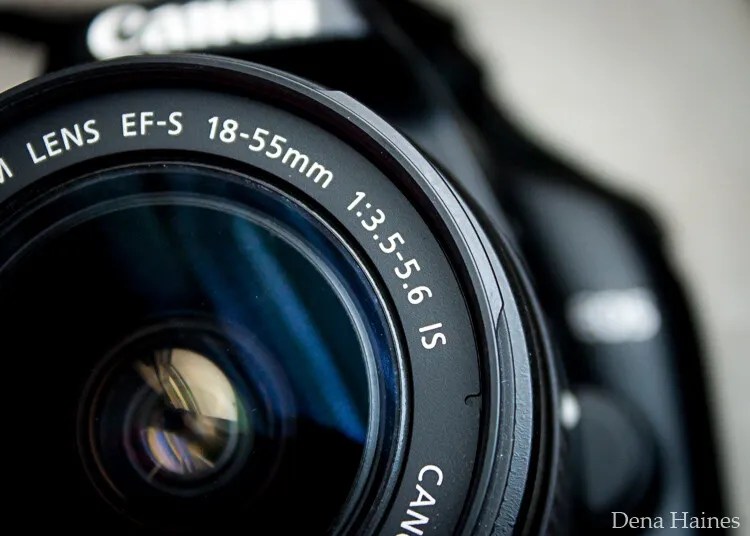
In this beginner’s guide, we’ll use an entry level zoom lens as our example. Most kit lenses (the basic lens that comes with a DSLR) generally shoot their sharpest at the mid-range aperture settings. To determine the mid-range of your lens, you’ll need to know its widest (or maximum) aperture setting. It is located on the side, or end, of the lens and will look something like this 1:3.5-5.6.
For example, here it is on my Canon 18-55mm zoom lens.
Lens aperture range
This means that when my lens is zoomed all the way out, its widest aperture is f/3.5. When zoomed all the way in, its widest aperture is f/5.6.
The rule to finding that mid-range sweet spot, is to count up two full f-stops (aperture settings are called f-stops) from the widest aperture. On my lens, the widest aperture is f/3.5. Two full stops from there would bring me to a sweet spot of around f/7.
Use this chart to count your f-stops
Robin Parmar
By Robin Parmar
There is some wiggle room in the mid-range, so anything from f/7 to f/10 will capture a sharp image. Once you know the mid-range of your lens, you can do an easy test to get your sharpest image. To perform the test you’ll need to shoot in Aperture Priority mode.

Take control with Aperture Priority Mode

Shooting in Aperture Priority allows you to choose the aperture setting you want, which gives you more creative control than Automatic mode. By controlling the aperture setting, it’s much easier to get a sharp image, and because your camera still chooses the ISO (if you are set to Auto ISO) and shutter speed automatically, it’s very easy to use.
You’ve probably heard that apertures like f/16 and f/22 are best for keeping everything in focus. While that can be true, focus does not always equal overall sharpness. Choosing a mid-range aperture will give you sharper images throughout. You can improve them even further by reducing camera shake with a tripod and a remote shutter release (or your camera’s self-timer).
Here’s an example of how shooting in your lens’ sweet spot will give you sharper images.
Sharp images shot in lens sweet spot
Mid range f stop sharper than small f stop
In the above split-image, the f/9 image is sharper than the f/22 one. The needles and shadows are not as soft or blurry as in the f/22 shot (look at the crispness and sparkles in the snow too).

Switching from Automatic to Aperture Priority Mode

To take your camera out of Automatic and put it in Aperture Priority, just turn the large Mode Dial to Aperture Priority. This is what that looks like on my Canon (on Nikon and other brans look for the A).
Aperture priority on canon mode dial
Automatic mode is the green rectangle; Aperture Priority mode is the Av (or A on a Nikon). Once your camera is in Aperture Priority mode, turn the smaller Main Dial (shown here on the top of my Canon) to choose your f-stop.
Main dial canon
As you turn that dial, you’ll see the f-number changing on your screen. In the next picture, it’s set to f/9.5.
Aperture setting on canon LCD screen

Perform a Lens Sweet Spot Test

Once you have your camera set up on a tripod, performing a sweet spot test only takes a couple of minutes. To begin, put your camera in Aperture Priority mode, then compose your shot and take a photo at varying apertures. Start out with the widest, then click that main dial a couple of times (to the right) and take another. Keep doing that until you’ve taken seven or eight photos.
Upload your photos to your computer and zoom in on them. You’ll quickly see which aperture settings gave you the sharpest overall image.
This next photo of my daughter was shot using natural light. Shooting in my lens’ sweet spot gave me a pretty sharp image, even in this low light setting.
Mid range aperture sharp image low light
Find your lens sweet spot for sharper images
The close up of the mugs shows the advantage of shooting in the lens’ sweet spot. Whenever you want to make sure you get the sharpest capture possible, take a shot at each mid-range setting f/7, f/8, f/9, and f/10.
Getting Your Sharpest Images
Now that you know your lens’ sweet spot, it’s time to practice. I hope you’re as pleased with the results as I’ve been!
Mid range aperture for sharper images
I love shooting in natural light, and learning how to capture sharper images in low light has made me so much happier with my photos.

Tips for capturing your sharpest images:

  • Shoot in Aperture Priority mode
  • Choose a mid-range aperture (usually f/7 to f/10)
  • Use a tripod and a remote shutter release (or your camera’s self-timer) to reduce camera shake
  • Take a series of shots at f/7 through f/10 when a sharp capture is especially important
But don’t stop here. Keep playing with settings in Aperture priority mode. It’s awesome to get images that are sharp throughout, but there’s a lot more to aperture than that.
Learn more about aperture and depth of field here.
Do you have any lens sweet spot tips to share? Please do so by commenting below.

Share this article.

Monday, November 25, 2019

3 Things Aperture Mode is Perfect For in Photography

By: Mat Coker Mat Coker
Many new photographers are overwhelmed by all the settings on their camera. But what if you could ignore most of the settings on your camera and just choose one to experiment with? Where would you begin?
I suggest you begin by experimenting with the aperture because this setting has a huge effect on your photos.
Once you know the things Aperture Mode (or Aperture Priority) is perfect for, you’ll have increased your creative possibilities and simplified the camera setting problem.
Here are three things you can do with Aperture Mode.

But first, how to put your camera on Aperture Mode

For most cameras, to put your camera on Aperture Mode you need to turn the dial to A in order to take control of your aperture (Av for Canon).
things aperture mode is perfect for
This is a Nikon camera. On Canon, you’re looking for Av

When you look at the screen on your camera, you’ll notice a number with an F beside it. This is your aperture value. Use the scroller on your camera to change that number. Experiment and see how high and how low you can make that number go.
things aperture mode is perfect for
When that number is smaller (1.8, 3.5, 5.6) the aperture is wider or more open.

things aperture mode is perfect for
When the number is larger (11, 16, 22) the aperture is narrower or more closed.
As we move through the tips, you’ll see how opening or closing your aperture affects your photo. When you’re intentional about setting your aperture, it will drastically change your photo.

1. How to create background blur (or keep the background in focus if you prefer)

Think in terms of opposites for a moment.
Normally, when we take a portrait, we only want the person to be in focus. But when we photograph a landscape, we want the whole photo to be in focus.
I’ll show you how you can use aperture to create background blur for portraits. I’ll also show you the opposite; how to keep the whole scene in focus for landscapes.
The principle is as simple as this: open your aperture for portraits, close it for landscapes.
PS – the technical term for background blur is bokeh (like a bouquet of flowers).
Image: Remember to open your aperture to create background blur in your portraits. Opening your aper...
Remember to open your aperture to create background blur in your portraits. Opening your aperture 
means setting it to the smallest number possible (probably 1.8 or 3.5 or 5.6). I set the aperture to 
F/2.5 for this portrait.

Image: F/1.2 using the 56mm Fuji prime lens
F/1.2 using the 56mm Fuji prime lens

things aperture mode is perfect for
Remember to close your aperture to keep the whole scene in focus for landscape photos. Closing 
your aperture means setting it to a larger number such as 11, 16, or 22. I set the aperture to F/11 
for this landscape photo.

things aperture mode is perfect for
The aperture is set to F/11 for this landscape photo.

How to achieve better bokeh (background blur)

The first thing I told you about bokeh is that you need to open your aperture all the way. That means that you need to set it to the smallest number possible. That number might be 5.6, 3.5, or even 1.8, depending on your lens.
However, opening your aperture all the way isn’t always enough. So I’ll show you a formula for getting an even better bokeh.
My goal for the following portrait of Batman is to have him in focus with a nice blurry background.
There are four simple steps involved; let’s look at them one at a time.

1. Open the aperture

Image: The aperture is set to 3.5
The aperture is set to 3.5
Now, I opened the aperture all the way, but the building isn’t really out of focus. The back part of the building is out of focus, but the part directly behind Batman is still pretty crisp.
The biggest problem is that he is too close to the background, so the second step will make a huge difference.

2. Bring Batman away from the background

Image: Batman has been moved away from the background.
Batman has been moved away from the background.
Now the building is out of focus, but let’s make it even more out of focus.

3. Zoom in

So far, I set my lens to its widest angle of 18mm. When I zoom all the way to 55mm, the background will go more out of focus.
things aperture mode is perfect for
The aperture has closed a little bit to f/5.6 because I zoomed in. This will happen with most lenses.
As well as blurring the background, zooming in also gave the photo a more compressed look.
Would you like the background to be even more blurry? Is it even possible?

4. Get closer

Yes, it is!
The closer you get to Batman, the more out of focus the background becomes.
things aperture mode is perfect for
I used my Olympus Tough TG-6 for this photo. The microscope mode allows me to get very close. 
The aperture is set to f/6.3 because I zoomed in.
For great bokeh just remember:
  • Open your aperture
  • Step away from the background
  • Zoom in
  • Get closer
Controlling your background blur is just one of the things Aperture Mode is perfect for. Now let’s see what else it can do.

2. Starburst effect

The starburst effect adds interest to your photos because we don’t normally see this with our eye.
To achieve the starburst effect, it’s as easy as closing your aperture.
things aperture mode is perfect for
For this landscape photo, I closed the aperture to F/8.

Image: For this photo, I set the aperture to F/8. I thought that it would be interesting to capture...
For this photo, I set the aperture to F/8. I thought that it would be interesting to capture this bridge 
using the starburst effect. But I’m disappointed with the angle or perspective. When the river freezes 
over, I’m going to come back and photograph the bridge from a different perspective. I consider this 
to be a “sketch shot.” I tried it out, and I know that it’s worth pursuing another photo later on.
The starburst effect is one of the more creative things Aperture Mode is perfect for. Now let’s see one of the biggest problems that Aperture Mode will help solve.

3. Low light photography

One of the biggest problems with dim light is that your photos become blurry from motion.
Image: A typical blurry photo caused by dim light and a slow shutter speed.
A typical blurry photo caused by dim light and a slow shutter speed.
Photos become blurry because there is not enough light and the camera takes more time to capture the photo. Technically, it’s a slow shutter speed issue.
The important thing to know is that you need to get more light into the camera. You can get more light in by opening your aperture all the way.
You should also raise your ISO higher (1600, 3200, or 6400).
Your shutter speed may still be a little bit slow, which could lead to motion blur in your photos. But if you hold still while taking the photo, and wait for your subject to hold still, you’ll get a pretty crisp photo.
things aperture mode is perfect for
I captured this candlelight portrait at F/2.0, ISO 4000, shutter speed 1/60 sec

things aperture mode is perfect for
F/2.0, ISO 2500, shutter speed 1/60 sec

Image: An extreme low light photo captured at f/2.0, ISO 5000, shutter speed 1/15 sec
An extreme low light photo captured at f/2.0, ISO 5000, shutter speed 1/15 sec
Sometimes you have no choice but to have a slow shutter speed. Why not get creative and make the most of it?

You’ve increased your skill as a photographer!

You’ve learned four things aperture mode is perfect for. These creative effects are achieved by simply opening or closing your aperture:
  • Blur your background by opening the aperture
  • Keep a landscape in focus by closing your aperture
  • Create a starburst effect by closing your aperture
  • Improve dim light photos by opening your aperture
Focusing on this one camera setting will help improve your photography and simplify camera setting confusion.
Try these out, and let me know how you go in the comments!

Share this article.

Why You Should Prioritize Spending on Experience Before Gear

By: John McIntireJohn McIntire

So, why should you prioritize spending on experience before gear? Yearning for new equipment is something that almost all of us, as photographers, go through. For some of us, that desire for the newest and shiniest camera body or lens is near-constant. By now, you should know that new equipment will have little effect on improving your photography. This is, after all, one of the most talked-about subjects in photography circles. Most of that talk, however, tends to suggest that you shouldn’t spend any more money on your photography. I disagree with that.
You should spend money on your photography. I would even go as far as to say that you should spend every penny you can afford. With a few exceptions (what’s a macro photographer without a macro lens?), your money is better spent elsewhere than it is on new equipment.

Fancy equipment

Why-You-Should-Prioritize-Spending-on-Experience-Before-Gear
New toys with lots of features are fun, but they are not the be-all, end-all; nor should they be the goal.
I’m not one to say that new and shiny equipment should be out of the question. Sometimes it’s a must.
That new and wonderful camera body, lens or light might:
  • Give you more options in how and what you can shoot.
  • Make certain techniques easier, or open up some techniques altogether.
  • Give you certain technical gains such as sharpness, low light performance and dynamic range.
  • Give you a temporary boost in motivation and excitement for your photography
  • Impress people that don’t know any better.

What new equipment will not do is:

  • Make you a better photographer.

The only way to get better

Why-You-Should-Prioritize-Spending-on-Experience-Before-Gear
Experience. The act of getting out and putting your skills to use over and over again is far more 
valuable than any new piece of kit.
The only tried and true way to become a better photographer is to get experience in being a photographer. It’s really as simple as that. Go out, boots on the ground, batteries charged, memory card loaded, and take photos. Evaluate, go out, and take some more. Rinse, lather, and repeat ad infinitum.
Sure, along the way, you will need to take on new information and learn new skills that you will then add to your repertoire through (you guessed it) experience.

Spending money

This is where my thought process diverges from those who tell you that you don’t need to spend money at all. If the only way to get better at photography is through experience, then where do you reckon I would suggest that you put the money you might have spent on that new lens that you don’t really need? Experience. It’s always experience.
Do you want to get good at landscapes? Pick a location and go on an extended camping trip and design the experience so you can do little else but concentrate on your photography.
Image: For landscapes, sometimes just a trip a couple of hours away is all you need and it won...
For landscapes, sometimes just a trip a couple of hours away is all you need and it won’t cost you much.
Do you want to get good in a studio environment? Go out and hire a studio.
I can’t speak for all areas, but in my area, most photographers who hire out their studio are more than happy to lend a hand to beginners who hire their space.
Image: Studio photography requires a lot of practice. To get better, you need to be practicing as mu...
Studio photography requires a lot of practice. To get better, you need to be practicing as much as 
possible. When you’re renting/hiring a space, you often don’t have to have the equipment yourself.
Do you want to be a travel photographer? Use the gear you have and spend as much as you can on traveling to the places you need.
Why You Should Prioritize Spending on Experience Before Gear
Do you want to be a fashion photographer? Spend as much as you can on hiring  stylists, makeup artists and models.
Repeat that formula for any genre of photography that you’re interested in.
If you want to fast track the process, you always have the option of workshops or one-to-one tuitions. Do you need to do this? No, absolutely not, but sometimes it is a lot more effective to get the first-hand experience with someone who is already able to get the results that you are after.

But, things cost too much

Why-You-Should-Prioritize-Spending-on-Experience-Before-Gear
Careful planning meant that I was able to spend eight days on a camping trip to work on landscapes 
for around $100.
Sure, some things that you may want to photograph will cost a lot more than that $3000 camera body that you desperately want.
For example, travel can be expensive. As long as we’re not talking African safaris though, you can still do a lot of travel with that kind of money.
I once flew from Reykjavik to Baltimore for $90. As long as you hedge your expectations and plan meticulously, you might be surprised by what you can achieve within a limited budget.

Do you want to be a better photographer?

Yes? Good. Close/put down the spec sheet for the new offering from Canon/Sony/Nikon/Fuji, book a studio, book a trip or just go outside and start taking photos.
They’re probably going to be bad.
Good. Figure out why, then start the process from the beginning, over and over again. Maybe, eventually, you’ll find yourself in a situation where you absolutely have to have that fancy lens that costs more than a good used car, but probably not. So prioritize experience before gear!

Share this article.

Sunday, November 24, 2019

Photographic Inspiration or Copying? Where does the line blur?

By: Charlie MossCharlie Moss

As photographers, we take inspiration from everywhere. Pictures we see on the internet, things our friends say to us over coffee, magazines, galleries and museums, even the advertising we see at the bus stop. All of it gets stored away inside our heads for later, even if we don’t realize it. All this visual information we have consumed throughout our lives becomes a part of the new photographs that we create in some way. It influences us to make certain choices about the way we style or shoot images or the way we post-process them. So if we’re all taking inspiration from the things we see around us, even without realizing, when is it photographic inspiration or copying?
Why is copying seen as such a bad thing in the photographic world? Moreover, is there a clear line between taking photographic inspiration, or is it fuzzy and open to interpretation?
photographic-inspiration-or-copying

Imitation or inspiration?

It’s often said that imitation is the most sincere form of flattery (a nineteenth-century English art collector originally said it). And in many ways, I agree with this.
If you’re imitating a picture by another photographer or you’re imitating their technique, then you must think it’s going to be worth putting in time and effort to learning more about what they do. And that’s where we get the idea that this process is flattery.
But it doesn’t always feel like flattery when you’re on the receiving end of being imitated. Instead, it feels like someone is just copying the hard work that you put in, without any creativity on their part.
Of course, in the commercial world, there can be real financial implications if another photographer copies your work. But perhaps it’s time, in the rest of the photographic world, to worry a little less about copying and to focus more on learning new skills and developing a voice.
photographic-inspiration-or-copying

Turning imitation into inspiration

We’ve all imitated others, I’m sure. Maybe a pose borrowed from one image, the lighting from another, or the setting from somewhere else. It’s so hard to be truly original when it comes to the creation of photographs. We can’t just close ourselves off from the world and stop looking at the imagery that surrounds us.
So how do you move from imitating another artist to using their work as inspiration?
I think that the difference happens when you start to bring your own experience to the images you create. If you allow the work to reflect your own view of the world and the things that have happened to you, then that’s when the originality starts to happen.
Photographic Inspiration or Copying? Where does the line blur?

Is originality of subject as important as originality of voice?

Let’s face it – you’re unlikely to hit upon a genuinely original subject or concept for your next photograph. Most things out there have been photographed thousands of times before.
I’m not sure that having a totally original subject is that important, as long as you’re bringing your own voice to the photograph. If you’re saying things in your way with your viewpoint, then that is something truly original.
Think about many of the celebrity portrait photographers, or the well-known landscape photographers. Those photographers don’t usually have original subjects that have never been photographed before. But what they do have is originality in voice, an ability to find something unique about their subject, and the skills to show that uniqueness to the world.

Finding your voice

It sounds so easy, doesn’t it? “Just find your voice and make your images unique!” I guess you’re sitting there wondering how you find your voice and stop copying? Here’s a few pointers with that in mind.
photographic-inspiration-or-copying

1. Bring your own experiences

Nobody else has led your life and had your experiences. If you bring these elements of you to your image-making, you will automatically be creating something different from everybody else. Nobody else is you, no matter how much they imitate your work.
Of course, your own experiences could also be showing up at the right time and place to create a unique shot.

2. Critique your photos

For every photo that you think is great, write down five ideas that would improve it if you took that photo again. Even the daftest ideas are worth writing down. Put a small print of the image in a notebook and record your thoughts there if you can. Then you can revisit it when you want ideas of new things to try.

3. Keep shooting

Don’t give up. It takes most people a long time to find their unique voice and viewpoint when they’re making images. You have to shoot quite a few photographs before you start discovering what makes your images unique. The longer you shoot, the more likely you are to hit on something that makes your work truly your own.

How bad is copying really?

So, photographic inspiration or copying? In the grand scheme of things, in my opinion, copying isn’t really that big of a deal.
Artists have always copied other artists. Going back hundreds of years, artists have sat in front of the work of another artist and made sketches from what they see. It’s a way of learning and improving your skills, and photographers can (and perhaps even should) consider doing the same – photographically speaking.
Photographic Inspiration or Copying? Where does the line blur?
If copying is being done for practice, learning, and curiosity, it should be encouraged. As long as nobody is claiming the ideas that they’ve copied as their own, then does it really matter?
The difficulty comes when people are using ideas and presenting them as their own, without taking the time to develop them fully and put an individual spin on the work.
So as long as you’re bringing something new to the work you present as being authentically yours, then I don’t think there’s any problem. And even if you are copying to learn technical or creative skills – so what? Does it even matter?
I’d like to know what you think about photographic inspiration or copying. What do you have to do to stop copying and start being inspired by other people’s work? How do you find your voice and make your own photographs unique? Share with us in the comments!

Share this article.

Saturday, November 23, 2019


Learn these Two Techniques for Dramatic Light-Painted Photos


“Wherever there is light, one can photograph.” – Alfred Steiglitz

You will find many quotes from famous photographers about light.  They know it is the very essence of photography.  The word is from the Latin roots, “phos” for light, and “graphe” for drawing or painting.  So, photography is quite literally, drawing or painting with light. In this article, you’ll learn two techniques for dramatic light-painted photos.
This "Autumn Apples Still Life" is in the style of the Dutch Master's paintings.
A single-exposure light painting. This “Autumn Apples Still Life” is in the style of the Dutch 
Master’s paintings.
Typically, we open the camera shutter for a slice of time, and whatever light exists in the scene creates an image on the sensor (or perhaps the film if that’s the medium you’re still using). The quality, quantity, and color of the light are recorded. Where there is no light, nothing is captured.
There is a basic difference in light painting photography. Rather than simply capturing the existing light during the exposure, you, as the photographer, will use light to “paint” the scene. Use more on the portions of the scene you want highlighting, less or even none on those places you want subduing.
Think of it as painting on a black canvas. Where you apply paint (light in the case of photography), an image will result — no paint (light), no image. And, of course, there are all kinds of quantities in-between.
techniques-for-dramatic-light-painted-photos
You can later add some other touches in editing to go even more in a painterly direction.

Two approaches

There are two basic techniques for dramatic light-painted photos:

1. Single exposure

Here you determine how long you will leave the shutter open. This will often be multiple seconds or even longer. While the shutter is open, you “paint” the subject with your light, emphasizing the portions of the scene you want to bring out, leaving in shadow those you want subdued.
Your working time will be the shutter duration, and you will make your entire image during that single exposure.

2. Multiple exposure

This technique is somewhat like the previous one in that you paint a portion of the subject with light during what will often be a multi-second exposure.
The difference is that you will take multiple shots of the subject, each time painting just a portion of the scene. Then in the edit, you combine these multiple images, much like pieces of a jigsaw puzzle, into the final composite image.
techniques-for-dramatic-light-painted-photos
“Goin’ Down in the Mine” – This is a single exposure light painting with some additional light 
from the lantern.

Single exposure technique

Scene considerations

What you decide to make the subject of your light painted photo is strictly up to you. Favorite subjects of mine are still-life images in the style of the old Dutch Master’s paintings. These use simple, static scenes. There is an emphasis on very directional lighting with portions of the image well-lit while other portions may be in deep shadow.
It is easy to find a few simple items and create a nice still-life scene. Perhaps put up a backdrop to simplify the shot, turn off the lights and let your flashlight be your sole source of light as you make the shot.
When starting to learn this technique, this can be a great place to start.
techniques-for-dramatic-light-painted-photos
“Doc Brown Makes a House Call” – Thematic scenes which tell a story can make nice subjects for 
still life light paintings.
I also like to make these kinds of light paintings with items in the shot which show a theme or tell a story. I was fortunate to initially learn light painting in a workshop put on by area photographer, Caryn Esplin. Espin not only taught our group the technique but also had various thematic sets we could photograph.
Several of the images in this article, I made during that workshop.

Motion types – light trails

Most of what we cover here will use a light to “paint” the subject.
A different kind of light painting is where the light IS the subject. It too, uses a long exposure, and when the light moves during that exposure, it creates light “trails.”
Sometimes this will be the lights of moving objects, such as the streaks of light created by moving vehicles or other illuminated objects. Other times, the photographer, or perhaps an assistant, will “draw” with a light source, creating the image with the light.
"Rush Hour - Boise, Idaho" - Lights that move during a long exposure will create light trails. This is a type of light painting, just not the kind we'll discuss in this article.
“Rush Hour – Boise, Idaho” – Lights that move during a long exposure will create light trails. This 
is a type of light painting, just not the kind we’ll discuss in this article.
There are many variations of this style of light painting, and the light used may not always be a flashlight. Special light “wands,” some even programmable, can be purchased for all manner of amazing effects. Steel wool spinning where an ignited piece of steel wool is spun, throwing sparks, and creating light trails is another example.
Image: If a light moves during a long exposure, you will get light trails.
If a light moves during a long exposure, you will get light trails.
Any moving object which emits light will create light trails during a long exposure. While that is a fun technique and one I’d encourage you to try as well, it’s just not the type which is the subject of this article.
Instead, we concentrate on using a light source, typically a flashlight (aka a “torch”), to paint our subject with light.

Single exposure: step-by-step

Location – Total darkness

You will be using a flashlight to make your image during a long exposure and want to be able to control exactly where that light does and does not fall. Ambient light is not what you want.
Try to work in a location that is quite dark. You can check if it is dark enough by making a shot with the exposure setting you intend to use, but not lighting it. You should get a black frame or at least only see a faint background of objects you might want to include.
You can light paint portraits, but your subject will need to sit very still during the long exposure.
“The Thousand-Yard-Stare.” You can light paint portraits, but your subject will need to sit very 
still during the long exposure.

Equipment

Most cameras will work for this if they go into full manual mode. You will need to be able to control the ISO, aperture, and shutter speed manually. Plus, you’ll need to focus and lock the focus manually.
If you will be shooting longer than the camera’s longest shutter speed (often 30-seconds), you will also need to be able to go into Bulb mode. This will allow you to keep the shutter open as long as you like. Usually, 30 seconds or less will be fine, but that depends on the subject, your light source, distance from the camera, and other exposure factors.
If you find your exposure will be longer than 30 seconds, you will also need a shutter release so you can hold the shutter open longer in bulb mode. There are very affordable corded releases.
If you need to be working further from your camera so you can both light the scene and trigger the shutter, a remote cordless shutter release can be a great way to go.
techniques-for-dramatic-light-painted-photos
Single Exposure Technique. 10 Seconds, f/16, ISO 100 with Canon 6D and  
Lens selection will depend on your proximity to the subject.  For tabletop still life shots where you’ll usually be just a couple of feet from your subject, a 50mm prime can be just right.  The “nifty-fifty” (Canon EF 50mm f/1.8 STM Lens) on my Canon camera is sharp and a perfect lens for this kind of work.
Pick your sharpest lens and an appropriate focal length to fill the frame with your subject.
A tripod is practically a must for this kind of long-exposure photography.
The camera must not move during the exposure. Whatever way you have of doing that will work, but I personally believe any photographer worth their salt owns a good, stable tripod.  Have a good tripod and use it.

Light

Here is the U.S., we call it a flashlight. In other places, it’s called a torch. What we’re talking about is a battery-powered portable light source that you can direct onto your subject.
Some will have focusable beams, which can be a nice feature. Some might have multiple intensity settings, which is also useful. If you can find one that has a neutral-white (about 4500-5000K) output, that’s even better.
Standard incandescent bulb flashlights will tend to have a warmer, yellowish color light while most LED bulbs are blueish in color.
The Zanflare F2 is a nice flashlight for tabletop light painting.
The Zanflare F2 which can be purchased with a 4500-500K bulb is a nice and inexpensive light 
for light painting.
A nice light for table-top light painting is the Zanflare F2 which can be had with a 4500-5000K bulb.  It has two power output settings and can usually be purchased for under $10.00 US.
Another very affordable light I recently purchased for longer range outdoor light painting is the Energizer ENPMHH62. It’s under $15.00 US. You can pay a lot for fancy “tactical” flashlights, but I’m not sure they will improve your light painting photography unless perhaps you need to light something very far away.

Camera settings

If you’re working inside where you can turn the room light off and on, set up your shot with the lights on. Focus on the subject, then turn off the autofocus, so the focus stays locked at that spot. Failure to do this will have your camera hunting for focus in the dark, and that will certainly ruin your shot.
If you’re outside and it’s already dark, use your flashlight to help set up the shot and get good focus. Turn off autofocus and lock it in once you have it.
Put your camera in full manual mode. Set the ISO as low as you can for the lighting conditions, remembering that a lower ISO setting will help reduce noise in your shot. Because you can make the shutter speed as long as you need to, you can often get away with ISO 100. Try that and adjust it later if you need to.
See if you can work with the “sweet spot” – the sharpest aperture for your given lens – usually about f/8 to f/11. This should also help give you an adequate depth of field. Stop down to f/16 or even f/22 if you really need the depth of field. However, realize smaller apertures significantly increase the amount of light, and the time of the exposure you’ll need to make a proper exposure.
As for the shutter speed, that depends on how much light you’re working with, the proximity of your light to your subject, the brightness of the subject itself, and how long you need to properly paint your subject for the look you desire. There is no “right” answer to this.
Start with good average settings – something like ISO 100, f/8 for 20 seconds. Once you make a shot and evaluate it, you can make adjustments for subsequent shots.

techniques-for-dramatic-light-painted-photos

Ready, set, paint!

With everything ready to go, set the 2-second timer to trip the shutter (or use the remote), trip the shutter and start painting your subject with the light.  Here are some things to keep in mind when doing so:
  • You will probably want to direct your light from the side, above, or maybe behind the subject.  Lighting from the front, the same position as the camera view, will result in an image that looks flat and uninteresting.
  • Shadows are every bit as important as the light.  You are not going for an image that is evenly lit, looks like it was taken in ambient light or was done with a flash.  Deep shadows, light on parts of the subject you want to draw attention to and shadows elsewhere will add to the drama you’re seeking.  Again, look at the still life Dutch Master’s painting style for clues on how to light your subject.  Less can really be more here. Caryn Esplin, the photographer I mentioned earlier, uses the expression “Reveal and Conceal.”
  • Use your light like a paintbrush, moving it in circular motions.
  • Do not allow the beam of light to point at the camera or you will create light trails on the image.
  • To be able to pinpoint smaller areas of your subject, consider “snooting” the flashlight, that is, putting a piece of tape, a cone, or something else on it to reduce the size of the beam.
  • Brighter objects in the scene will need less light, darker objects more.  You will also want to leave some portions of the scene dark to better emulate the painters’ style and add drama.
Cross Lighting brings out the texture and adds drama to this image.
Simple subjects can make good light paintings. The cross-lighting brings out the texture and the 
deep shadows add drama in this “Pigskin Portrait.”
  • Shoot, chimp, evaluate and adjust, and shoot again.  Adjust your camera settings as necessary for the best exposure.  Look at your image and think about what you might do differently.  You might get lucky and nail the shot on your first try. However, it’s more typical to make lots of images, trying different things and later choosing the best.  Digital film is cheap.  Don’t be afraid to make LOTS of shots.
Image: “Patriotic Pickup.” Put it on an Australian flag and you can call it a “Lan...
“Patriotic Pickup.” Put it on an Australian flag and you can call it a “Land Down Under Ute.”

Multiple-exposure technique

This is the second of the techniques for dramatic light-painted photos. While in the previous technique, the photo is made and the subject painted all in one long exposure, this technique involves making multiple exposures. Then you combine them like the pieces of a puzzle into the final image.
Making each of the individual exposures is essentially identical to techniques used in the prior method, but instead of having to light paint the entire scene in one shot, smaller pieces of the scene are done individually.
For example, say you wanted to make a light-painted photo of an old truck at night with the Milky Way overhead in the sky. You could make the background shot of the stars first, then using your flashlight, make a shot lighting just the front tire. Then light the grill, hood, or perhaps the interior. Add some light from the side, back, and on the grass in the foreground. Each of the individually lit shots would be a piece of your puzzle.
That’s exactly the technique used by Richard Tatti, the guy whose online Youtube tutorials taught me this method. The only difference is that he, being an Australian photographer, calls what I would describe as a pickup truck a “ute.” (Editor note: As an Aussie, we also call them “you-beaut utes!” Total slang, of course.)
techniques-for-dramatic-light-painted-photos
One image was made for the sky and mountains, followed by about 10 other shots, each lighting a 
different location in the scene. This uses the multiple-exposure technique.
Richard does a nice job describing the light painting and photographing of a scene, as well as how to edit and combine the individual images into one in this tutorial. So I will suggest you view that for the step-by-step how-to. 
I will simply list the steps you’ll be taking.

In Lightroom

After making the individual shots, Lightroom is a good tool for preparing, sorting, and perhaps doing some minor editing to them. Be sure to sync them, so they are all the same size before the next step. The next step is where you select the individual images you will use and then use the “Open as Layers in Photoshop” command to export them into Photoshop. To do this, go to Photo->Edit In->Open as Layers in Photoshop.
Image: Decide which of your images you want to use as “pieces in your puzzle,” select th...
Decide which of your images you want to use as “pieces in your puzzle,” select them all, and then 
send them out using “Open as Layers in Photoshop.”

In Photoshop

This might take some time, especially if you have lots of layers, but when done, you will see the individual photos all lined up in a Photoshop layers stack.
Find what you would consider your “base” or bottom layer in Photoshop, and if it is not already in the bottom position, click, hold and drag it to that spot in the stack.

Aligning

If you shot on a tripod and the camera didn’t move during the series of exposures (which is what you need to do), this step might not be necessary. However, if the camera moved even a tiny bit, you will want to align the images. It’s not a bad idea to do anyway; it just takes a little more time.
Click the top layer, hold down Shift, and click the bottom layer, so all are selected. Then click the Edit->Auto Align Layers->Auto->OK. Let it work; it’ll take a bit.
Once done, if you see any white edges, crop the image to eliminate those.

Lighten Blending Mode

At first, you will see just the top layer in the stack. Let’s turn the lights on.
Click the top layer in the stack to select it. Then hold down Shift and click the next to last layer, so all but the bottom layer is selected. Then click the Lighten blending mode.
Presto! The lighted portions of your image will all appear, much as if you’ve turned on all those individually lit portions of the image. Cool huh?
Image: Selecting the layers and then applying the “Lighten” blending mode will turn the...
Selecting the layers and then applying the “Lighten” blending mode will turn the lights on!

Use the Eyeball

The little icon to the left of each layer is an eyeball. If you click it on any individual layer, you can toggle that layer, making it visible or invisible. In this case, if you click it to make it invisible, the “lights” on that layer will be turned off.
Think of the eyeballs as light switches. Click them on and off on each layer, and it’s like individually switching the lights on each portion of the shot. It’s a great way to see the effect of that layer on the entire shot.
Sometimes after viewing what a given layer is doing, you may not choose to use that layer at all. If not, leave the eyeball off for that layer.
Image: Work a layer at a time using masking layers and a brush set to black to rub out pieces you do...
Work a layer at a time using masking layers and a brush set to black to rub out pieces you don’t 
want or perhaps want to reduce the opacity.

Fine-tuning with masks

If you’ve not worked with layers and masks in Photoshop before, this part can seem intimidating.  It need not be.  You will simply use a layer mask and the paintbrush tool set to black to, as Richard calls it, “rub out” any parts of the lighting layers you don’t want to appear.  You can also adjust the opacity of a brush or of the layer itself to control how much impact that layer has on the overall image.
For more on using layer masks, read this article.
techniques-for-dramatic-light-painted-photos
This is the same scene as before, but with a different camera angle and different choices about how 
I used each lit layer.

Go let your light shine!

Light painting is a lot of fun and a great way to produce some nice images. Because of the nature of how you move the light over a subject, no two images will be the same, and what you create will be uniquely yours.
The single exposure method is a great place to start, and if you are a beginner photographer, using the manual settings of your camera will be a good lesson. You will quickly learn the relationships of light and the camera controls; ISO, aperture, and shutter speed, for adjusting your exposure.
The multiple exposure method is a great way to work in larger settings. You can light a tree here and another way across the field if you want as you’re not restricted to making the image all in one click of the shutter. Blending the individual images in Photoshop will also teach you a lot about layers and masks, something that can sometimes be a challenge to learn.
If you make some nice images, post them in the comments so we can see what you’ve created. Also, if you have problems or questions, post something in the comments, and I’ll see if I can help you.
Now, grab your camera, tripod, flashlight/torch, and try these techniques for dramatic light-painted photos. And go let your light shine!
Author’s Note – Just as this article was being submitted, I held a light-painting workshop for my fellow members of the Boise (Idaho) Camera Club.  Have a look at their work here.

Share this article.

Canon RF vs EF Lenses - Which are the Best? | Comparative Review