Monday, October 22, 2018

When and how to Photograph

1. “When in doubt, click.”
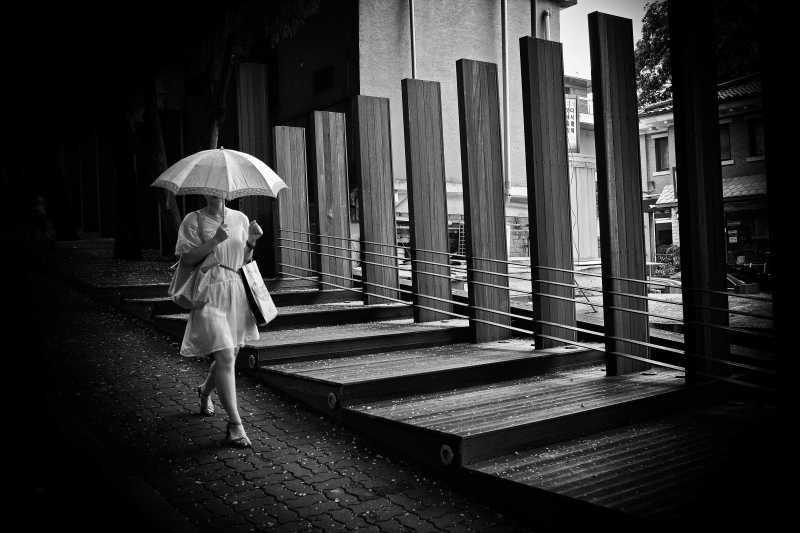


Seoul, 2009
Seoul, 2009

One of the biggest regrets I often have in my photography is not clicking the shutter.
For example, I might see a good scene, but I might hesitate. I let fear get the best of me.
For example, I get worried if the subject might get angry at me. I get worried if the photo I am taking is a “cliche” photo. I worry about my technical settings, focusing, and the light.
However my suggestion is whenever your heart tells you, “Take that photograph!” — listen to that voice.
Don’t let your brain and rational mind dictate your shooting style. Let your gut, intuition, and emotions control your shooting process.

2. Be selective about what you decide to photograph; but once you find something good, shoot the heck out of it

1-la-sweat-contact
One of the biggest lessons I wish I knew if I started photography all over again is this — to be more selective about the scenes that I find interesting. But once I find a scene that is interesting, take as many photos of that scene as humanly possible.
For example, when I started photography, I took 1–2 photos of everything I saw in a day (around 300 photos). However often none of these photos were interesting.
However I recommend doing the opposite — only look for 1–2 interesting situations or scenes or “photo opportunities” in a day. Once you find that situation, then take 300 photos of each of those scenes/situations.
Why is this a better tactic?
In photography, it is rare that we find a good scene which makes us excited, and our hearts beat. Once that moment is gone, it is gone forever.
So once you find that scene that really speaks to your heart, “work the scene” and take as many photos of the scene as possible. That can be 3 photos, 5 photos, 10 photos, 30 photos, 50 photos, or even 300 photos.
The difference between beginner photographers and master photographers is this — the beginner photographer is satisfied with “good enough.” The master photographer seeks perfection.

3. Big cameras are overrated


Downtown LA, 2015
Downtown LA, 2015

One of the big myths in photography is that the bigger your camera, the more “professional” you are, and the better photos you will take.
I take the opposite approach — I say that big cameras are overrated, and small cameras are underrated.
I am a huge fan of small and compact cameras, because the smaller your camera, the more likely you are to take it with you everywhere you go, and the more likely you are to make photos.
In my personal photography journey, I started off with a small Canon digital point-and-shoot camera. It fit in my front pocket, and was easy for me to take it with me everywhere I went.
However as time went on, I wanted to make more “professional” photos that I saw online. I saw people shooting with photos with shallow depth-of-field (later figure out this was “bokeh”) and I was enamored. I invested all of my meager savings into buying a Canon 350D (Rebel XT), and soon got suckered into buying a “full-frame” camera (Canon 5D) or else I wouldn’t be taken as a “serious” photographer by others.
The problem was as I acquired more gear, the bigger my camera got (and the lighter my wallet got). And the bigger my camera became, the less likely I was to carry it with me everywhere I went.
I used to carry my point-and-shoot camera with me constantly in my front pocket, and and it brought me so much joy — because I was making photos constantly. Once my camera got too big, it started to collect dust on my shelf. I would never take it with me, because it was too much of a bother.
If anything, the ideal camera to shoot with is a smartphone. Why? It is small, invisible, and always with you. Sure the image quality isn’t as good as a high-end digital camera, but I feel the trade-off is worth it.
If anything, photographers focus too much on the quality of a photograph in terms of sharpness. They never focus on the quality of a photograph in terms of emotion and composition.
So when in doubt when buying a new camera remember: the smaller the better.

4. Don’t “take” photos, “make” photos


Paris, 2015
Paris, 2015

Probably the biggest breakthrough I made in my photography is when I learned the difference between America and Europe — Americans usually say “take” photos, while Europeans tend to say “make” photos.
What is the difference?
For me, “taking” a photo implies you are stealing something from someone. It sounds forceful, aggressive, and unfriendly.
Whereas “making” a photo implies you are collaborating with your subject, that you are making art, and you are doing something altruistic.
Even as a tip, whenever I approach strangers that I want to photograph, I will ask them, “Excuse me sir, do you mind if I made your photograph?” (instead of asking them to “take” their photograph).
Generally this question gets a lot better response. Why? Because it implies that I want to work with my subject to make something artful.
A small change in terminology can drastically change how you approach photography, creativity, and collaboration as a photographer.

5. Focus less on technical settings; focus more on composition and framing


Provincetown, 2015
Provincetown, 2015

One of the regrets I have in my photography is worrying too much about technical settings, trying to master “manual” mode, and trying to brag how all my photos were shot fully-manual.
I do believe that having some technical knowledge of photography is important— it can help you make the photos that you want to make.
However knowing technical settings for the sake of knowing it is a bit of a waste of time. Furthermore, if you can use an easier camera setting that creates the photos you desire, go for the easier route.
If you have an exhibition, nobody will care whether your photo was shot fully-manual or in a more automatic mode. What matters more than technical settings is emotion, soul, and creativity.

6. “Set it and forget it”


Santa Monica, 2009
Santa Monica, 2009

I’m a big fan of using “P” (program) mode in photography.
Why?
99% of the time when I am shooting in “P” mode, I get the photos I want.
To take it a step further, I try to simplify my technical settings as much as possible in my camera. For my ISO I set it relatively high (ISO 800–1600) which prevents me from getting blurry photos. As for autofocus, I just use the center point, which tends to be the quickest and most accurate.
While these aren’t the best settings for every situation, they work for 99% of the situations for me (especially when shooting street photography).
I think that the less you have to worry about your technical settings, the more mental energy you will have to focus on composition, framing, and capturing emotions in your photographs.
Furthermore, if your camera can make your life a little easier— why don’t you let it? Insisting on shooting fully-manual for the sake of it on your camera is like insisting only on sending handwritten letters (and never using email).
So once again, with technical settings— think of the classic American Rotisserie Chicken commercial: “Set it and forget it.”

7. What you subtract from a frame is more important than what you add to a frame


Tokyo, 2012
Tokyo, 2012

Having a good composition in photography is more about what you decide to subtractfrom the frame, rather than what you decide to add to the frame.
For example, many beginner photographers have the issue of making a photo that is too cluttered. Not only that, but they are generally too far away from their subject.
So instead of trying to add more information to your frame, seek to subtract distractions, noise, and superfluous elements.
If you are a beginner photographer, the best composition advice I can give is to start off with a simple background. Start off by looking for a white, grey, or neutral background if possible. Then add in your subject.
Furthermore, focus on framing by looking at the edges of your frame. If you have clean edges in the frame of your photograph, the less likely you are to have a poor composition. And the less likely you will need to crop a photograph.
So the next time you’re making a photograph, think to yourself: “Is this element in my frame adding or distracting to my image?” When in doubt, subtract from the frame.

8. The most important question to ask yourself in photography: “Why do I make photos?”


SF, 2016
SF, 2016

The common questions we are asked in photography include:
  • What camera do you shoot with?
  • What lens do you have?
  • What do you like to take photos of?
Very rarely do people ask us, “Why do you make photos?”
The why of photography is probably the most important question you will ask yourself.
To start off, ask yourself these questions:
  • Why did I first pick up a camera?
  • Why did I first start taking photos?
  • Why does photography bring me joy?
By answering these questions, you will better discover who you are as a photographer and human being.
One of the lessons I’ve also learned in photography is that the point of photography isn’t to become a great photographer. The point of photography is to enjoy your life.
Photography should be a tool which enriches your day-to-day life, and your living experiences. If photography becomes a chore or a burden to you, why do you make photos?
And once you figure out why you make photos, you will have a better insight in terms of what camera to shoot with, what to make photos of, and how to share your photos.

9. Buy books, not gear


Kyoto, 2015
Kyoto, 2015

I’ve spent thousands of dollars on camera equipment over the years. I regret about 90% of my purchases.
However I’ve also spent thousands of dollars of photography books over the years. I regret 0% of my purchases.
Any camera you buy today will be redundant or outdated in about 5–10 years.
Any photography book you buy today will probably still be relevant 5–10 years from now. If anything, many of your photography books (if you buy art books) will increasein value.
The mistake I made in photography is that I thought my photos weren’t good enough because my camera wasn’t expensive enough. I thought if I bought this new camera, this new lens, this new tripod, or whatever— I would suddenly become more “creative” and “inspired” in my photography.
The effect lasts a week, then you are back to square 1.
The only lasting effect to improve my photography was to invest in photography books — especially photography books from the masters of photography.
Think about it— a master photographer will probably spend his/her entire working life (30–50 years) to create a body of work. And that photographer will invest thousands of dollars to produce this book, market the book, and share it with others.
A photography book is a well-curated, well-considered, and well-edited collection of images. In today’s social media society, we are drowning in cat photos and selfies by sunsets. The more time we spend on social media, the more we are eating “visual junk food.”
You are what you eat. Therefore if you look at great photography (especially in the form of photography books), you will aspire to make great images. You will learn what makes a great photograph, what great composition is, and how to make a body of work that lasts through the years and decades.
Don’t get me wrong, I am still suckered by G.A.S. (Gear Acquisition Syndrome). I still have moments where I doubt myself, and think by investing in a new camera system I will suddenly make better photos.
But in those situations when I have an urge to buy a new camera, I will spend $50 on a book instead. And that urge will go away, and I will be inspired to make greater photos.
Never forget, #buybooksnotgear

10. Photography workshops are a better “bang-for-the-buck” experience than attending photography schools


Provincetown, 2015
Provincetown, 2015

I have never been to photography school, but I have many friends that did. While they had a great experience, many of them are $200,000+ in debt.
Was it worth it? I don’t think so.
Honestly, all of the information you need about photography can be easily learned on the internet and YouTube. And if you want feedback and direction in your photography, it is much better to attend photography workshops or hire a photography tutor.
I attended a photography workshop by the Magnum photographers Constantine Manos and David Alan Harvey — and had nearly a decade-worth of photography knowledge from both of them in a week. I regret not taking one of their workshops earlier on when I started photography. I would have saved tons of time, money, and effort.

11. Aim to make 1 good photo a month, and 1 great photo a year


Portugal, 2015
Portugal, 2015

One of the biggest challenges I had in my photography starting off was how easily disappointed I was. I had the wrong idea that every time I went out, I had to make a great photograph.
However upon studying the work of the master photographers, I discovered that they rarely got good shots. The only difference between us and the master photographers is that they are more selective in terms of which photos to share (and which photos notto share).
Upon studying many master and contemporary photographers, most of them only admit to making 1 good photo a month, and 1 great photograph a year.
And think about it— if you can make 1 good photo a month, that is 12 good photos in a year. 12 photos is good enough for a nice little coffee shop exhibition, or website gallery.
If you make 12 good photos in a year, then in 3–4 years you can easily put together a photography book of 36–48 good images. You can either self-publish your work, or approach a publisher.
If you make 1 great photograph a year (depending on how old you are), you can aspire to at least make 5–10 great photos before you die.
I feel that if a photographer is even remembered for 1 photograph, he/she has done their job as a photographer.
And think about the master photographers from the past— very few photographers are remembered for more than 1 memorable shot.
So set your expectations low, but work hard. This way you will never be disappointed in your photography.

12. More megapixels, more problems


Prague, 2015
Prague, 2015

This goes back to the G.A.S. (Gear Acquisition Syndrome) point. We think our photos aren’t good enough, and we need better cameras with more megapixels, better sensors, etc.
However what I’ve discovered in my photography is this — more megapixels, more problems.
When you upgrade your camera, you often need to upgrade your lenses (let’s say if you’re going from a crop-sensor to a full-frame sensor). Not only that, but you will probably need to upgrade your computer (to handle the bigger megapixels of the files). And not only that, but you will probably need more hard drives or invest in more storage to house all your files.
Also consider— beyond a certain point (let’s say 8 megapixels) you don’t need any more. Unless you are a commercial, studio, or fashion photographer and plan on printing your photos as big as billboards.
An 8-megapixel photo is good enough for a quite big print (12×18 inches, or even 20×30 inches). And to be honest— 99% of our photos are just going to be shown on our mobile devices and computers. How many megapixels do you need to see an image on a 5–6’’ screen?
So nowadays, whenever I see cameras with more megapixels, I feel leery. I like to stick to cameras with fewer megapixels whenever possible.
Fewer megapixels = less stress = more time and energy to enjoy photography.
By Eric Kim

Sunday, October 21, 2018

7 SIMPLE photography TIPS I wish I knew EARLIER

HOW I LEARNED PHOTOGRAPHY - Tips & Advice For Beginners

11 Tips for Beginner Photographers

Tips-Beginner-Photographerssubmitted by CSS from www.heretocreate.com
As a new photographer, these are some of the ideas that have helped get me going. Update: Also check out our Digital Photography Tips for Beginners Page.

1. Don’t go crazy buying the most expensive equipment right away.

It’s possible to get very nice photos with an inexpensive point and shoot. See these examples on Flickr. The more photos you take, the more you’ll know about what kind of camera to get when it’s time to upgrade.

2. Consider a tripod.

On the other hand, an inexpensive tripod is worth getting, especially if you have shaky hands like mine. When I got a tripod, my satisfaction with my shots skyrocketed. For even more stability, use your camera’s timer function with a tripod (read our introduction to tripods).

3. Keep your camera with you all the time.

Photo ops often come when you least expect it. If you can keep your equipment relatively simple – just a small camera bag and a tripod – you might be able to take advantage of some of those unexpected opportunities. Or, if your phone has a camera, use it to take “notes” on scenes you’d like to return to with your regular camera.

4. Make a list of shots you’d like to get.

For those times you can’t carry your camera around, keep a small notebook to jot down places you’d like to come back and photograph. Make sure to note any important details, like the lighting, so you can come back at the same time of day or when the weather’s right. If you don’t want to carry a notebook, send yourself an email using your cell phone with Jott.com.

5. Don’t overlook mundane subjects for photography.

You might not see anything interesting to photograph in your living room or your backyard, but try looking at familiar surroundings with fresh eyes. You might catch an interesting trick of the light or find some unexpected wildflowers in your yard. Often a simple subject makes the best shot.

6. Enjoy the learning process.

The best part of having a hobby like photography is never running out of things to learn. Inspiration is all around you. Look at everything with the eyes of a photographer and you’ll see opportunities you never noticed before.

7. Take advantage of free resources to learn.

Browse through Flickr or websites like the GIMP a try.

8. Experiment with your camera’s settings.

Your point and shoot may be more flexible and powerful than you know. Read the manual for help deciphering all those little symbols. As you explore, try shooting your subjects with multiple settings to learn what effects you like. When you’re looking at your photos on a computer, you can check the EXIF data (usually in the file’s properties) to recall the settings you used.

9. Learn the basic rules.

The amount of information about photography online can be overwhelming. Start with a few articles on composition. Be open to what more experienced photographers have to say about technique. You have to know the rules before you can break them.

10. Take photos regularly.

Try to photograph something every day. If you can’t do that, make sure you take time to practice regularly, so you don’t forget what you’ve learned. An excellent way to motivate yourself is by doing the weekly assignments in the DPS Forum.

11. Don’t be afraid to experiment.

If you’re using a digital camera, the cost of errors is free. Go crazy – you might end up with something you like. You’ll certainly learn a lot in the process.

http://app.autoaffiliatemachine.com/pro/pdf/PhotographyJobs1539496451.pdf


Saturday, October 20, 2018

Depth of Field for Beginners

Ahh depth of field… aka DOF. This term strikes fear into the hearts of young aspiring photographers everywhere, both film and digital. They know it deals with optics and math - two things that most creative people are not really into. My first instinct is to say that depth of field is not that complicated… but then again I had to take an optics class in college which made me want to stab my eyes out with metal darkroom tongs… and then pour stop bath in them. I believe this class had a very deceptive name, along the lines of “Principles of Photography” or something like that. It was, in fact, all math. Ewww.

But as usual I digress, so let us get back to the task at hand - which is understanding the glorious principles of depth of field and how they apply to your film photography. Let me just say right now that I am about to do a basic overview “for dummies” style, so please do not write to me claiming that I did not explain such and such complicated principle. You can grab a copy of Ansel Adams’ “The Camera” for that. Here we go:

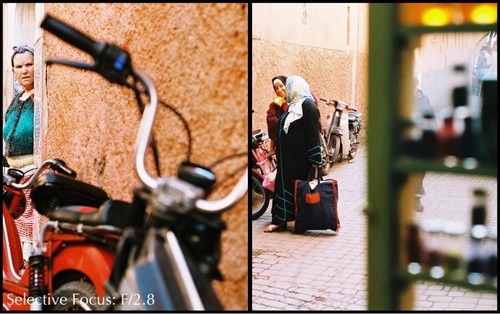
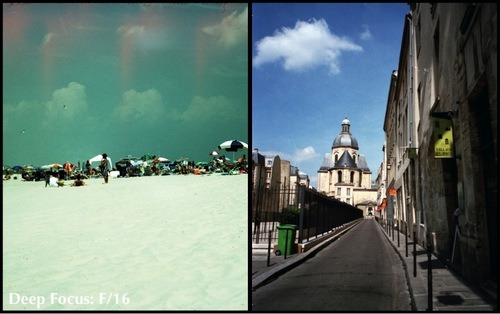
In über-simple laymen’s terms, depth of field refers to the part of your photograph that is in focus. If all or most of your photograph is in focus, you have a deep depth of field (also called deep focus.) If only a part of your photograph is in focus, you have a shallow depth of field (also called shallow focus and selective focus.) And that’s what depth of field is. Seriously.

The tricky part is figuring out how your aperture relates to your depth of field, and your beloved (or hated) exposure triangle. What is an exposure triangle, you say? You best be reading my Exposure 101, I answer. Several factors affect depth of field, including your distance to your subject, the focal length of your lens, your selected aperture (f-stop) and the format you are shooting. This means that a photo taken with a 50mm lens at f/1.8 from the same distance will not have the same depth of field when taken with a 35mm camera and 4x5 field camera.

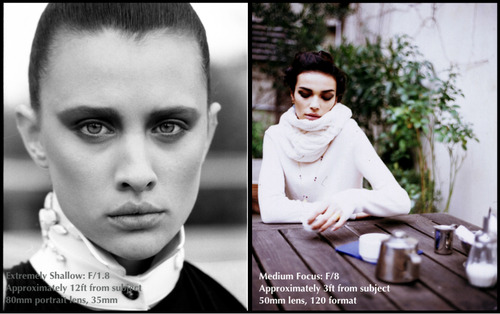
A general rule to guide you: the smaller the f/stop number (so the larger the opening), the shallower the depth of field. F/1.2 has a shallower depth of field than f/1.8, which has a shallower depth of field than f/2.8 and so on. F/5.6 and F/8 tend to give medium focus, depending on your distance from the subject (and the format you shoot, of course.) If this confuses you, have a look at What is aperture/f-stop?.
Side-by-side examples:
image
{Selective Focus: F/2.8 - This is pretty shallow, but not to the point where it creates a complete bokeh effect and the background is indistinguishable. Both of these were shot at F/2.8 with a 50mm lens in 35mm.}
image
{Deep Focus: F/16. -These two, on the other hand, have deep focus - meaning that the foreground and background are in focus. Both were shot at F/16, but the left image is medium format and the right is 35mm.}
image
{Shallow and medium side-by-side: The background in the left shot is completely blurry with zero detail. It was shot at f/1.8, approximately 12 feet from the subject with an 80mm portrait lens on 35mm film. The right shot has a blurry background, but you can still tell what it is. It was shot at f/8, approximately three feet from the subject with a 50mm lens on medium format film.}

F/32 is most commonly the highest number on lenses that don’t cost a bajillion dollars, but you can definitely come across field cameras with an f/64. In fact, in the early 1930s, a bunch of photographers (including Ansel Adams) got together to form Group F/64. Their principal belief was that photographs should be  perfectly exposed, profoundly sharp and completely in focus (in contrast to the Pictorialist era, for the History of Photo buffs.) An aperture of f/64 was the best way to achieve this, as far as they were concerned.

Some of you may be saying, “Hey, but f/32 really doesn’t let a lot of light in….” No, it doesn’t. This is where mastering your exposure knowledge truly helps you create the photograph you want. If you absolutely have to shoot 100 ISO and need a very deep DOF, you’ll have to lower your shutter speed. If you want to use a specific shutter speed at f/32, you’ll have to pick a film with a high enough ISO.  For those who shoot digital, this doesn’t prove as much of a constraint, considering you can change the ISO. For my beloved kittens who shoot film, your ISO is your ISO and you can’t change it. Even if you decide to push or pull to fit the situation, you still have to shoot at that ISO for the entire roll. For more on that, please check out  What is ISO? in the Beginner’s Guide to Film Photography.
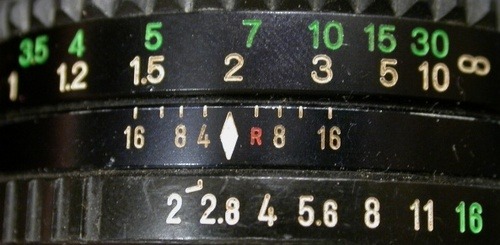
All of this information can seem confusing, but your lens actually tells you the depth of field if you really look at it:
image
See how it’s on F/2.8? And there’s a little white diamond on the middle ring? And more numbers on the third ring? Voila your DOF indicators. We can understand that the manufacturer says that this lens at F/2.8 has a DOF range of 1.5 to 2 meters, or 5 to 7 feet. Meaning that anything in between that range will be in focus. The manufacterer is most often, but not always, right. (Side Note: Mastery of using these numbers to focus without looking is known as “Zone Focusing” in fancy photographer talk.)
Many SLR film cameras have a depth of field preview button; it’s usually located on the front near the button to release the lens or the self-timer. When you hold the depth of field preview button and look through the viewfinder, you’ll notice it is significantly darker but accurately displays your complete depth of field. For a great explanation of this button, check out Ken Rockwell’s The Depth of Field Preview Button.
Let’s sum up the major points:
  • Depth of field refers to the areas of the photograph in focus.
  • Small f-stop numbers produce shallow depth of field, or selective focus. This is when the background is blurry. Great for portraits.
  • Medium f-stop numbers produce a medium depth of field, still with selective focus, but with significantly more definition in the out-of-focus areas. Good for portraits and specific landscapes. 
  • Large f-stop numbers produce a deep depth of field, meaning the foreground and background are in focus. Ideal for landscapes.
If you want to get more in depth on depth of field (sorry, couldn’t resist), I highly recommend Understanding Depth of Field in Photography from Cambridge in Color. They’ve got loads of fancy diagrams to confuse you ;)

                                                                                                                           istillshootfilm.org

Wednesday, October 17, 2018

Studio In A Small Space; Big Studio Effect Without The Cost


Much of my portrait and fashion photography is done on location, but living in a place like Colorado the models (and the photographer, too) just aren’t always in the mood to stomp around in the cold weather and snow. That’s when a studio comes in handy. Some photographers just prefer having complete control over the lighting. Instead of the hassle and cost of renting a studio, why not create one using a room you already have? The real secret, if there is any, of making portraits in limited spaces is having the right equipment with gear that doesn’t have to be expensive.


© 2008, Joe Farace, All Rights Reserved
© 2004, Joe Farace, All Rights Reserved
Space: A Final Frontier In Lighting, Too
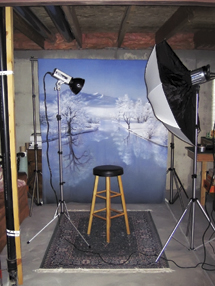
The first thing you need for an in-home (or in-apartment) studio is space. You don’t need much, but more is always better than less. You can put a studio in a basement, if you have one, garage, spare bedroom, or just use the living room, as Mary and I did when we were getting started many years ago. Back then, we set up the lighting equipment and background for each shoot and then had to knock it down and pack it away afterward. That’s not the best way to shoot but it worked because in creating a studio from existing space you need to be both inventive and flexible. Some of the images accompanying this article were made in my basement using an 8x9-foot space sandwiched between my model train layout at (what would be) camera right and an old sofa on the left. In the illustration showing my original setup (top, left), you’ll even see a water drainpipe on the left edge of the frame.

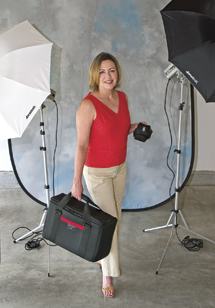
No matter where and what kind of space you use, some compromises are inevitable. Using the basement the way I do now means the gear can remain set up from shoot to shoot, saving time, but it also means I have to deal with low ceilings. Shooting in the garage (photo top, right), which I’ve also done, offers high ceilings, providing more flexibility in lighting setups, especially the ability to use booms and hairlights, but that is not a viable option for me because of the local weather in the winter. In more temperate climates, this could be an ideal solution, if your cars don’t mind being put outside. (You can see some of my garage shots in “Quantum’s Leap,” December 2004 issue of Shutterbug or online at: www.shutterbug.com.)

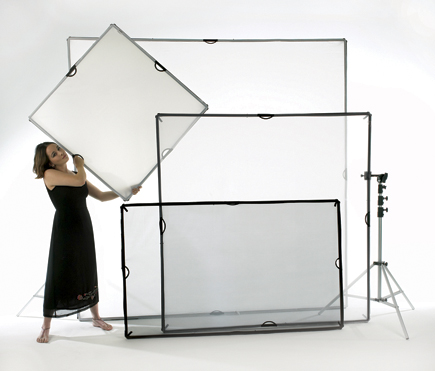
Another ceiling-related issue is its color. In my basement studio, I have joists and subfloor above the subject that creates a light trap, avoiding reflecting any unwanted light falling on the subjects. Some photographers who have finished drywall ceilings in their studios paint them black to avoid reflections, but that may not be a permanent solution if you occasionally have to convert that space back for living. In that case, you might consider using Westcott’s (www.fjwestcott.com) Scrim Jim (see the “What’s a Scrim Jim?” sidebar) covered in Black Block fabric and strategically placed to avoid unwanted reflections that would ordinarily be caused by a light-colored ceiling.

This year, I decided that I wanted to shoot full-length shots and the answer was to clean up some of the junk on the opposite side of my basement from my original studio and pose the models in the space where I used to stand. This produced a clear space of 10x10 ft. Not a huge increase in space but bigger than my first try and one that will have to work for a long, long time. I am using that space to test lighting products for Shutterbug as well as shooting glamour photographs for my 2010 book on the subject from Amherst Media. Full-length poses require wider-angle lenses than I might prefer or would have used outdoors, but when working in smaller spaces, as I said, compromises are required.

Tip: Making wider-angle lenses work requires more close attention to camera height and sometimes I find sitting in a chair to photograph the model works best. You can use whatever contortionist trick works for you as long as you are not shooting down on your subject with a wider-angle lens. If you do, it will create unflattering foreshortened and distorted portraits with disproportionate head sizes.

Putting It All Together
Here’s a list of all of the gear I’m currently using for portrait sessions in my 10x10-foot basement studio:
Lighting
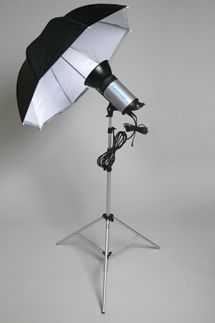
In my basic setup, lighting is provided by three monolights. The main light is a Flashpoint II 620A (www.adorama.com) monolight that produces 300 ws output. It has continuously variable power that lets me tweak exposure by adjusting the flash power instead of my camera’s aperture so I can control depth of field. Fill light is another Flashpoint II 620A that produces 150 ws that also features stepless power output control from Full down to 1⁄8 power. A Flashpoint II 320A monolight is used as a hair or background light. If you’re just getting started, Flashpoint offers a lighting kit that includes a 320A monolight, umbrella, and stand for only $129.95.
Light Modifiers
Umbrellas and light banks can have a big effect on the quality of the light produced in your temporary studio. For the later portrait sessions shown in my 10x10 studio, my main light was fitted with a Plume Ltd. (www.plumeltd.com) Wafer light bank whose slim profile makes it practical for use in small spaces and on location, yet produces amazing light quality in a compact package. Plume does not make a speed ring to attach the Wafer to the Adorama monolights, but does for many other brands. The one I use was custom made by sawing off the mount of a Flashpoint II’s reflector and adapting a Photogenic speed ring. I use a 45” Westcott Optical White Satin Umbrella for fill and an inexpensive Flashpoint II Snoot ($39.95) on the hairlight.
Light Stands
One old studio rule of thumb is that you can never have too many light stands. Most of the heavy lifting in my 10x10 basement studio is done with two Flashpoint Heavy Duty Pro 10-foot ($54.95) and two Flashpoint Heavy Duty Pro 9-foot Air Cushioned light stands ($49.95). I have probably another half-dozen stands that I use to hold reflectors and scrims but the Flashpoint stands are my workhorses because of their rugged construction—even though I can rarely extend any of these stands to their full height because of the low basement ceiling.
Backgrounds And Stands
I use Adorama’s affordable Belle Drape backdrops. For a background stand that perfectly complements Belle Drape muslins, JTL’s (www.jtlcorp.com) $139.95 B-1012 stand is perfect. It expands to 12.6 ft wide using the four extension poles provided. For the 70” wide scenic background shown in the setup photograph, only two of the support sections were required. When I set up a 10x12 or 10x24 Belle Drape, I use three or four sections.
Digital Darkroom To The Rescue
Many problems of shooting full-length poses in my basement studio were partially solved when I cleaned and flipped my basement studio space, but not all of them. While muslin backgrounds can be softly shaped to fit the available space, seamless paper backdrops firmly resist such treatment, so while a 53” paper background fits my space, the 107” version won’t. I could shoot on the narrow background but the images would have to be rescued later in the digital darkroom. So, here’s what I did:

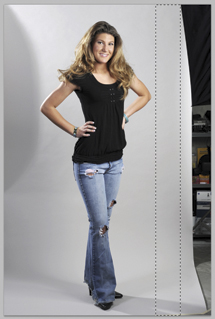
Step 1: I photographed Haley standing in front of a Savage Soft Gray seamless paper background using three of Adorama’s Flashpoint II monolights. Because of her full-length pose and the narrow 53” seamless paper, I was unable to capture a full background in the same frame as the model.


1
Photos © 2008, Joe Farace, All Rights Reserved

Read more at https://www.shutterbug.com/content/studio-small-space-big-studio-effect-without-cost#iyCG5XuJHbPi1igs.99


Studio In A Small Space; Big Studio Effect Without The Cost Page 2


Step 2: I used Photoshop’s rectangular Selection tool to select an area between the left edge of the seamless paper and Haley’s elbow. Then, using Photoshop CS4’s Content-Aware Scaling feature (Edit>Content-Aware Scale), I dragged one of the selection “handles” until the original frame was filled with gray background. I clicked Enter and was finished with this part of the background.

2
Photo © 2008, Joe Farace, All Rights Reserved
Tip: If you have an older version of Photoshop that lacks Content-Aware Scaling, select and drag one of the handles and it will work with a solid color background like this one, but forget using it with anything more complex.

Step 3: Next I used the rectangular Selection tool to select an area between the right edge of the seamless paper and Haley’s other elbow. Then, using the same technique as the left-hand edge of the seamless background, I used Content-Aware Scaling (Edit>Content-Aware Scale) to drag one of its “handles” until the frame was filled with gray background.

3
Photo © 2008, Joe Farace, All Rights Reserved
Building a studio of your own using a small space begins with an attitude that says you can do it! All of the tips, tools, and techniques that I have shown here are just the beginning. Use them as a springboard and expand these concepts to fit your space, your gear, and your imagination. It all begins with clearing space for your in-home studio today!

4
© 2008, Joe Farace, All Rights Reserved

What’s A “Scrim Jim”?
image: https://www.shutterbug.com/images/archivesart/1009studio03.jpg
Westcott’s Scrim Jim is a strong, collapsible diffusion and reflector system made up of a series of frames, diffusion and reflector fabric, and grip accessories that make the system work the way you want, especially important when creating a temporary or permanent home studio. The square-sectioned frames are made of lightweight aircraft aluminum that look heavier than they are and are easy to assemble using the built-in connector. Their modular construction allows you to create four easy-to-handle frame sizes: 42x42, 42x72, 72x72, and the super-sized 96x96. The modular design allows for easy portability as well as quick set up and knock down. The high-quality fabrics have hook-and-loop tape sewn around their perimeter that produce an even, snug, and secure fit to the frame.
image: https://www.shutterbug.com/sites/all/themes/hometech/images/s.gif

Read more at https://www.shutterbug.com/content/studio-small-space-big-studio-effect-without-cost-page-2#SX1Q4wxZslZETAsH.99

Tuesday, October 16, 2018

http://app.autoaffiliatemachine.com/pro/pdf/PhotographyJobs1539496451.pdf

Water

Water can be a deep subject. But seriously, it’s photographically fascinating. It takes on so many different forms, you could build an entire portfolio around it. For that reason, water is an ideal subject for improving your technical skills. Master the art of photographing water, and you’ll be drawing on core concepts, including shutter speeds and apertures, reflections and lighting, and composition and scale.
The essential question is whether you want the water to be crisp and sharp, freezing its motion, or if you’re going for a dreamy, soft blurred effect. As shutter speed is the critical setting in either case, we recommend shooting in manual or shutter (time value) priority mode.

Stopping Water

The opening photograph is a great example of when you want to stop water in motion. You need to use a relatively fast shutter speed. A safe bet is 1/500th of a second or faster. That may mean you need to open up to a large aperture, decreasing your depth of field, so pay special attention to your focus.

Blurring Water

A favorite effect for waterfalls, streams and shorelines, the creamy, ethereal look of blurred water motion can add a softness that makes a nice contrast to sharper elements in the frame. For this effect, you need shutter speeds of one second or longer, so don’t forget your tripod—even the best stabilized lenses can’t help you here. If you’re trying to do this in bright conditions, you may not be able to select an aperture small enough for the very slow shutter speed you need. That’s where a neutral- density (ND) filter can help you reduce the amount of light coming into the lens, allowing for a longer exposure. ND filters are available in several densities. Try a two-stop filter for starters; if you plan to use this effect often, you may want to have a selection of ND filters at different densities on hand.

Bracket Your Exposures

Bracketing exposures is smart, especially when you’re experimenting with your technique. Start with the shutter speeds we’ve recommended, but take several additional shots, using slower and faster shutter speeds to greatly increase your chances of getting the effect you want. Use the outtakes as a learning tool: compare shots to see what worked and what didn’t.

Shoot The Moon: Night Photography Tips

When the sun sets and the rest of the photographers pack up for the night, you can get some of the most stunning and unique images
Yosemite National Park - night photography tips
Rising full moon. Bridalveil Fall, Yosemite National Park, Calif. Canon EOS-1Ds Mark III set at ISO 200. Hart used a 2.5-sec. exposure at Æ’/11 and a 3-stop grad ND filter to create the image.

night photography tips
Moonbow and Big Dipper, Lower Yosemite Fall, Yosemite National Park, Calif. Canon EOS-1Ds Mark III set at ISO 800, 30 sec. exposure at Æ’/4. Keeping the exposure to 30 seconds or less prevents the stars from becoming streaks.
I started “shooting the moon” in a quest for unique photos, and while I’m certainly happy with my results, I’ve discovered that the actual experience of moon and moonlight photography is just as rewarding as the images I bring home. When the sun departs, so do the photographers and other reminders of a more hectic world—in their void, I can explore landscapes freely, set up my tripod wherever I want and simply relish the solitary wait for moonlight in some of nature’s most special locations.

Gear Up

Darkness, cold weather, night breezes and unfamiliar terrain all conspire to magnify the shortcomings of even the most robust photography equipment. Before embarking on a nighttime shoot, make sure you have the right equipment, it’s in good working order, and you know it well enough to operate it in the dark.
With exposures measured in seconds or minutes, of foremost importance is your tripod. If you don’t have a rock-solid tripod, buy one, rent one or borrow one. Tripod leg warmers and/or carbon-fiber legs will improve both your comfort and dexterity on cold nights in the field. If the wind picks up, adding weight to your tripod will help stabilize it—I attach my camera bag to the hook at the bottom of the center post, but a plastic grocery bag filled with dirt or rocks will do the job, too.
A remote release (wired or wireless) is a small investment that will further minimize vibration, and a locking remote is essential if you plan to shoot in Bulb mode. If your camera has mirror lockup, use it. Depending on your shutter speed and focal length, it may not make a difference, but anything that reduces vibration never hurts. In low-light focusing situations (more on this later), a good quick-release mechanism is helpful.
Batteries don’t perform as well when cold. Make sure your battery is fully charged; in extremely low temperatures, a backup battery is good peace of mind. Store any battery not in your camera close to your body to keep it warm. A photo vest makes this easier. I also appreciate my photo vest because having my lenses within arm’s reach sure beats tracking down and rummaging through my camera bag in the dark.

night photography tips
Rising full moon from Sentinel Dome, Yosemite National Park. Canon EOS-1Ds Mark II set at ISO 100 with a 1/2 sec. exposure at Æ’/14.
Keeping Warm
I never want the temperature to cause me to rush or to drive me for shelter when I’d otherwise be shooting. Since I prefer being far too warm to just a little too cold, I always dress for the projected overnight low for the area I’ll be shooting. This is most important for sunrise shoots, as the lowest temperature is usually right around sunrise.
On particularly cold nights and mornings, I wear a thin pair of wind-resistant gloves under a thick pair of warm, fingerless gloves. This keeps my hands warm while retaining enough feel to manage my camera’s buttons and dials. A wool hat that covers my ears is another important part of my nighttime wardrobe. Hat and gloves all fit nicely in the pocket of my down jacket or vest if I get too warm.
Do Your Homework
There are only a handful of days each month when the moon’s phase and position are ideal for photography. Because the moon’s arrival, departure and location change significantly each night, it’s important to anticipate, not react. If you see the moon on your way home from work and think, wow, I’ll have to get out tomorrow night to shoot that, you’re too late.
Many resources are available to help you determine the moon’s phase and position. Most GPS devices provide this information, as do many websites. One site with all the phase and position info I need is www.usno.navy.mil/USNO/astronomical-applications. Applying this site’s lunar altitude and azimuth information to my National Geographic Topo software (other map applications will do the same thing), I can calculate exactly when and where the moon will rise and set from any location on earth. Don’t forget that moonrise/set and sunrise/set times are based on a flat horizon—you’ll need to account for anything (mountains, trees, buildings) between you and the horizon.
If these kinds of computations sound daunting, don’t despair—simply knowing moonrise and moonset relative to sunrise and sunset, and the general direction (east or west) is enough to get started. And many iPhone apps offer astronomical data.
Focalware gives me all the information I need to instantly (albeit approximately) locate the moon from wherever I am. Regardless of the approach you take, the more you do it, the better you’ll become at finding the moon when and where you want it.

Photographing A Full Moon

A full moon is directly opposite the sun, with the earth in between, rising in the east as the sun sets in the west. But I like to capture detail in both moon and foreground—a sun that sets as the moon rises rarely leaves enough light to capture foreground detail without overexposing the moon. The best time to photograph detail in the lunar disk is when the sun and moon are both low on the horizon and the moon is nearly full—easy if you know how.
As the moon cycles through its phases, it rises and sets roughly one hour later each night. That means the day before a full moon, when the moon is more than 95% full, it rises in the east shortly before sunset. That extra hour or so provides ample time to photograph a nearly full moon suspended in the east above a landscape glowing with warm, late light.
Similar reasoning applies when the scene you want to photograph requires the moon’s disk in the western sky. Since the moon sets an hour (or so) later each day, you can count on a nearly full moon on the western horizon a little after sunrise the day following a full moon.
Exposing to balance detail in the foreground against detail in the full moon’s disk is sometimes difficult. Trial and error will help you find the brightest exposure that doesn’t overexpose the moon. I have blinking highlights turned on in my digital camera, but have to look very close to see them in the moon.
Shooting RAW, I’m comfortable exposing up to a stop beyond the point where the highlights start to blink, then recovering the highlights in postprocessing. Sometimes I process the RAW image twice—once for the foreground and once for the moon—then blend them in Photoshop. Since it’s the same image, I never need to worry about everything lining up.

night photography tips
Rising moon, South Tufa, Mono Lake, Calif. Canon EOS-1Ds Mark III set at ISO 100 with a 1/2 sec. exposure at Æ’/16.
Photographing A Crescent Moon
A new moon occurs when the moon is between the earth and the sun, meaning its illuminated side faces the sun and away from the earth, making it not visible from earth. But since the moon arrives and exits about an hour later each day, adding or subtracting a thin slice of detail with each passing, you’ll find its crescent near the amber-to-indigo transition zone between day and night one or two days before and after the new moon. The day before it’s new, the moon’s thin crescent hangs low in the east just before sunrise; the day after it’s new, you’ll see a similar crescent in the western sky right after sunset.
I’ve also had good success at sunrise two days before the new moon, and at sunset two days after the new moon. That extra day gives the crescent just a little more body and provides separation between the moon and the sun, keeping the moon’s crescent from being overpowered by sunlight.
On nights I plan to shoot a crescent in the western sky, I arrive early enough to photograph sunset. Once the sun is down, I start searching for the moon’s crescent in the darkening portion of the western sky. For a crescent in the east, I try to be in place an hour before sunrise and continue shooting through sunrise, long after the moon is washed out by the brightening sky.

Finding The Scene

Whether I’m after a delicate crescent or a robust full moon, I try to scout locations and plan compositions in advance. Looking for scenes that would be enhanced by a full or crescent moon has become second nature, not just on my photo trips, but in my everyday travels, as well. Recognizable landmarks, prominent features like trees, city skylines, lakes and oceans, or rivers and streams that flow in the direction of the rising or setting moon, make excellent subjects.
An extreme telephoto lens can beautifully silhouette a distant ridgetop tree against the moon’s brilliant disk, but a common misconception is that photographing the moon requires maximum magnification. Many of my most successful moon images, full and crescent, are wide, using the moon as an accent to turn an already striking scene into something special.
Photographing a crescent moon means shooting toward the brightest part of the sky, making exposure difficult. It’s the moon’s shape, not its features, that make a successful crescent image, so an overexposed crescent doesn’t bother me. And crescent moons are made for silhouette images. Look for a prominent shape—a tree or mountain, for example—that stands out against the sky. Water’s ability to reflect the sky’s light and color makes it another ideal foreground subject.
Shooting In Moonlight
On nights I photograph a rising full moon, I usually plan to stay out and photograph in moonlight. When the sun finally leaves and the stars appear, I turn my camera away from the full moon and start photographing the moonlit landscape. In most of my moonlight shots, the moon is at my back because it’s important that my subject be frontlit. Keeping my exposure times at 30 seconds or below minimizes star movement (I prefer waiting for moonless nights to photograph star trails), especially if I’m using a fairly wide lens.
The moon’s brightness varies each month, but rather than rely on my meter and histogram for exposure settings, experience has given me an exposure starting point that gets me within one stop on the first shot. I typically start at ISO 400 at Æ’/4 for 30 seconds (don’t forget to remove your polarizer!). A glance at my LCD—not my histogram—usually tells me whether I need to dial it up or down a stop.

Many moonlight shots look like daylight photos with stars. That’s partly because they’re too bright and partly because auto white balance doesn’t understand moonlight. My moonlight histogram is always skewed left and is rarely much use to me. And shooting RAW allows me to adjust the Photoshop WB slider until I find the best color temperature. Generally, shifting the color temperature slider to the left, below 4,000, restores the blue tint that gives the scene a nighttime feel.
As with daytime photography, moonlight images benefit from a strong foreground. But foreground for moonlight shooting is relative—with the limited depth of field of a large aperture, my foreground subjects are generally at infinity and large (no intricate foreground detail in moonlight). Reflective subjects like water or granite work best. Silhouetting trees or other prominent objects against the night sky is also effective. And adding a recognizable constellation to a moonlight image is a great way to make it memorable. The Big Dipper, Cassiopeia and Orion all make wonderful overhead complements for a moonlit earthbound subject.
Another thrilling moonlight element is a “moonbow,” the moonlight version of a rainbow. Unlike the human eye, a camera’s timed exposure capability allows it to accumulate light, revealing the rainbow prism the eye can’t see. To capture a moonbow, position yourself in view of a waterfall when a full moon is low in the sky, with your moon-shadow pointing directly at the waterfall’s mist. Start with exposure settings I suggested earlier and increase until you see the moonbow in your LCD.
Get Focused
Conventional focusing using moonlight ranges from difficult to nearly impossible. There’s rarely enough light for autofocus, and manually focusing is often guesswork. Fortunately, most moonlight scenes are at distances that allow focus at infinity. Infinity focus isn’t as easy as it sounds when the infinity point of your zoom lens changes with the focal length, but it enables a simple focus trick: Compose your shot on a tripod, and without changing the focal length, remove the camera from the tripod (an easy quick-release plate helps here), and autofocus on the moon. When focus is locked, change to manual focus, return the camera to the tripod, and take your shot.
Just Do It
Compared to a typical photography outing, shooting the moon adds a few wrinkles, but with a little research, patience and a capacity for minor discomfort, you can enjoy solitude in even the most photographed locations. Preparation and the right equipment will allow you to enhance any scene with a radiant lunar disk or crescent, or turn a photo that would be cliché by day into a star-studded moonlit landscape. Whether or not you get perfect results, you’ll certainly have a memorable outing and probably return home with lots of ideas for the next time.
night photography tipsFinding Your Way
Unless you stay out until sunrise, you’ll be walking back in the dark. Don’t think simply hiking to your destination by daylight will be enough to enable you to find your way back safely in darkness. Any route looks entirely different in reverse, a problem magnified by darkness, making a simple route by day a maze of shadows at night.
Stay alert on the way to your destination, noting prominent landmarks such as large trees, rocks or anything else that might stand out in the dark. If you know how to use it, a GPS can be a real help, but don’t purchase your GPS in the afternoon and expect to be able to navigate with it in the dark that night. Whenever possible, I try to walk the route to my moonlight location, and back, in advance.
Full-moon light is bright enough that sometimes I don’t need artificial light, but if I’m hiking through a forest, or the moon goes behind clouds or a mountain, too much light is better than not enough. I carry a small (but bright) flashlight and headlamp. I don the headlamp when it gets too dark to view the controls on my camera or locate items in my bag. The flashlight is for the walk back to the car, which when combined with the headlamp, allows me to view the ground at my feet and the trail ahead.
See more of Gary Hart’s work and learn how to enroll in one of his workshops at www.eloquentimages.com.

Monday, October 15, 2018

DIY – High Speed Photography at Home

 by  
high_speed_photography_glass
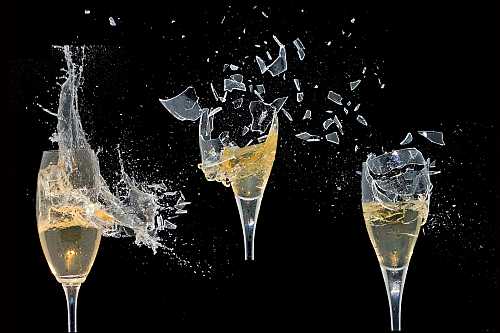
How to take photos like the one you are seeing here. It’s a glass of Champaign, being shot with a BB gun. You can use this technique to take picture of exploding things like tomatoes, watter balloons, watermelons, or even you Canon camera as you smash it against a wall for not understanding the menus (Sorry, could not resist…)
Freezing fast motion (AKA High Speed Photography), can give some pretty special photographic effects. High Speed Photography is used in physics, health research, sports and more. This guide describes how to capture super fast movements using ordinary camera gear and a little home made electronics. I will describes the setup I used the problems I encountered and what I did to solve or work around them.
Here is a nice example of High Speed Photography:
Capturing a balloon just as it punctures
high_speed_photography_balloon
Nuking an apple
high speed photography apple
Capturing such images introduces a lot of challenges. How does one handle timing with exposures times
faster than 1/6000 second!?
We have to handle shutter lag, synchronize the flash and time the exposure to just the right moment.
But the shutter lag of any normal camera is so long that it will be all most impossible to time the exposures. And how do you synchronize the flash with an exposure time of less than 1/6000 second?
To work around the problems with shutter lag and flash synchronization, the exposure is done in a completely dark room. This way the shutter can opened without actually getting an exposure. The exposure time set on the camera just has to be long enough for the action to happen while the shutter is still open. Because the room is dark, the long exposure time will not have any effect on the final output (this is because no light enters the lens to hit the sensor / film)
To actually get an “exposure”, a flash is fired. The flash light duration will now become the actual
exposure time.
SO now we need to see how long does it takes the flash to fire. It turns out that the output power of the flash, actually affects the duration of the light, so to get exposure times. If you need exposure faster than 1/6000 seconds, the output needs to be reduced. For more information on the light duration please see the test I ran on my Sigma EF-500 flash.
Now we only need to synchronize the flash with the action we want to capture.
This can be done in several ways. For example synchronizing with a balloon puncture, can be done via sound. Impact-actions, like a BB Soft air gun pellets, can be triggered with a mechanical switch, like in the picture below. When the pellet hits the cd-cover it’s pushed on to the switch, which then triggers the flash.
high_speed_photography_impact
Here is my High Speed Photography setup and work flow (Balloon Shot).
The Gear:
  • Balloon (OK – we are going to nuke this one, so don’t use your favorite)
  • Digicam
  • Tripod
  • Sigma Flash
  • Home made sound trigger (more info). If you do not have an optical slave you can use the Universal Sound Slave Circuit
  • Needle (or BB-gun, see below)
  • Backdrop (I use a black Bristol sheet)
The Setup
First step is to set-up the scene. The black Bristol sheet is used as backdrop. The balloon, flash, microphone
and camera are placed like in to image below
high_speed_photography_setup.gif
Gear settings:
  • Flash: optical slave and 1/16 output power.
  • Camera: Exposure time: 1-2 sec. ISO 100-200 Aperture F 11-16 manual focus.
  • Microphone: The distance between the balloon and microphone, is used for synchronization. 50-70cm is good for balloon punctures 🙂
Next step is framing and focusing:
While trying to stay within the best performance on the lens, I either zoom or move the tripod, until I have the desired framing. Focus can be obtained either automatic or manual, but do remember to switch to manual to lock focus, otherwise the camera will try to focus when the lights are switched off.
Now it’s time to test the setup and lightning. All lights are switched off and the shutter is set to bulb.
To fire the flash I just clap my hands. Then I review the image on the camera, checking for exposure, framing, focus and DOF.
To get the correct amount of light / exposure, one can Increase or decrease:
– the strobe distance to the balloon
– the output power of the flash
– the aperture on the camera
– ISO sensitivity on the camera
Taking the shot (pan intended :))
The test is repeated until satisfactory result have been reached, and the real photo can be taken. This is done the same way as when testing, but instead of clapping, the balloon is punctured with a needle.
One could also just fill the balloon with water and shoot it with a BB Soft air gun 🙂
high_speed_photography_bb-gun
This article was contributed by Karsten Stroemvig (aka Lullaby), see his other great high speed photograph projects