What chemical is used to develop film?
Jim Mowreader
Since I spent many happy years in total darkness as a professional developing and printing all my own black and white, I can address the question from a monochrome standpoint.
Most black and white (monochrome) developing solutions are what old timers call "M-Q" developers.The M stands for Metol (monomethyl-p-aminophenol hemisulfate), and the Q is short for hydroquinone, or just Quinone, a type of phenol. These two are often used in various combinations to formulate many common monochrome developers for either film or paper. Metol and hydroquinone in aqueous solution have the property of reducing sensitized silver halides (salts of silver) found in films and papers to metallic silver, which is what the developed image is made of. By varying the proportions of each, many types of developers may be made for longer scale or higher contrast. There are ready to mix powders or liquid concentrates, or the worker with a laboratory scale and a sense of daring can formulate his/her own. Eastman Kodak used to publish a fat book of all their formulas, but I don't know if it's still available.
Many developers also include Phenidone (1-phenyl-3-pyrazolidinone), which is much more active than Metol but harder to control because of its reactivity.
Together with the necessary developing (reducing) agents are usually mixed alkalis because an aqueous alkaline solution works much better and faster than one with a neutral pH. Sodium carbonate is one typical alkali added to developers. Many others may be used alone or in combination depending on the contrast wanted and the speed of working.
Developers are perishable and liable to combine with atmospheric oxygen, since all developer is, is an oxidizer. To prevent accidental underdevelopment due to aerial oxidation of an older solution, many workers use "one shot" developers, mixing and using them fresh. Sodium sulfite is usually added to developers as a preservative. It is also alkaline.
A little more about b&w developersAs the above answer stated, there are three basic chemicals in use: metol, phenidone and hydroquinone. There are a LOT of agents that have been used in the past, like paraminophenol, amidol and pyrocatechol, but the trinity of metol, phenidone and hydroquinone has served us well for decades and will into the future.
Metol and phenidone are "detail" agents. In general a formula will contain either metol or phenidone; very few formulas use both. It's possible to replace metol with phenidone in most formulas, and it's better if you do--metol is a weird, weird ingredient. For one thing, it won't dissolve if there's too much sodium sulfite in solution. If you buy packaged D-76 from Kodak, you will pour it into water just a little at a time while you stir and stir and stir until your arm tries to fall off, and in the end you'll have all these little metol crystals floating on top. Come back the next day, and the metol basically just gives up. Ilford made a version of D-76 they called ID-11. The difference was it came in two little pouches. One had the developing agents plus just a little sodium sulfite, the other had all the rest of the ingredients. You mixed Packet A into water, then Packet B and added more water to equal one litre. That dissolved really easily and gave the same result on film. The other problem with metol is, it's a sensitizing agent--a lot of people are allergic to metol, and the more you work with metol the more likely you are to be allergic to it. Phenidone is hypoallergenic and dissolves in any sulfite concentration.
One thing you need to know if you're trying to substitute phenidone for metol: phenidone is so active it's capable of producing chemical fog in the highlights. You need to add a restraining agent to a phenidone developer; the classic restrainer is benzotriazole aka "Kodak Anti-Fog Number 1." The other restrainer is 6NBN (trust me, you do NOT want to know what that means!) aka "Kodak Anti-Fog Number 2." Number 1 is available wherever fine photochemicals are sold. 6NBN isn't so easy to come by.
Hydroquinone is a "contrast" developer. If you're looking for contrast quick, this is the stuff. Metol doesn't NEED this agent to work right, if you're willing to develop film for 23 minutes. (There are also "stand" developers that produce really spectacular events. They're pure metol, are very dilute, and they're used by pouring them into the tank and letting it stand undisturbed for a couple of hours.) Phenidone requires hydroquinone; you won't get any contrast without it--hence, no phenidone-based substitute for the hydroquinone-free D-23 or D-25 developers, which contain only metol, can be made. If you need a very contrasty developer, like a lith developer (lith negs have black, white and nothing in between), use only hydroquinone in your developer. And from the color side...Color images are formed of dyes--cyan (negative red), magenta (negative green) and yellow (negative blue). The film contains layers that are sensitive to red, green or blue light, and each contains light-sensitive silver halide grains plus color couplers--partial dyes.
When a silver halide grain is developed into a silver grain, it oxidizes. The color coupler grabs the product of that oxidation, and converts into a visible amount of dye.
There are two chemicals used to develop color today: Kodak CD-3 (used in the processes for color slides and prints from slides) and Kodak CD-4 (used in the processes for negatives and prints from negatives). No one uses the proper chemical names for these two because they are very long.
Please click the Related Question below for an even more detailed answer on photo chemistry.
Thursday, August 28, 2014


How can you control contrast in black and white film development?
Micron
Answer 2Since the question was about film contrast and not photo contrast, my comments pertain to step 1. The best way to control contrast is by matching the characteristics of the film with those of the developer, and modifying exposure to suit. Sounds vague because the answer is not as simple as suggested, and really requires a good knowledge of film and developer characteristics (which can be learned from books). Simply modifying development time is a less than ideal approach since that will affect the amount of silver halide that has been converted to black metallic silver (BMS) OVERALL, primarily affecting the image density and therefore, quality. Yes, the highlights will be slightly more affected than the shadows, hence a minor variation in contrast. To the critical eye, the result will likely be somewhat dissapointing, and in the case of increased development, may result in image fog (indiscriminate addition of BMS over the whole image). The best approach is to select a developer with the characteristics (more/less metol, hydroquinone, bromine [or is it bromide, I forget]) suited to your particular need. Read the product sheets or library books to learn more.Here is a technique that I learned 20 years ago for high contrast scenes (streetscapes/store fronts with night lighting, etc.) that produced some amazing results.1)Over-expose the film by 3 stops to produce extra shadow density (two would ordinarily suffice, but I went the extra to allow for reciprocity failure due to long exposure times).2) In total darkness with one open tank of regular developer and one open tank with water, using a reel with a spool center, lower the reel in the developer, rotate reel for 10 seconds to prevent air bubble adhesion & let sit for another 50 secs.3) transfer to the water bath for 4 minutes, NO AGITATION.4) transfer back to the developer, gently agitate (by rotating spool) for 10 secs., total immersion to be 1 minute.5) Repeat 3 and 4 so that the entire cycle is 1-4-1-4-1-4-1 = 16 minutes to develop.6) Stop and fix as normalHOW DOES THIS WORK??Each immersion in the developer does the usual thing. The water bath causes development to rapidly slow down in the highlights due to the levels of bromine (see above) being produced as a by-product of reduction (silver halide being reduced to BMS). However, the bromine levels in the shadows are less because the amount of BMS produced is less, hence the water has less effect. Since the film was much over exposed, the shadows will produce more density while the highlights are suppressed. I have produced B&W prints from such negatives on Ilford Multi-Grade paper with no contrast filters with detail in the shadows (showing bushes) and no burning-in required during printing for the lights on or in the builidng. The technique seems to enhance the acutance of the BMS as well, producing very sharp definition. BTW, I also learned how to reduce the contrast of color slides using a Freeman Patterson trick. If y'all would like to converse on this, I can be reached at yullneverknow.com (I only access this once every month or so, so be patient initially).By now you may have surmised that I got real heavy into the science of development at one time, and hopefully was able to spark some interest in my students.Micron************************* Answer There are essentially three basic ways to do it.First step is when you develop the film in the film tank with the developer. Developing times are put out by the film makers for optimum exposure representation. So if you want absolute control over your pictures, use these times. If you want to get a bit uncontrolled (crazy), try leaving the developer in for another minute or so, or take it out a minute early. The longer you leave it in the more the contrast, while the shorter its in the more gray you get. This is quite a random process, because as soon as you disregard the manufacturers recommended times, the film can behave in ways beyond your control, due to room temperature, water acid levels, and if you live in Auckland especially, the amount of fluoride in the tap water.Second, if you have a black and white enlarger (ie. there aren't colour control adjusters) you will need filters. You can buy these singularly, or in packs. I suggest the Ilford Filter pack, as this gives you a good range of filters. They come in grades, from 00 to 5, with half increments in between, the 00 give the least contrast, while the 5 gives the most. Depending on your enlarger, put a filter in above the light box. Some enlargers have the slot under the light box, so look out for a holder approximately the same size as your filter. When exposed, the light passes through the filter, with certain frequencies getting knocked out or converted, so the light hitting the photo paper is controlled to give a certain amount of contrast.The third common method gives you the greatest control over the amount of contrast, and is my preferred method. If you are lucky enough to have access to a colour enlarger, use it, even for black and white photography. Set all the dials onto 0, except for the Magenta, which you set to about 60. This gives you approximately the same amount of contrast as on a standard black and white enlarger. To get more, increase the magenta, and to get less contrast, decrease the magenta. From there, develop your paper as a normal black and white print.I have on one occasion required more contrast than the magenta dial could give me. To counter this, I squeezed a contrast filter into the machine above the light box. If you do this, ensure you have a foolproof way of removing it.Remember that as soon as you start using filters, you are cutting down on the amount of light that is getting to the paper. You will need to increase exposure time in the darkroom to compensate for this.
Micron
Answer 2Since the question was about film contrast and not photo contrast, my comments pertain to step 1. The best way to control contrast is by matching the characteristics of the film with those of the developer, and modifying exposure to suit. Sounds vague because the answer is not as simple as suggested, and really requires a good knowledge of film and developer characteristics (which can be learned from books). Simply modifying development time is a less than ideal approach since that will affect the amount of silver halide that has been converted to black metallic silver (BMS) OVERALL, primarily affecting the image density and therefore, quality. Yes, the highlights will be slightly more affected than the shadows, hence a minor variation in contrast. To the critical eye, the result will likely be somewhat dissapointing, and in the case of increased development, may result in image fog (indiscriminate addition of BMS over the whole image). The best approach is to select a developer with the characteristics (more/less metol, hydroquinone, bromine [or is it bromide, I forget]) suited to your particular need. Read the product sheets or library books to learn more.Here is a technique that I learned 20 years ago for high contrast scenes (streetscapes/store fronts with night lighting, etc.) that produced some amazing results.1)Over-expose the film by 3 stops to produce extra shadow density (two would ordinarily suffice, but I went the extra to allow for reciprocity failure due to long exposure times).2) In total darkness with one open tank of regular developer and one open tank with water, using a reel with a spool center, lower the reel in the developer, rotate reel for 10 seconds to prevent air bubble adhesion & let sit for another 50 secs.3) transfer to the water bath for 4 minutes, NO AGITATION.4) transfer back to the developer, gently agitate (by rotating spool) for 10 secs., total immersion to be 1 minute.5) Repeat 3 and 4 so that the entire cycle is 1-4-1-4-1-4-1 = 16 minutes to develop.6) Stop and fix as normalHOW DOES THIS WORK??Each immersion in the developer does the usual thing. The water bath causes development to rapidly slow down in the highlights due to the levels of bromine (see above) being produced as a by-product of reduction (silver halide being reduced to BMS). However, the bromine levels in the shadows are less because the amount of BMS produced is less, hence the water has less effect. Since the film was much over exposed, the shadows will produce more density while the highlights are suppressed. I have produced B&W prints from such negatives on Ilford Multi-Grade paper with no contrast filters with detail in the shadows (showing bushes) and no burning-in required during printing for the lights on or in the builidng. The technique seems to enhance the acutance of the BMS as well, producing very sharp definition. BTW, I also learned how to reduce the contrast of color slides using a Freeman Patterson trick. If y'all would like to converse on this, I can be reached at yullneverknow.com (I only access this once every month or so, so be patient initially).By now you may have surmised that I got real heavy into the science of development at one time, and hopefully was able to spark some interest in my students.Micron************************* Answer There are essentially three basic ways to do it.First step is when you develop the film in the film tank with the developer. Developing times are put out by the film makers for optimum exposure representation. So if you want absolute control over your pictures, use these times. If you want to get a bit uncontrolled (crazy), try leaving the developer in for another minute or so, or take it out a minute early. The longer you leave it in the more the contrast, while the shorter its in the more gray you get. This is quite a random process, because as soon as you disregard the manufacturers recommended times, the film can behave in ways beyond your control, due to room temperature, water acid levels, and if you live in Auckland especially, the amount of fluoride in the tap water.Second, if you have a black and white enlarger (ie. there aren't colour control adjusters) you will need filters. You can buy these singularly, or in packs. I suggest the Ilford Filter pack, as this gives you a good range of filters. They come in grades, from 00 to 5, with half increments in between, the 00 give the least contrast, while the 5 gives the most. Depending on your enlarger, put a filter in above the light box. Some enlargers have the slot under the light box, so look out for a holder approximately the same size as your filter. When exposed, the light passes through the filter, with certain frequencies getting knocked out or converted, so the light hitting the photo paper is controlled to give a certain amount of contrast.The third common method gives you the greatest control over the amount of contrast, and is my preferred method. If you are lucky enough to have access to a colour enlarger, use it, even for black and white photography. Set all the dials onto 0, except for the Magenta, which you set to about 60. This gives you approximately the same amount of contrast as on a standard black and white enlarger. To get more, increase the magenta, and to get less contrast, decrease the magenta. From there, develop your paper as a normal black and white print.I have on one occasion required more contrast than the magenta dial could give me. To counter this, I squeezed a contrast filter into the machine above the light box. If you do this, ensure you have a foolproof way of removing it.Remember that as soon as you start using filters, you are cutting down on the amount of light that is getting to the paper. You will need to increase exposure time in the darkroom to compensate for this.
Wednesday, August 27, 2014
How to Photograph the Milky Way
Last week, I took a photo of the Milky Way above an old schoolhouse building in Idaho. I posted the photo on our Facebook page, and it received 1,548 likes, 177 comments, and was shared 84 times. I was pretty happy (okay, fine… I was ecstatic) that so many of you said such nice things about my picture.
MANY of you asked how the photo was taken, and wanted a tutorial on photographing the Milky Way. Your wish is my command.
If you are subscribed to this website via email and don’t get the videos associated with my posts, be sure to check out the on-location video of me photographing the Milky Way here.

Milky Way in Idaho
Camera Settings for Night Photography of the Milky Way
Shutter speed – 30 seconds: For this photo, I shot most of the night using a 30 second shutter speed (meaning that a professional tripod is necessary to keep the camera rock solid). I find that if you use a shutter speed that is too long, the stars in the sky start to look oblong because of Earth’s rotation. 30 seconds of shutter speed only makes the stars look BARELY oblong, and you really only notice it if you zoom way in on the COMPUTER .
.
.
However, don’t take 30 seconds as the perfect answer for taking pictures of the stars that aren’t star trails. The longer the lens you use, the shorter the shutter speed will need to be. If you shoot on a crop sensor camera with an 18mm lens, you probably won’t be able to use a shutter speed longer than 15 or 20 seconds, because the stars will appear larger in the frame, so the streaking is far more noticeable.
Aperture – f/2.8: Normally, you would want to use a high aperture for landscape photography to achieve maximum depth-of-field. Photographers often get tricked into thinking they need a very high aperture since the stars are far away, but remember that depth-of-field is about how much of the picture is sharp, not where the sharpness appears.
So the CORRECT aperture for this photo is–the lowest f-stop you have available to you on your lens. By focusing on the stars, you’re focused to infinity (the furthest out the lens can focus), so you can use a low f-stop to capture the dim star light.
aperture for this photo is–the lowest f-stop you have available to you on your lens. By focusing on the stars, you’re focused to infinity (the furthest out the lens can focus), so you can use a low f-stop to capture the dim star light.
In this photo, I had a lens (the Nikon 14-24mm lens) that could go down to f/2.8, so that’s the aperture value I used to take this picture. The trouble with using such a low aperture value is that I chose to take this picture with a large foreground element, the old schoolhouse, so when I used f/2.8, the house was BLURRY since I was focused on the stars. Knowing that it would be impossible to shoot a photo in such low light with an f-stop like f/16 that would have afforded me more light, I chose to shoot one picture of the stars at f/2.8 and one picture focused on the house at f/2.8. Then I simply combined the two in Photoshop. If you’re a “get it right in the camera” zealot, this may not sound like an attractive way to take this photo, but I promise you that it is also the ONLY way to take this photo. Yep, the only way. You need a high f-stop for the depth-of-field, but a low f-stop for light gathering… so you have to use post-processing.
since I was focused on the stars. Knowing that it would be impossible to shoot a photo in such low light with an f-stop like f/16 that would have afforded me more light, I chose to shoot one picture of the stars at f/2.8 and one picture focused on the house at f/2.8. Then I simply combined the two in Photoshop. If you’re a “get it right in the camera” zealot, this may not sound like an attractive way to take this photo, but I promise you that it is also the ONLY way to take this photo. Yep, the only way. You need a high f-stop for the depth-of-field, but a low f-stop for light gathering… so you have to use post-processing.
If you take a photo out in the woods or the desert or another open location with nothing in the foreground to worry about, then you could easily just shoot at f/2.8 and forego the Photoshop bit. But if you’re shooting a photo just like mine, there is no other way with current TECHNOLOGY.
.
ISO – 3200: Normally, photographers like to keep the ISO as low as possible to prevent the photos from becoming grainy. However, many types of night photography require high ISO values. Such is the case here, where I shot with an ISO of 3200. If you have a camera made in the last couple years, it will likely allow you to choose an ISO as high as 3200 or even higher (I shot some photos this same night at ISO 6,400).
Since I shot at ISO3200, there is definitely some noise in the picture I took. Frankly, that is unavoidable with current technology, but there are quite a few things you can do to at least mitigate the noise in the photo caused by the high ISO and long SHUTTER speed. One of those methods is long exposure noise reduction.
speed. One of those methods is long exposure noise reduction.
Long exposure noise reduction is available on all DSLRs (that I know of, anyway) that were made in the last few years. On a Nikon, you’ll find “Long Exposure NR” in the shooting menu of the camera. On Canon cameras, go to your menu, then go to custom functions, and browse through them until you find long exposure noise reduction (it’s a different custom function on each Canon model). This feature uses a technology called dark frame subtraction that I explain in the video associated with this post.
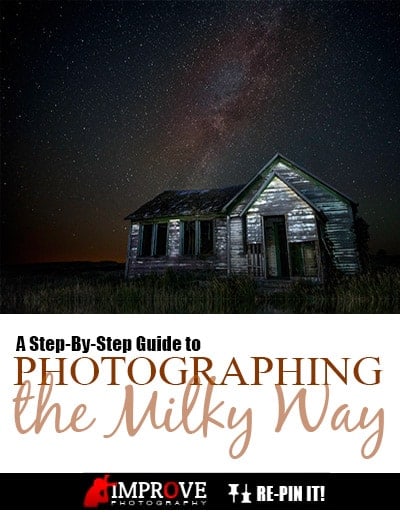
This photo was made for those of you who are kind enough to pin my stuff on PINTEREST.
.How to Focus for Night Photography
All autofocus systems require some amount of contrast in order to find proper focus. When shooting at night, there is rarely enough light outside for your camera to autofocus properly. The best way to solve this problem is to look around you for a STREET LIGHT or other light that is the same distance away from you as where you want the focus to be. Then, autofocus on that light, and slide the focus mode switch on your lens to “manual” this will keep the focus where you last set it as long as you don’t accidentally twist the manual focus ring at the front of your lens.
or other light that is the same distance away from you as where you want the focus to be. Then, autofocus on that light, and slide the focus mode switch on your lens to “manual” this will keep the focus where you last set it as long as you don’t accidentally twist the manual focus ring at the front of your lens.
If you’re taking a picture of the stars and don’t have to worry about focusing on anything in the foreground, then you may want to rack your focus all the way out as far as it will go, and then come back just a slight bit. This will focus your lens to INFINITY (as far as it focuses), which is always the proper focus for shooting the stars. If the moon is bright enough, you could also focus on the moon and then you’re set.
(as far as it focuses), which is always the proper focus for shooting the stars. If the moon is bright enough, you could also focus on the moon and then you’re set.
If I need to focus on something closer to the camera, like how I focused on the schoolhouse for one of the photos, then shining a bright flashlight or laser pointer on the building will help your camera to find focus. One other technique is to simply show up to the location where you’ll be shooting before it’s actually night time. Then you can adjust your composition before it gets dark, and lock down your focus while there is still enough available light.
How to See the Milky Way
Most PEOPLE never see the Milky Way with their naked eye. Usually, the artificial lights from houses and streetlights are too bright for our eyes to see the faint glow of the ring around the Milky Way at night. However, by using the amazing light gathering ability of newer DSLRs, the Milky Way can usually be captured in a picture.
never see the Milky Way with their naked eye. Usually, the artificial lights from houses and streetlights are too bright for our eyes to see the faint glow of the ring around the Milky Way at night. However, by using the amazing light gathering ability of newer DSLRs, the Milky Way can usually be captured in a picture.
I intentionally waited to take this picture until a night that did not have a bright moon. This lessens the amount of light in the sky to make the Milky Way less visible. Also, I drove 1.5 hours away from the nearest major city to get rid of all of the city lights. In this rural location, I could see the Milky Way with my naked eye, which was intensified when I took a picture and gathered the light with a 30 second exposure.
Frankly, I’m not much of an astronomer to tell you if the Milky Way is visible, or even to point you to a resource where you might find out when and where the Milky Way will be visible. But in Idaho, I find that it’s visible most all of the year for most of the night. I just go out and shoot a couple times to know where it will rise and set, and approximately what time of night. For this shoot, I knew the Milky Way became visible as soon as it was FULLY black outside, and was directly overhead around 2PM. Perhaps someone in the comments can point us to a good resource to check the sunrise time/location for different parts of the world.
Conclusion
Photos like this don’t happen by accident. It takes a lot of practice and planning to take a photo of the Milky Way, but the payoff is huge! Although it was quite cold outside taking this picture since I didn’t bring a proper jacket, the time I got to spend out in the middle of nowhere looking at the brilliant stars for a few hours last week was incredibly soothing.
9 Photography Mistakes to Avoid
As a photographer, mistakes are a part of life. They help us grow and become better photographers. For example: how many of us have been outside taking photographs and then walked inside, gotten distracted, and forgotten to adjust our settings to the new lighting? Adjusting to changes like this become more automatic with time, but we all make the mistake dozens of times before learning. It teaches us to be aware of our camera all the time when shooting; however, there are some mistakes that take even more time to learn. Lessons that do not have an automatic reminder like we see when we look at the photo on the back of our cameras.
Wouldn’t it be nice if someone simply told you about them now so you can try to avoid them in the future?
9 Easy-to-Make Photography Mistakes
#1 Hiding behind the camera
This is so easy to do that many of us don’t even realize we’re doing it! We keep the camera up, stay back, and timidly ask our clients if they could pose a certain way, or just expect them to know what to do. When the shot doesn’t look the way we imagined, we convince ourselves that we are just better at shooting candid. But that isn’t the whole story – we have to remember that we are working with PEOPLE. Sometimes it’s important to put the camera down, walk up to them, and show them what you have imagined for the shot. The more your subject sees you as a person with a camera (instead of just a camera with a stranger behind it), the easier it becomes to pull genuine emotion out of them.
This is so easy to do that many of us don’t even realize we’re doing it! We keep the camera up, stay back,
and timidly ask our clients if they could pose a certain way, or just expect them to know what to do. When the shot doesn’t look the way we imagined, we convince ourselves that we are just better at shooting candid. But that isn’t the whole story – we have to remember that we are working with PEOPLE. Sometimes it’s important to put the camera down, walk up to them, and show them what you have imagined for the shot. The more your subject sees you as a person with a camera (instead of just a camera with a stranger behind it), the easier it becomes to pull genuine emotion out of them. #2 Using the SHUTTER speed to change how the flash is exposed
This is an extremely common mistake for newer flash photographers. Shutter speed does not affect how bright the flash appears in the photo–period! The duration of a pop of flash is incredibly quick–much quicker than your shutter speed when shooting flash–sometimes up to 1/13,000th of a second! Adjusting your shutter speed when shooting with flash will only affect the ambient light in the scene, but will not affect the apparent brightness of the flash. Learning to expose for flash photography takes work, but will eventually become automatic.
#3 Being overly focused on gear
We are almost all guilty of this. RIGHT now I’m lusting for an Olympus OMD EM-1 which is soon to be released. While new gear is nice to have and fun to use, most of the time it just isn’t that important when it comes to producing fantastic photos. I started shooting professional photography with a Canon Rebel, 50mm f/1.8 and two other basic lenses (They were inexpensive gigs and I was COMPLETELY upfront with the clients). I was able to grow my business despite what most would say is sub-par equipment. I believe using equipment with severely limited low light capability (compared to modern cameras) made me a better photographer and forced me to be aware of how the light changes in a room.
now I’m lusting for an Olympus OMD EM-1 which is soon to be released. While new gear is nice to have and fun to use, most of the time it just isn’t that important when it comes to producing fantastic photos. I started shooting professional photography with a Canon Rebel, 50mm f/1.8 and two other basic lenses (They were inexpensive gigs and I was COMPLETELY upfront with the clients). I was able to grow my business despite what most would say is sub-par equipment. I believe using equipment with severely limited low light capability (compared to modern cameras) made me a better photographer and forced me to be aware of how the light changes in a room.
#4 Focusing too much on the technicalities when shooting
While it’s important to be aware of the exposure, early on we are often too intently focused on what ISO, aperture and shutter speed we need. When you’re so busy worrying about the camera settings, you’re not paying very close attention to what is in front of the camera. Not only does this take the fun out of shooting, but it generally produces images we aren’t happy with. This severely hurts our creativity since we are so focused on the technical aspects of shooting. There is no short way around this. Practice, practice and more practice is the only solution. You can easily practice at home by walking into different rooms, estimating the needed exposure settings, and then metering in your camera to see how close you were.
#5 Working too fast
Many times I have looked through the viewfinder and noticed little mistakes in the scene–a misplaced stick in the foreground of a landscape, hair blown onto the subject’s face, a pose that just looked “okay”, or other abnormalities–and I simply ignored the mistakes. This is also common with newer photographers who accept the lighting for what it is without working to change it. When I finally realized I would no longer accept “okay” in the viewfinder, my photography IMPROVED tremendously. If you see a problem, fix it and don’t pretend it doesn’t exist.
tremendously. If you see a problem, fix it and don’t pretend it doesn’t exist.
#6 Being afraid of making mistakes
I know many people who have purchased a flash but never learned to shoot it off camera because it’s new TECHNOLOGY to them.  Fortunately for them (and for all of us!), COMPUTER manufacturers developed a delete button. Try new things and play. Try different angles. Experiment to see what happens if you really slow down your SHUTTER and zoom in at the same time. This is photography, not rocket science! Make mistakes all day, and have fun. If you are a professional photographer and have developed a sense for “safe” locations and poses that you know will work, break the habit and try something new!
to them. Fortunately for them (and for all of us!), COMPUTER manufacturers developed a delete button. Try new things and play. Try different angles. Experiment to see what happens if you really slow down your SHUTTER and zoom in at the same time. This is photography, not rocket science! Make mistakes all day, and have fun. If you are a professional photographer and have developed a sense for “safe” locations and poses that you know will work, break the habit and try something new!
#7 Posting too many images from a set
This is the biggest enemy for photographers who want to step into getting paid for their photography. It’s easy to get in the mindset that you need to post hundreds of photos to look legitimate. Actually, that’s counter-productive. Learn to be a ruthless editor and only put forth your best work. Be confident.
Often, photographers showcase several images of the same scene instead of picking the absolute best one. If you shoot something interesting and it doesn’t come out as you had hoped, don’t post the best one of that group. Instead, write it off as a learning experience. Nobody, and I mean nobody, makes a fantastic image every single time they press the shutter button.

Ready for PINTEREST!
!
#8 Motor driving the camera
(Also known as burst mode.) There are some legitimate times where motor driving is warranted, so don’t write it off as useless. However, motor driving when depended on to capture the first kiss, for example, takes away from developing one of the most important skills we can develop as photographers: anticipating the situation. If we are paying attention and in the moment, we can anticipate what is about to happen and select the exact moment we want to capture instead of motor driving and hoping the camera gets something we want. An added BONUSof not motor driving: it saves time in post processing – there’s no need to go through 5-8 photos of the same exact scene over and over again.
of not motor driving: it saves time in post processing – there’s no need to go through 5-8 photos of the same exact scene over and over again.
#9 Using zoom lenses to get closer
Starting out in photography, we often zoom with the lens instead of our feet. Zooming and moving in closer accomplish two different things. While a zoom lens is great to have and very useful, remember that when you zoom in with the lens you are not just bringing the subject closer to the camera; you are also making the background apparently closer in the photo. At times this can make a space appear smaller or more crowded than it is. (The opposite is true when zooming out – that’s why real estate photographers use short focal lengths: to make rooms appear larger.) It also helps us look for more interesting perspectives to shoot from since we are physically moving around the subject.
Take a few minutes and think about your own photography. Do you find yourself making any of these mistakes? Do you think you could IMPROVEyour work and cut down on some of your post-processing time by avoiding some of them? Give it a shot, and leave me a comment on what mistakes you have learned or which of these mistakes you’d like to fix.
your work and cut down on some of your post-processing time by avoiding some of them? Give it a shot, and leave me a comment on what mistakes you have learned or which of these mistakes you’d like to fix.
via: Improve Photography Site
Tuesday, August 26, 2014
Syrian photographer aims to capture peace, beauty
 at London Film School, coming to the United States 25 years ago. Paul Post — ppost@digitalfirstmedia.com
QUEENSBURY >> A man who grew up surrounded by hatred, violence and war brings peace and beauty to the world through the lens of his camera.
Zaki Farah, a Christian Syrian who TRAINED at London Film School, came to the United States 25 years ago.
at London Film School, came to the United States 25 years ago.
The Digital Age has revolutionized photography, from film to electronic equipment, bringing his skills into even sharper focus as he strives to capture the artistic nature of every subject matter.
“It’s not simply clicking the camera,” Farah said. “Exposure, framing and composition are all very important.”
Sometimes, the viewfinder is the only place he can escape the images from his youth, which drove him to leave his homeland in search of a better life. Farah’s two sisters still live in Syria, but he hasn’t gone back, as fighting rages between opposition groups and forces loyal to President Bashar al-Assad.
“It’s very dangerous to cross that border,” Farah said. “There is no mercy. They’re ruthless.”
A Queensbury resident, he settled in upstate New York with help from a relative, a former mayor of Ithaca.
Photography has been a lifelong love that he practices in many forms.
From 1992 to 2007, Farah owned Elegance Portrait Studio in Queensbury, which also did a great deal of film processing.
“I was doing 50 to 70 rolls per day,” he said. “It was the only professional lab in this immediate area that did poster-size prints. When digital came in, the dynamic of the BUSINESS changed totally. Now I have my own in-home studio called FotoFarah with state-of-the-art cameras, lenses and printing. I do classic photography with a twist of contemporary style.”
changed totally. Now I have my own in-home studio called FotoFarah with state-of-the-art cameras, lenses and printing. I do classic photography with a twist of contemporary style.”
Much of his work is done in-house, but he uses settings and backdrops throughout the region, such as Congress Park in Saratoga Springs, to give subjects their desired look and feel.
Recently, Farah has also branched out with occasional commercial shoots in Houston for high-class auto and real estate firms. His ability to present intricate details, from a Mercedes 350’s dashboard to its shiny exterior, does a great deal to generate sales.
“It’s hard work, from 7 in the morning to 8 at night, but I really enjoy it,” Farah said. “I’m not ready to retire. I love my work.”
More important, he’s thankful that his profession, despite its many challenges, has allowed he and his wife, Raiza, to RAISE a young family in a land much different from the one he grew up in.
a young family in a land much different from the one he grew up in.
“It’s the best,” Farah said.
Subscribe to:
Posts (Atom)